miniDSP Ltd, Hong Kong / www.minidsp.com / Features and specifications subject to change without prior notice 22
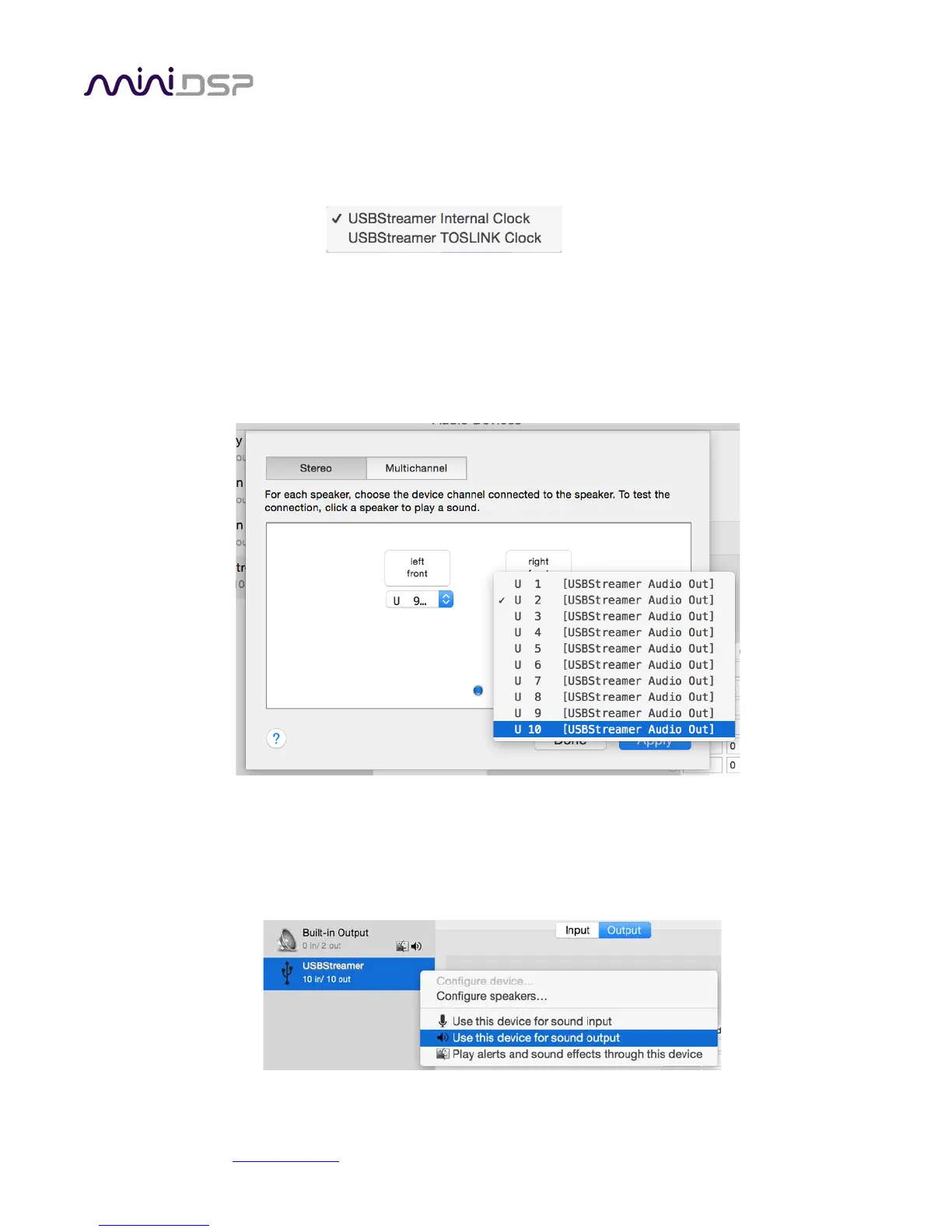
By default, the sample rate clock of the USBStreamer is internally derived, but it can also be derived from the
TOSLINK input by using the Clock Source selector:
If you are using software that is able to route audio to ten different channels, no further configuration is needed. If,
however, you would like the TOSLINK output to be the default stereo output for all applications, then:
1. Click on USBSTREAMER and then the Output button.
2. Click on the Configure Speakers button. Select the Stereo button. For the left channel, select Channel 9, and
for the right channel, select Channel 10. Then click Apply and then click Done.
3. Select the output sample rate. Typically, 44.1 kHz is the best choice. Some audio players will automatically
change this setting according to the media being played.
4. To set the USBSTREAMER to be the default audio output device, right-click and select “Use this device for
sound output”.


 To Next Page