minifinder
pico
www.mininder.com 17 of 20
APP SettingsAPP Settings
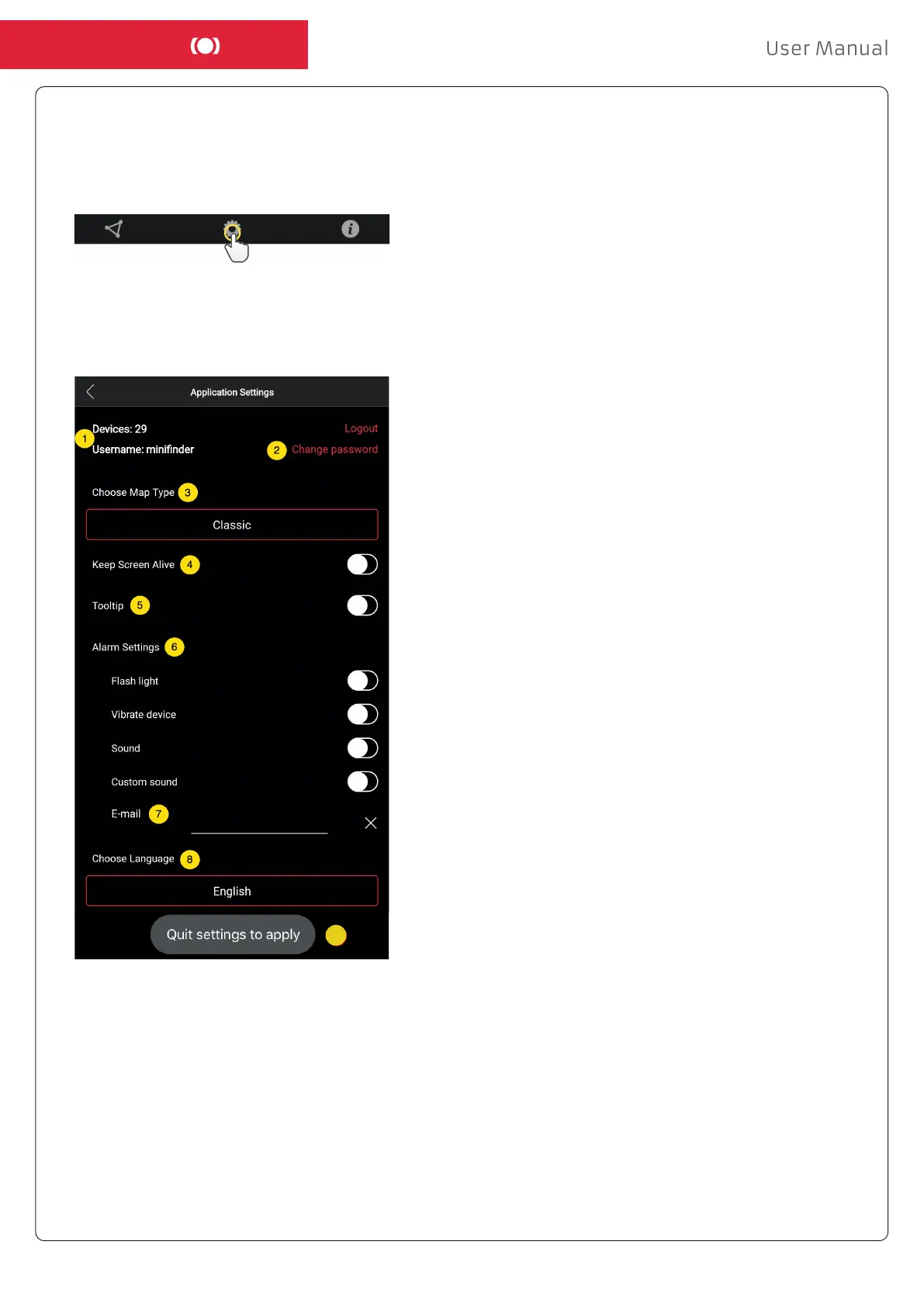
- Click on the gear symbol to make settings in the MiniFinder GO APP.
- Settings Menu.
1. Number of licenses and your username.
2. Change your password.
3. Map selector (Classic, Hybrid, Terrain and Satellite)
4. “Keep Screen Alive” keeps your mobile device’s screen
on until it is turned o manually. The setting may
involve increased battery usage for your mobile device
depending on settings.
5. “Tooltip” shows information of your
GPS above the map pin. Disable this if you do not wish
to view the information.
6. Alarm settings denes what your mobile device would
react when alarms are triggered.
7. Enter an email address to receive emails notication
when alarm are triggered.
8. Change a language:
English, Swedish, German, Finnish, French.
9. Simply quit the settings to apply changes.
9


 To Next Page