minifinder
pico
www.mininder.com 3 of 20
APP OverviewAPP Overview
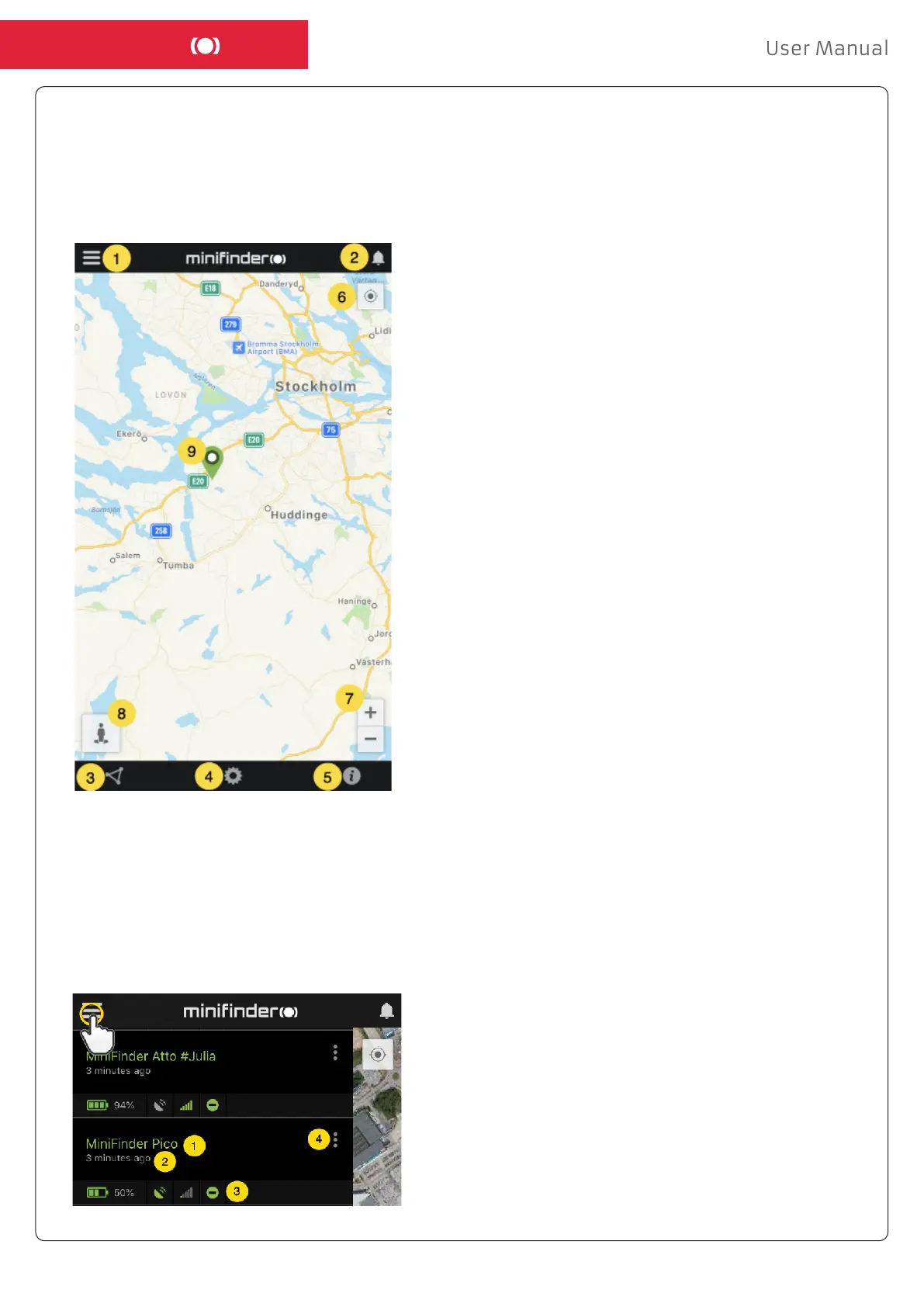
After logging in the MiniFinder GO APP, you will see the view as shown below.
This consists of 9 dierent parts:
1. Menu (Device list)
2. Alarm notication
3. Create / Edit GeoFence
4. Applications settings
5. Application info & Help
6. View the position of my mobile phone
7. Zoom in / out
8. View street information of a selected GPS device
9. GPS device location indication on the map
Menu/Device ListMenu/Device List
Click the menu icon to open the menu. The menu consists of one or more devices (GPSs) depending
on how many licenses you have in the system.
1. Unit name
2. Time for the last position
3. Status icons:
Battery, GPS signal, GSM signal and motion
4. Action menu (history, settings, ...)


 To Next Page