minifinder
pico
www.mininder.com 8 of 20
Authorize Telephone NumbersAuthorize Telephone Numbers
To be able to call or receive calls from the device, one or more phone numbers need to be authorized
in the device. Telephone number 1 is used as the rst alarm receiver of the panic alarm (SOS button).
Only phone number 2 receives calls from the call button.
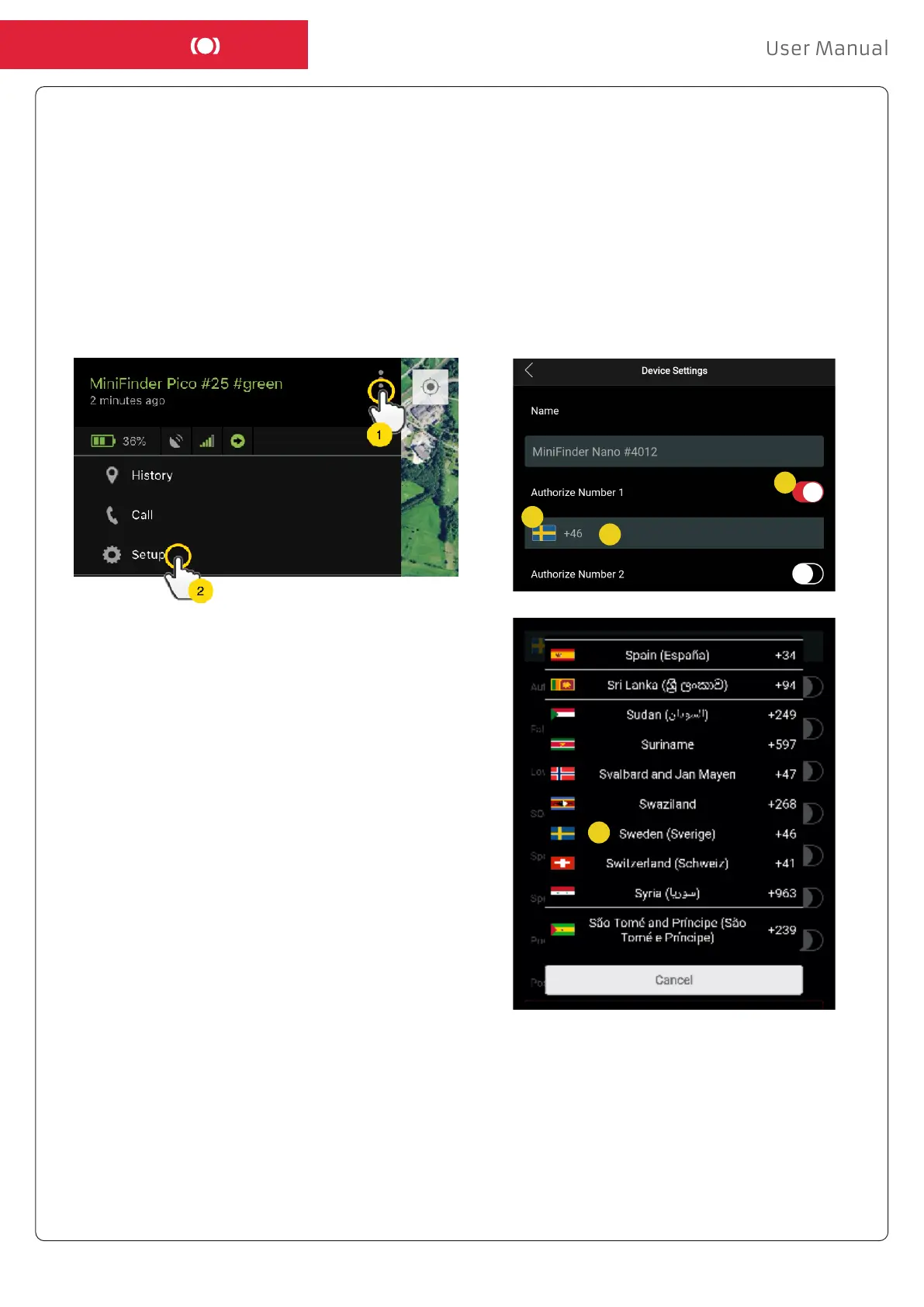
- Open MiniFinder GO APP, click the Action Menu (1) and then click on the “Setup” (2).
NOTE! All MiniFinder devices include a roaming-free SIM card with a foreign telephone number.
- Enable authorization (3).
- Click on the ag (4) to select a country code.
- Select a country in the list (5).
- Enter a telephone number (6) to receive alarms.
- Click “Apply” to save the settings.
3
4
5
6


 To Next Page