11
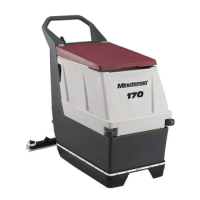
Machine Overview
Bail Handle
(A) When the scrub deck is lowered to the floor, the bail handle enables the brush and vacuum motors and moves the machine
forward once depressed.
Handle Adjustment Knobs
(B) Allows the handle position to be raised or lowered.
Key Switch
(C) Controls the machine’s power (Off/On) with a key for safety. When it is turned to the on position, the machine will operate.
Direction Switch
(D) This 3 position switch sets the direction the machine will move when the bail handle is pulled. The middle position is neutral -
brushes & vacuum will operate but machine will not move.
Squeegee Lift Lever
(E) When moved to the top position, the squeegee is lowered and the vacuum motor will turn on when bail handle is depressed.
When locked in the bottom position, the squeegee is raised and the vacuum motor shuts off (after a 10 second delay).
Battery / Fault Gauge
(F) This gauge displays the remaining battery charge. This gauge also displays any fault codes that might occur with the Drive Motor
Controller (see Diagnostic Codes).
Speed Control
(G) This control sets the speed at which the machine will move.
Charge Status Indicator
(H) This gauge displays the status of the batteries during charging. The gauge has a readout of 3 LEDs. 1 Green, 1 yellow, 1 Red.
Green indicating a full charge, Yellow indicating 80% charged, Red indicating the batteries are charging.
Solution Control Lever
(I) This lever controls the rate at which solution is dispensed. Moving the lever up will increase the amount of solution. Moving the
lever down will decrease the amount. Moving the lever all the way down shuts off solution flow.



 To Next Page