35
Troubleshooting
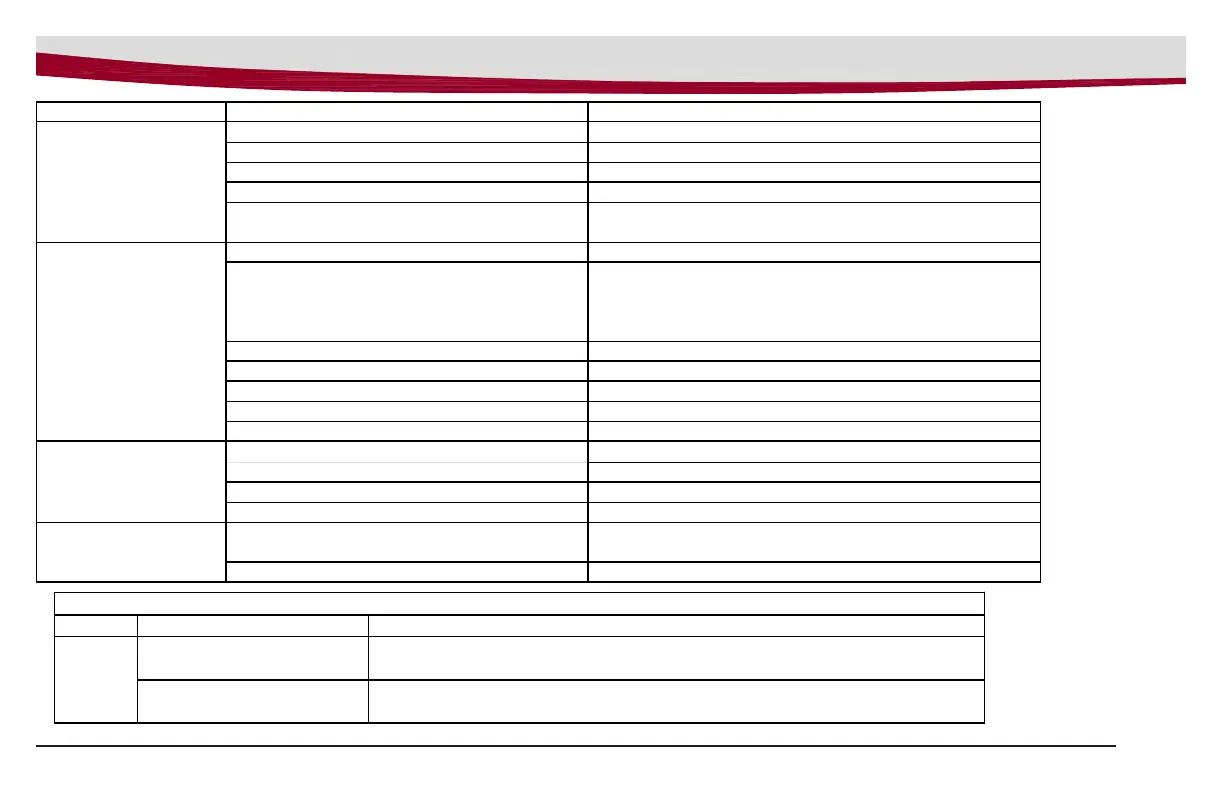
Problem Possible Cause Remedy
Machine does not
operate
Tripped Control Power circuit breaker Reset circuit breaker
Batteries have low charge Recharge batteries
Batter
char
er o
eratin
Un
lu
batter
char
er when char
e is com
lete
Key switch off Turn key on
Bail handle depressed too quickly after
turning key on
Turn key off, turn on, wait until battery gauge lights up
without flashing
Vacuum motor
does not turn on
Recover
tank full Em
t
recover
tank
Excessive foaming in recovery tank.
Empty recovery tank.
Rinse off the screened float inside recovery tank.
Use less or change chemical.
Use de-foaming agent.
Squeegee in raised position Lower squeegee
Tri
ed vacuum motor circuit breaker Reset breaker
Broken vacuum limit switch Replace switch
Carbon Brushes worn Re
lace carbon brushes
Vacuum switch disconnected Connect wirin
Batteries do not
charge
Charger not plugged to wall outlet Plug into wall outlet
Circuit breaker tri
ed in wall outlet Reset breaker
Battery disconnected from machine Connect battery to machine
Charger malfunction Call service
Brush deck
vibration
Brushes may have flat spots from sitting
for a long period of time on the floor
Rotate one of the brushes in the deck. Use machine
for 30 minutes, flat spots will work themselves out.
Debris in brushes Remove debris from brushes.
Charger Warning Indicators
LED Status Descri
tion
Warning
RED LED lamp blink once
Output open circuit or short circuit or reverse polarity connection of charger to
battery. Battery voltage is too high (may be connected to wrong voltage battery).
RED LED lamp blink twice
Abnormal cycle (may be weak or bad battery)
Char
in
time has safet
timed out due to batter
roblem.



 To Next Page