34
Vacuum pumping
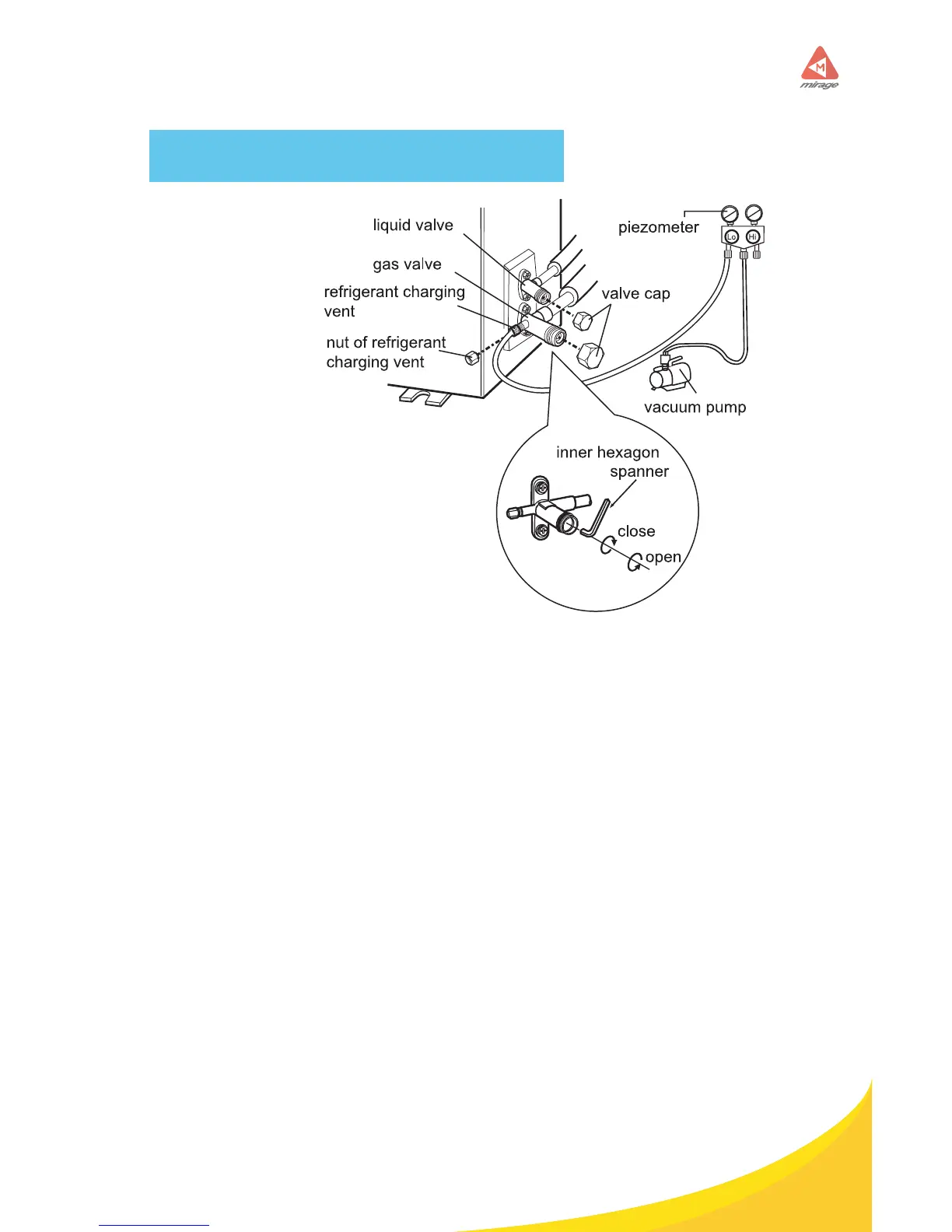
Use vacuum pump
1. Remove the valve caps on the
liquid valve and gas valve and the
nut of refrigerant charging port.
2. Connect Vacuum meter to suction
port (by T-tting), next connect
charging hose to vacuum meter and
nally service hose to the vacuum
pump.
3. Open manifold completely and
pull a proper vacuum until get 300
microns on reading. (Note: Re-
moving core or using 3/8’’ hoses is
useful to save time)
4. Close manifold and turn vacuum pump OFF to check if pressure keeps
stable. If not you must look for leakage, x and try again.
5. If vacuum level is stable, use an Allen wrench to open gas and liquid
valves completely to let refrigerant ll the system up.
6. Put valves cap back and do the same with nut of suction port once you
have removed manifold.
Leakage detection
1. With leakage detector: Check if there is leakage with leakage detector.
2. With soap water: If leakage detector is not available, please use soap
water for leakage detection. Apply soap water at the suspected position and
keep the soap water for more than 3min. If there are air bubbles coming out
of this position, there’s a leakage.



 To Next Page