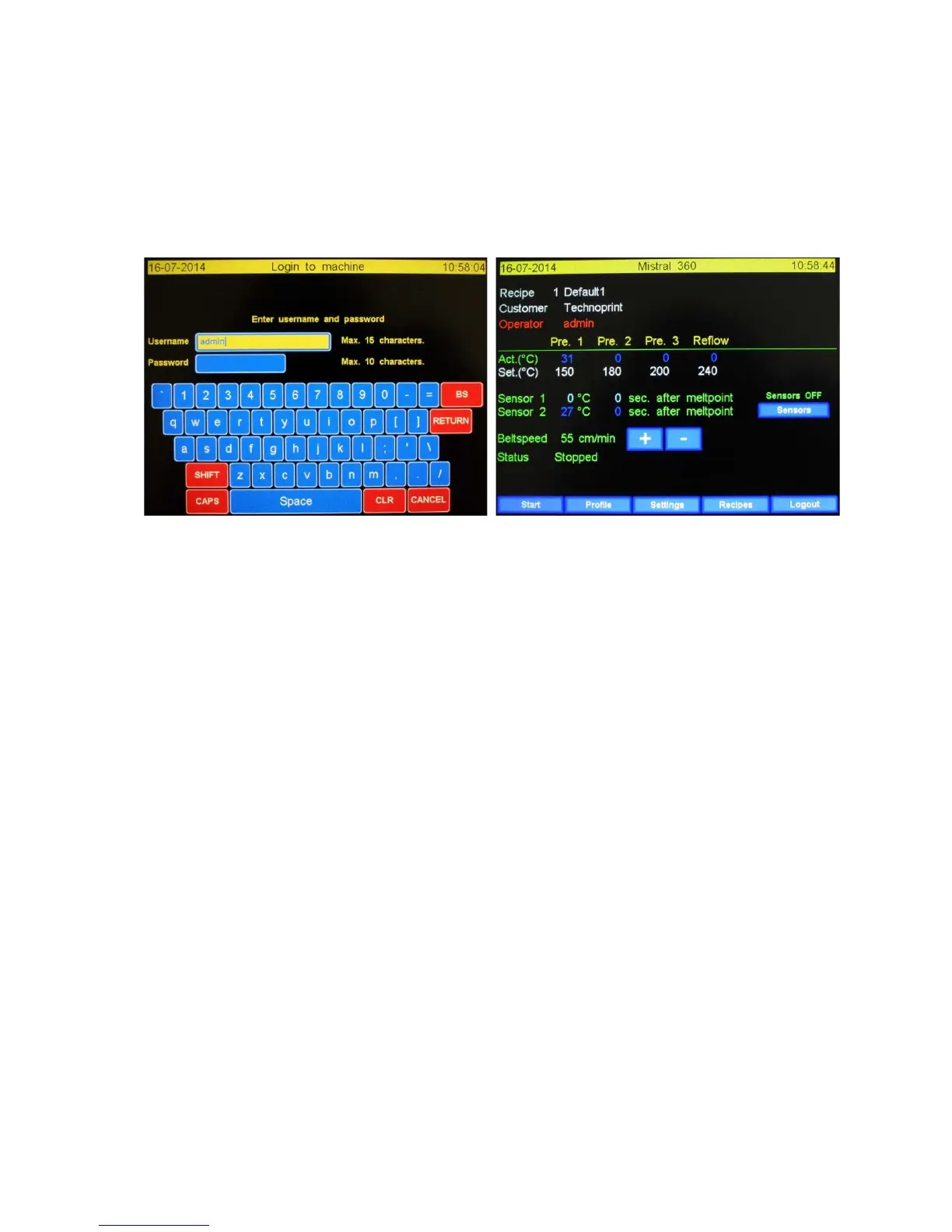
3.2 Main screen with password check.
This screen will be displayed when in the menu “Settings \ Display & Sound” the function “Use user
& password” is set to “Yes”. This also concerns machines booting process, as it will display the
password screen instead of the main screen.
The “Login to machine” and main screen when using the password option are shown below.
3.2.1 Logon to the machine.
The use of the login screen is straight forwards. After entering your username hit enter. You’ll now
moving to the “Password” en the field is changing to yellow. Enter your password en hit enter. If the
username and password are valid the main screen is coming up. If the values are not valid the logon
screen is cleared and waiting for input.
3.2.2 Functions explained.
The functions of all buttons and field has not been changed, it only adds 2 new values:
Operator: The name of the current machine operator. The operator privileges and name can be
changed in the “Settings \ User & Passwords” menu.
Logout: By pressing this button the user will log out of the machine and will return to the password
screen. Another user can now login to the machine. (Note: different users have different privileges)


 To Next Page