3.8 Setting User & Passwords
With this screen you can maintenance the operators who are allowed to work with the oven. To use
these operators en protection you have to enable the option “Use user and passwords” in the
“Display & Sound” screen.
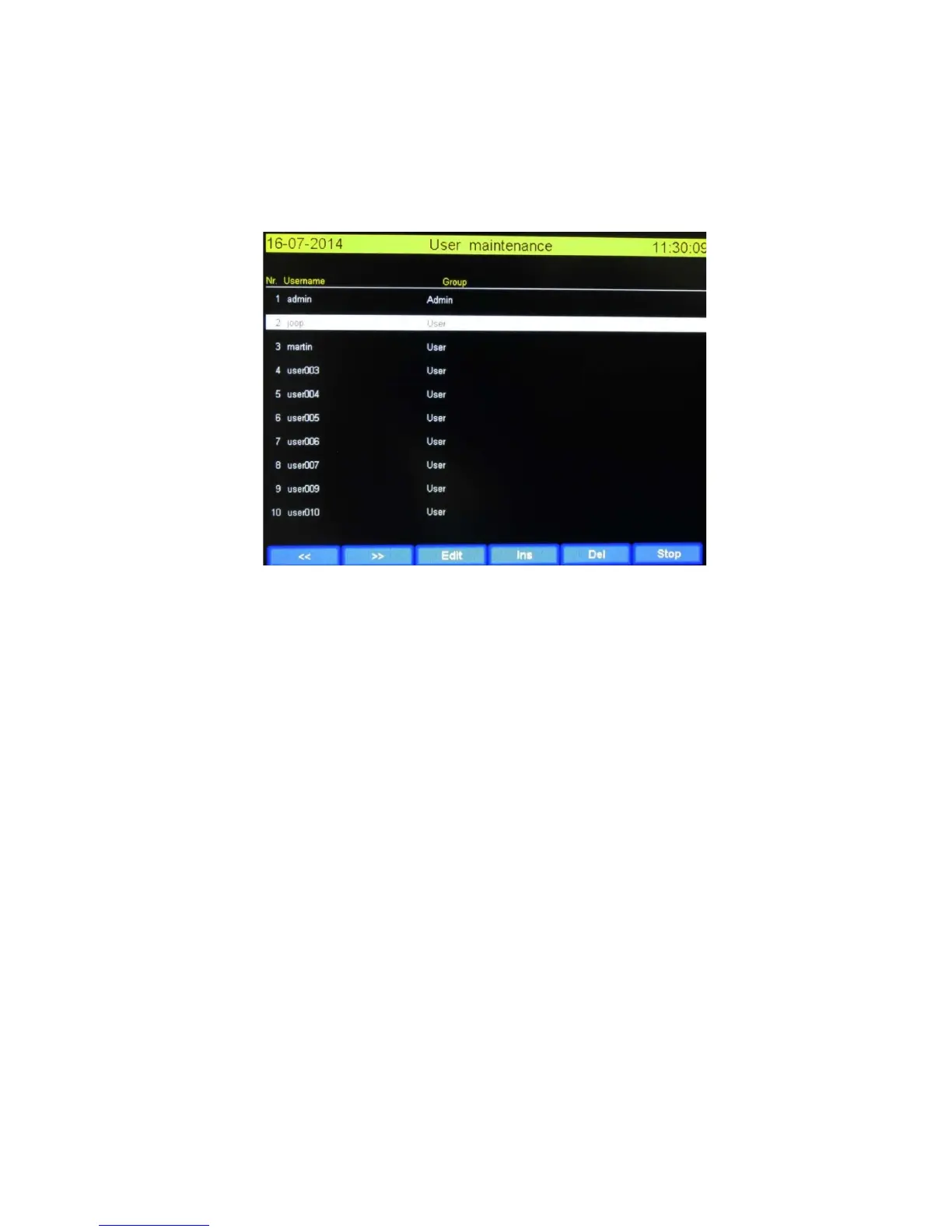
The “User maintenance” screen is showed below.
Ticking on a use row will mark the user as selected with a white bar.
3.8.1 Functions explained
<<: One page back
>>: One page forwards
Edit: This opens the “Edit user data” screen. Refer to the ”Edit user data” chapter.
Ins: Insert a new user at the location of the white bar.
Del: Delete the user selected by the white bar.
Stop : Go back to “Machine settings and info” screen.
****************** WARNING *****************
It’s not a good idea to change the first user called “Admin”. The standard password for this
user is: tp-admin.
Use this user only in special cases. If you lose these data it’s possible that you cannot enter
machine anymore. This situation is outside warranty rules.
****************** WARNING *****************


 To Next Page