3.5 Recipe selection
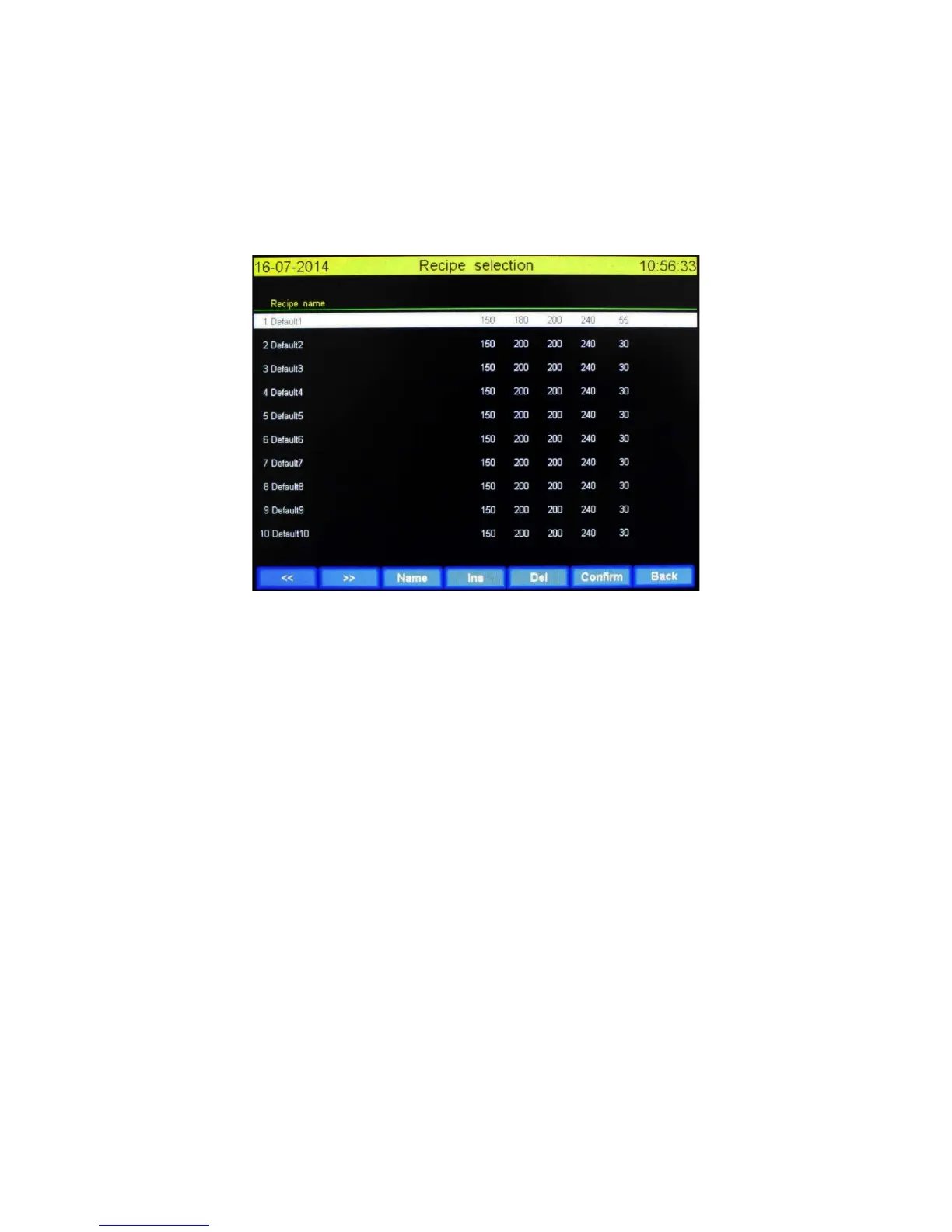
When ticking on “Recipes” in the main screen you will enter the “Recipe selection” screen. The
number of possible recipes is practically limitless. Off from the factory there are 20 default recipes.
User can select, insert or delete recipe in this screen. It’s not possible to change values in this screen.
Values can be changed after the recipe is selected and placed in the main screen.
The “Recipe selection” is showed below.
The user can select a row by ticking on it. A white bar mark the last ticked recipe as selected.
3.5.1 Functions explained
<<: One page back
>>: One page forwards
Name: Toggle between recipe- or customer name
Ins: A new recipe is inserted at the location of white bar. Values can be changed in the main screen.
Del: The row whit the white bar is deleted
Confirm: The selected recipe will be used and the “Recipe selection” is closed. The main screen is
show up with the newly selected recipe. It’s possible to change the values now.
Back: Go back to main screen and do not change the recipe you was using.


 To Next Page