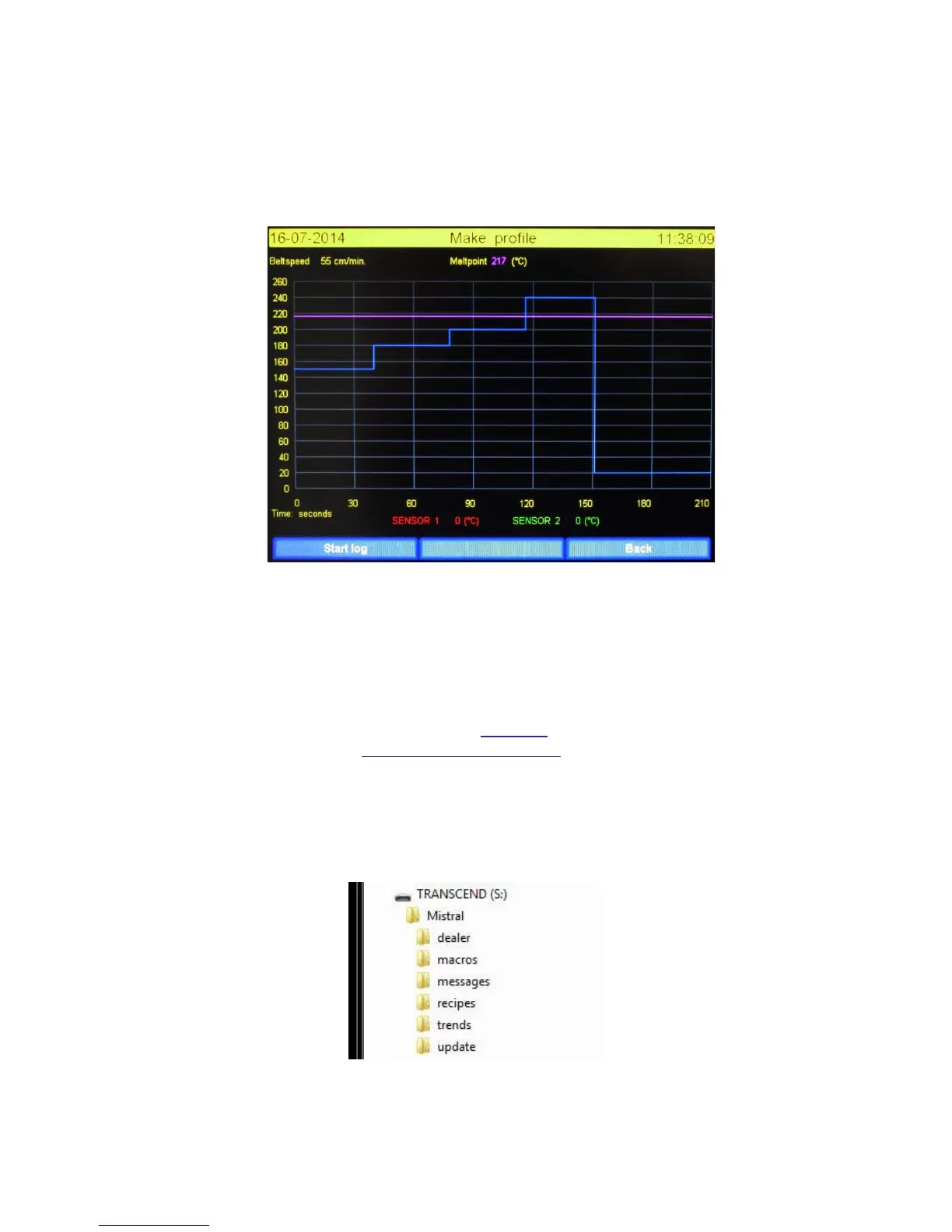
3.4 Profile or “Trend” screen.
This screen will be displayed if “Profile” has been ticked at the main screen. This function allows
users to draw a profile of the soldering process. If a USB stick is inserted these profiles will be saved
at this USB stick.
The “Make profile” screen is shown below.
The Y axis displays the temperature related to the max. temperature of the recipe. The X axis displays
the time related to belt speed. Both axis will change according the values entered in the recipe.
To use this option at least 1 thermocouple must be attached to the product and connected to the
machine, there should also be a USB stick in the USB port. The USB ports are found at the zone
entrance.
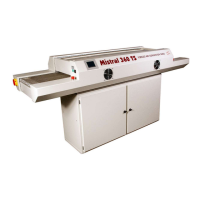
A folder “Mistral” must be created on the USB stick. In de “Mistral” folder a folder “trends” must be
created. The names of these folders must be typed EXCACTLY as described.
Mind the use of capital letters.
The USB stick should have a name. In this example the name of the USB is “TRANSCEND”. There are
no restrictions concerning the name of the USB stick.
Folder structure in the root of the USB-Memory stick TRANSCEND is shown below:


 To Next Page