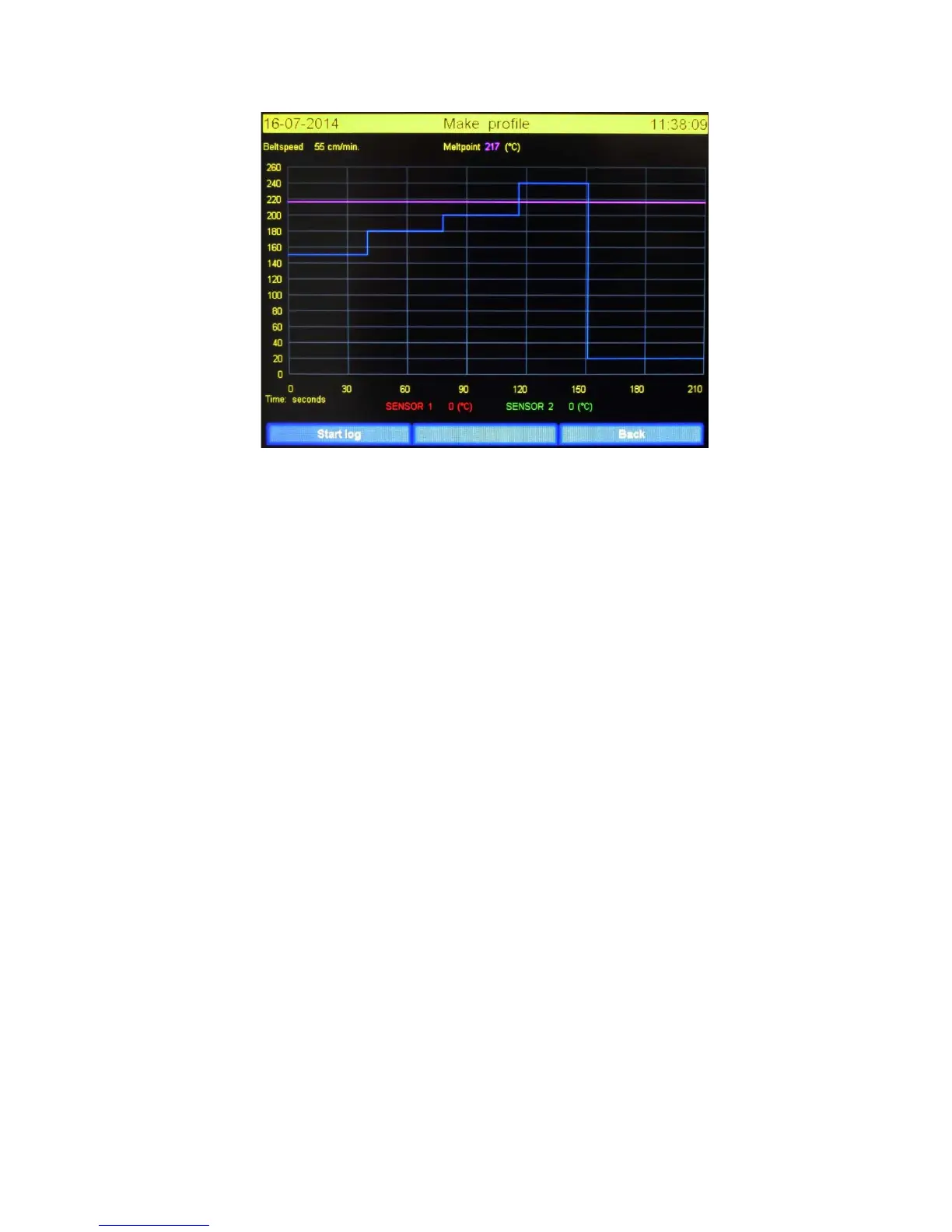
3.4.1 Functions in idle state explained.
Start log: By pressing this button the program will start logging the thermocouple values. The values
will be represented by a red ( SENSOR 1) and a green ( SENSOR 2 ) lines in the graph.
Back: By pressing this button the user will return to the main screen, all unsaved data will be lost.
3.4.2 Layout “Make profile” screen
Belt speed: The belt speed as defined in the recipe.
Melt point: The required temperature to melt the solder. Consult with your solder supplier for more
information on melting temperatures. This value is also defined in the recipe.
The values at the left hand side of the screen ( 0 – 260 ) : This is the temperature scale. These values
depend on the recipe.
The values at the bottom of the screen ( 0 – 210 ) : this is the time scale. These values depend on the
recipe.
SENSOR 1 en 2: This shows the current value of the thermocouple.
Use of lines: The purple line represents the melting temperature. The blue line represents the set
temperature of the zones. The length represents the time the product is in the zone.


 To Next Page