Mistral 6TTR-10TTR – Pag. 69
Elimination of a Step: If a Step in a program is not necessary it will be
possible to cancel it with this simple operation:
1 Enter the Step mode
2. After that enter the Setting mode
3. Scrol the Steps until reaching the one to be cancelled
4. Keep the button
presed for 3 seconds
5. this Step will be cancelled and the numerical sequence of the
other steps that compose the program will be automatically
up-dated.
6. Save the operation with the button
ATTENTION: if the operation is not saved
at the end of the cancellation
of one or more Steps, the modifications will be cancelled.
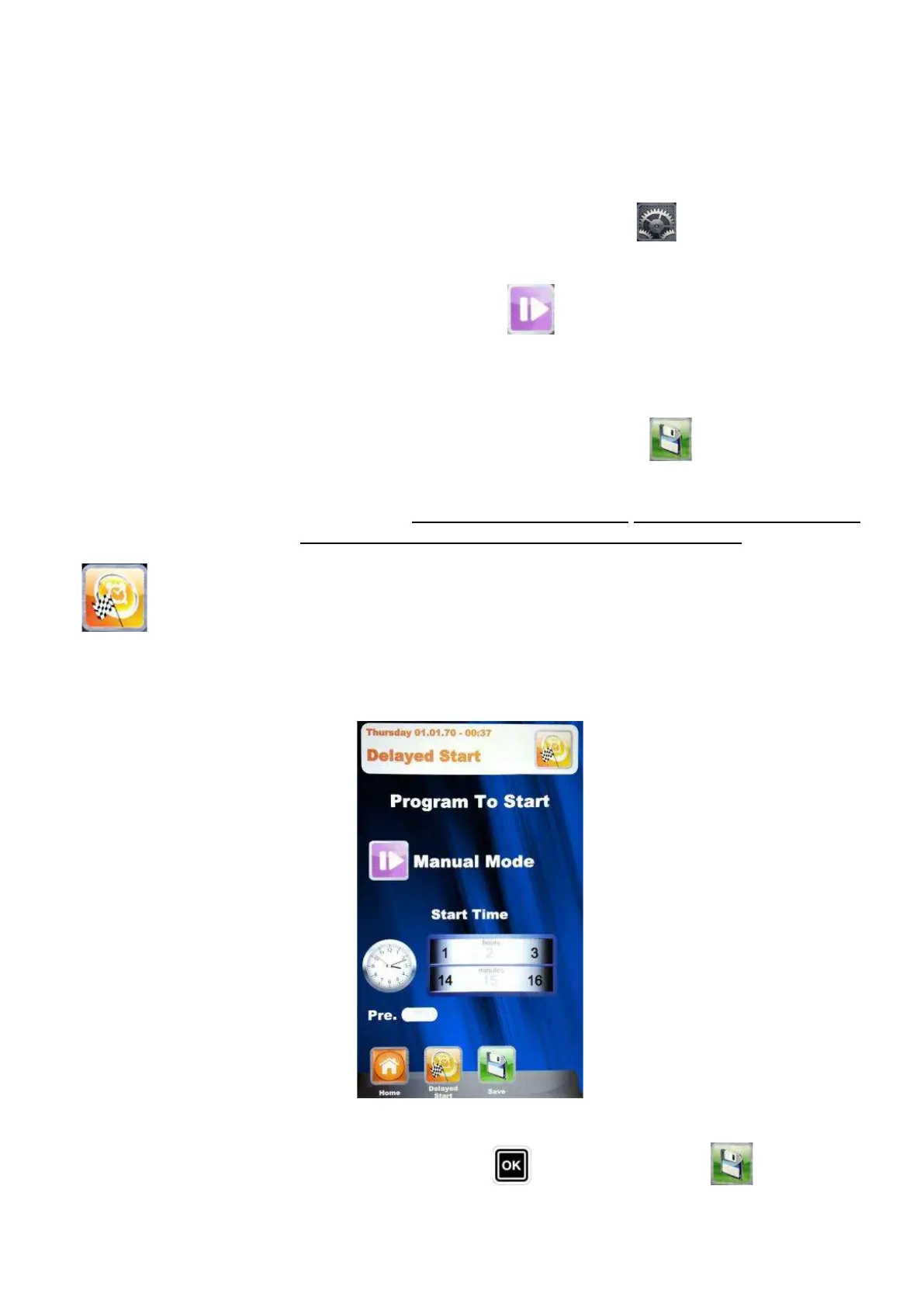
Delayed Start –
in every baking mode (Chef, Recipes and Manual), it is possible to set
the start of the chosen baking program at a determined time.
Select the desired baking program, scroll with the Slider and
entre the menu Delayed Start. Following screen will appear:
With the Slider, set the desired time for the program start and, in case it is necessary, the pre-
heating phase. Confirm every setting with the button
. Save with the button . On the main


 To Next Page