3
TELEPHONE/MENU FEATURES
3.1 SPEED DIAL MEMORY
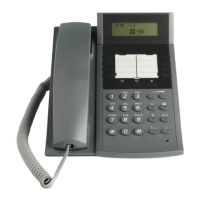
There are 4 memory keys (M0-M3) for storing frequently used numbers. The number card is intended
for noting the name.
Save telephone number
1. Place the handset on the phone
2. Press one memory key (M0 to M3)
3. Press and enter the number to be saved
4. Press key again to complete saving
Note: For some rare conditions it may be useful to insert a pause between e.g. the area code and the
phone number. To do this; enter the area code, press the pause key and then continue with the
telephone number.
Dial from a Memory
1. Pick up the handset
2. Press the memory key (M0 to M3) to be dialed
Delete/ Change a saved number
There is no special delete or change procedure. Instead the “save procedure” is used.
1. To delete a number
Follow the Save procedure starting with step 1 but do not enter a new number in the 3
rd
step. In
this way you “save no number” which will clear the memory in step 4.
2. To change a stored number
Follow the Save procedure and enter a new number in step 3 and finish the save procedure in
step 4. In this way the previous number will be replaced.
3.2 PHONE SETTING
Set Ring Volume
Three levels of ring volume is provided: High, Low, Silence
1. Place the handset on the phone
2. Press ‘Volume + to increase ring volume
3. Press ´Volume – to decrease ring volume.













 To Next Page