Use the manual Beichen Automation BCNET-FX-S Ethernet communication processor
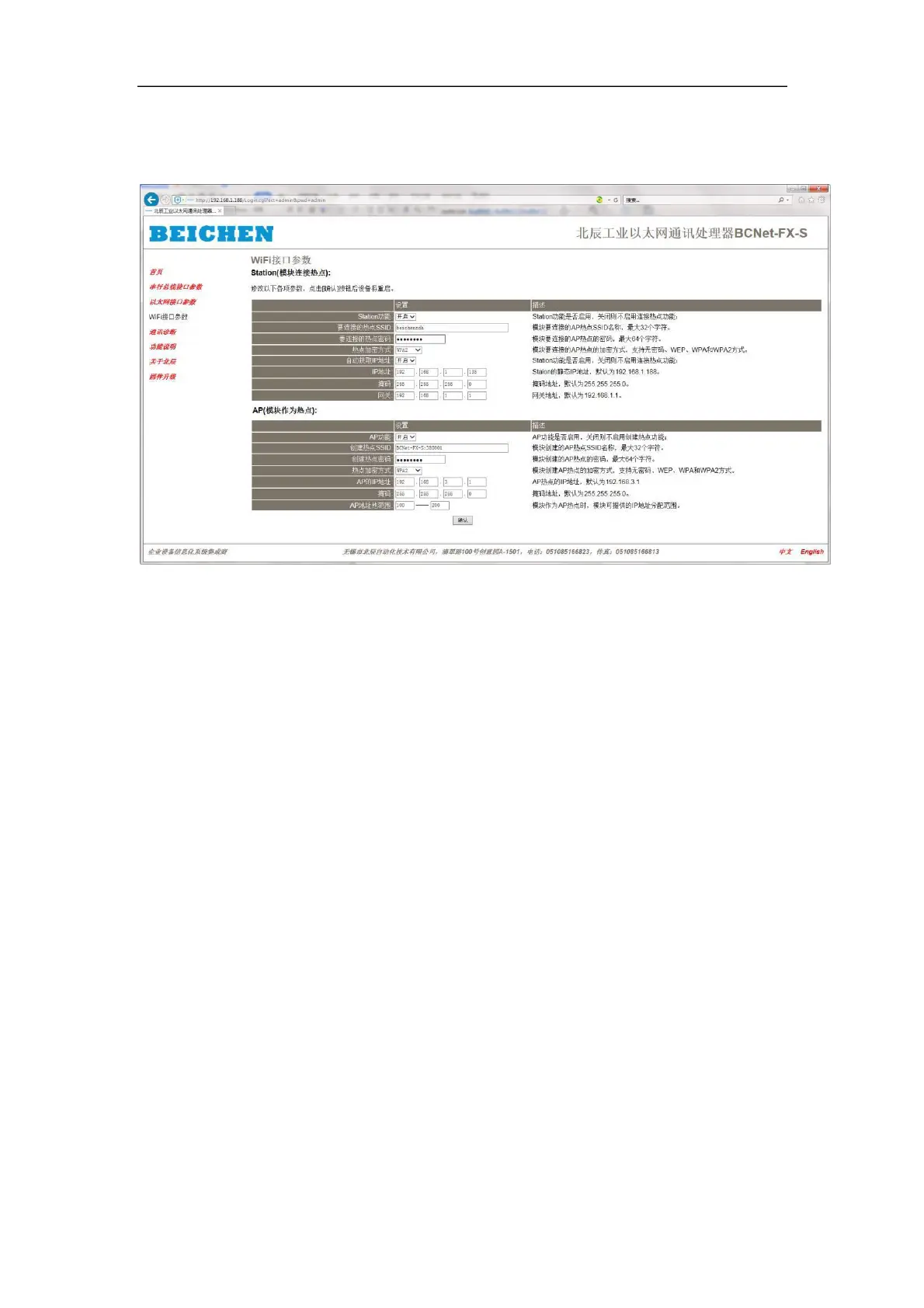
3.2.3wifi interface parameters
Station (module connection hotspots) : This setting, the module as a client to connect WiFi
hotspots;
Station function: if the Station function is enabled, the connection hotspot function will not be
enabled if the Station function is turned off.
Hot Spot SSID to connect: the name of the AP Hot Spot SSID to which the module
will connect, up to 32 characters.
Hot-spot password to connect: the AP hot-spot password to which the module is
connecting, up to 64 characters.
Hotspot Encryption: module to connect the AP hotspot encryption mode,
support no password, WEP, WPA and WPA2 mode.
Automatic access to IP addresses: when a module connects to a hotspot, does it
access the IP address from the hotspot, or does it use a static IP address.
IP address: Static IP address for Station, default 192.168.1.168.
Mask: Static Mask address for Station, default 255.255.255.0.
Gateway: Static Gateway address for Station, default 192.168.1.1.
AP (modules as hotspots) : this setting, modules as WiFi hotspots, to be connected by the client;
AP function: If the AP function is enabled or not, no hotspot function will be created if the AP
function is turned off.


 To Next Page
 Loading...