EasyManua.ls Logo

Mitutoyo EC-101D - User Manual

Mitutoyo EC-101D
6 pages
Print Icon
To Next Page IconTo Next Page
Loading...
1
Printed in Japan
Date of publication: August 1, 2021 (1)
Safety Precautions
Use this product in conformance with the specifications, functions, and
precautions for use described in this document. Failure to do so may impair
your safety.
Foreword
To obtain the highest performance and the longest service life from this
product, carefully read this document thoroughly prior to setup and operation.
After reading, retain it close at hand for future reference. Be sure to follow the
precautions below.
Export Control Compliance
This product is subject to the "Foreign Exchange and Foreign Trade Act"
of Japan. Contact Mitutoyo for re-export and re-sale of the product, or re-
provisioning of the technology.
Electromagnetic Compatibility (EMC)
This product complies with the EMC Directive and the UK Electromagnetic
Compatibility Regulations; however, if this receives electromagnetic
interference that exceeds these requirements, it will be out of warranty and
require appropriate measures.
CONVENTIONS USED IN THIS DOCUMENT
General
WARNING
Indicates a potentially hazardous situation which, if not
avoided, could result in serious injury or death.
NOTICE
Indicates a potentially hazardous situation which, if not
avoided, may result in property damage.
Specific
Indicates that grounding needs to be implemented.
Precautions for Use
WARNING
Do not remove the cover or disassemble the product. Otherwise you may
be subject to electric shock, and there is a risk of breakage or fire due
to a short circuit caused by metallic powders that have gotten inside the
product.
y
This product is precision equipment. Be careful not to apply excessive
shock or force to any of the parts.
y
Use this product in an environment where the temperature is between
0
°C
and 40
°C
and where it will be subject to minimal temperature change
without condensation.
y
Avoid using this product in the following places:
Places exposed to chips, machining oil, dust, and vibration.
Places subject to direct sunlight.
Around devices that use high voltage or current.
Warranty
In the event that this product should prove defective as a result of
workmanship, material or transportation, within 1 year from the date of original
purchase, it will be repaired free of charge. Contact your dealer or the nearest
Mitutoyo sales office/service center for repair.
1
Overview
1.1
Major Functions
This product is a Counter that displays the counter values from connected
Mitutoyo Linear Gages. The following main functions are available.
y
Preset, Zero setting, Tolerance judgment
y
Communication with a PC or external devices via the I/O connector
1.2
Supported Linear Gages
The following table shows the Linear Gages supported by this product and
their features:
Model No.
Supported Linear
Gages
Feature
EC-101D LGD, LGS, etc. (ID
and SD are also
supported)
y
Digimatic output type
y
ABS function (no need for master
setting)
Tips
Counter values will not be displayed correctly on the Counter in the
following cases.
If the gage that is connected displays a counter value that is more
than 6 digits (whole-number digits + fractional digits).
If the resolution (minimum reading) is 0.1 mm or more and less than 1
mm.
1.3
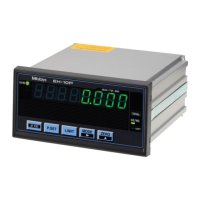
Part Names and Functions
Front side of the main body
B
A
F
C
G
D
H
E
I
Symbol
Name Description
A Sign indicator Indicates the sign of a counter value or a setting
value. Lights when the displayed value fills all
available digits and the value is also negative.
B Display Displays the counter value from the connected
Linear Gage.
C Tolerance
judgment
indicator
Indicates the tolerance judgment result from the
Linear Gage by color.
D UNIT indicator
y
Blinks while a HOLD signal is being input when
the I/O connector is connected.
y
Lights when an E unit has been selected for the
corresponding parameter.
E P. SET
indicator
Lights when you set a Preset value.
F [ON/OFF] key
Turns on or off the display. For details, see
"4.5 Turning On or Off the Display" (page 4).
G [Fn] key Switches to setup mode where you can set
tolerance values or the Preset value.
Tips
When setting parameters, this advances the
parameter number.
H [ZERO] key Sets the current value shown on the Display to 0.
Tips
When setting a parameter, this advances
the set value.
When setting the tolerance, Preset, or
optional constant value, this increases the
value of the selected digit.
I [P.SET] key
y
Displays the Preset value.
y
Cancels an error.
Tips
When setting a parameter, this advances
the set value.
When setting the tolerance, Preset, or
optional constant value, this increases the
value of the selected digit.
Linear Gage Counter EC-101D
No. 99MBC089B5 User's Manual
*99MBC089B5*
Question and Answer IconNeed help?

Do you have a question about the Mitutoyo EC-101D and is the answer not in the manual?

Summary

Safety and Compliance

Safety Precautions and Warnings

Covers general safety, precautions for use, and warnings.

Document Conventions and Warranty

Explains document conventions and warranty policy.

Export Control and EMC Notes

Information on export compliance and electromagnetic compatibility.

Product Overview

Major Functions and Supported Gages

Outlines key functions and compatible linear gages.

Part Names and Functions

Identifies and describes the main body's front panel components.

Setup and Connections

Unpacking and Component Check

Lists components received and checks them.

Panel Mounting Procedure

Details the steps and dimensions for mounting the unit on a panel.

Connecting Power and Equipment

Covers power source connection and external equipment cabling.

Operation Verification

Steps to confirm correct connections and basic operation.

Parameter Configuration

Setting Procedure Overview

Guides the user through the parameter setting mode.

Basic Parameter Settings

Explains essential parameters like counter direction and counting method.

Advanced Parameter Options

Details advanced settings for display, functions, and output.

Core Measurement Operations

Zero Setting and Preset Value

How to set the counter to zero or an arbitrary preset value.

Tolerance Judgment Setup

Procedure for setting tolerance limits for measurement.

Display Control and Constant Value

How to turn the display on/off and set optional constant values.

External Interface Functions

I;O Connector and Cable Details

Information on I/O connector, compatible cables, and pin assignments.

Data Output Modes

Explains tolerance judgment output and Digimatic output.

Timing and Signal Information

Timing charts for output signals and input logic.

Troubleshooting and Specifications

Troubleshooting Common Issues

Lists common operational problems and their solutions.

Error Code Reference

Details error codes, causes, and methods for cancellation.

Technical Specifications Summary

Provides key technical data including dimensions and interfaces.

Available Options

Lists optional accessories and their corresponding part numbers.

Overview

The Mitutoyo EC-101D Linear Gage Counter, identified by Code No. 542-007, is a single-axis digital counter designed to display values from connected Mitutoyo Linear Gages. It supports Digimatic output type gages such as LGD and LGS, including ID and SD models, and features an ABS function, eliminating the need for master setting.

Function Description:

The EC-101D primarily displays counter values from connected Linear Gages. Its core functions include Preset, Zero setting, and Tolerance judgment. It also offers communication capabilities with a PC or external devices via an I/O connector. The device can perform calculations with a constant, allowing the counter value to be multiplied by a predetermined or arbitrary factor before display. It supports various counting methods (INC, ABS, Multi-Unit) and unit systems (mm, E units). Key operations can be protected to prevent accidental changes.

Important Technical Specifications:

  • Display: Minus (-) sign and 6 numeric digits (green LED).
  • Minimum Reading (Count Display Range): Automatically set according to the gage, typically 0.01 mm (±9999.99) or 0.001 mm (±999.999).
  • Power Source Voltage: DC +9 V to 12 V.
  • Power Consumption: Max. 4.8 W (Max. 400 mA).
  • Operating Temperature Range: 0°C to 40°C (20% RH to 80% RH, without condensation).
  • Storage Temperature Range: -10°C to 50°C (20% RH to 80% RH, without condensation).
  • External Dimensions: 96 (W) x 48 (H) x 85 (D) mm.
  • Mass: Approx. 220 g.
  • Interface: I/O, Digimatic output.
  • Output Circuit: Transistor output (open collector) with a maximum withstand voltage of 24 V and current of 20 mA. Output saturation voltage is max 0.7 V.
  • Input Circuit: Input is valid when the input voltage is "L" (negative logic). Input current max 1 mA, input voltage H = 4 to 24 V, L = max 1 V.

Usage Features:

  • Setup and Unpacking: The product comes with a Linear Gage Counter, washers, rubber feet, an AC adapter (various regional types available), and a user's manual. Rubber feet are provided to prevent slipping and minimize vibration when placed on a desk; they should not be used if panel mounting.
  • Panel Mounting: The device can be mounted on a panel with specific dimensions (Width: 92.0 to 92.8 mm, Height: 45.0 to 45.8 mm, Panel thickness: 1.0 to 3.2 mm). Fixing brackets are used to secure the counter from the back of the panel. Washers are provided to adjust for different panel thicknesses.
  • Connections:
    • Power: Uses the supplied AC adapter and cable. Alternatively, a DC power source (9 V to 12 V, 1 A or more) can be used. It is crucial to connect the product to ground to minimize electrical noise.
    • Linear Gage: Connects to the Linear Gage input connector.
    • External Equipment: An I/O connector connecting cable is required for external equipment. Power and Linear Gage cables should not be run through the same cable duct as other power lines.
  • Parameter Setting: Parameters are set in Parameter mode to configure the Linear Gage, display, and external output. This includes setting the counter direction (+ or -), counting method (INC, ABS, Multi-Unit), unit system (mm, E units), and calculation with a constant. Advanced parameters allow for display at startup, hiding lowest-order digits, tolerance judgment/Digimatic output switchover, Digimatic input WAIT time, and key protection.
  • Basic Operations:
    • Zero Setting: The current counter value can be set to 0 at any point using the [ZERO] key or the Preset function.
    • Preset: An arbitrary value can be set as the current counter value.
    • Tolerance Judgment: The device performs 3-step tolerance judgment (Lower limit, GO, Upper limit) based on set tolerance values, indicated by amber (-NG), green (GO), and red (+NG) indicators.
    • Turning On/Off Display: The display can be turned on or off using the [ON/OFF] key.
    • Optional Constant Value Setting: An arbitrary multiplication factor can be set for the counter value, though accuracy is not guaranteed when this function is used.
  • External Input/Output Function:
    • Output Modes: Supports "Tolerance judgment output mode" (outputs judgment result) and "Digimatic output mode" (outputs data to Digimatic equipment).
    • Input Signals: External signals can activate Preset and HOLD functions.
    • Digimatic Output: Measurement data can be printed via a Digimatic Mini-Processor (DP-1VR) or output to a PC via a USB Input Tool.
  • Timing Chart: Provides details on the timing of tolerance judgment result output and Preset signal input.

Maintenance Features:

  • Troubleshooting: The manual provides a comprehensive troubleshooting guide for common issues such as incorrect counter values, inability to execute Zero setting, unexpected Zero setting, and inability to modify parameter settings. Solutions include checking parameter settings, external inputs, power supply, and Linear Gage connections.
  • Error Codes: Specific error codes (Err 10, Err 30, Err 40, F*****, Err 90, Err 95) are listed with their causes and recommended solutions, including error cancellation methods.
  • Warranty: The product is covered by a 1-year warranty from the date of original purchase for defects due to workmanship, material, or transportation. Repairs are free of charge within this period.
  • Safety Precautions: Users are warned against removing the cover or disassembling the product due to risks of electric shock, breakage, or fire. The device is precision equipment and should be handled with care, avoiding excessive shock or force. It should be used in an environment with temperatures between 0°C and 40°C, minimal temperature change, and no condensation. Avoid places exposed to chips, machining oil, dust, vibration, direct sunlight, or high voltage/current devices.
  • EMC Compliance: The product complies with the EMC Directive and UK Electromagnetic Compatibility Regulations. However, electromagnetic interference exceeding requirements will void the warranty.
  • Export Control: The product is subject to Japan's "Foreign Exchange and Foreign Trade Act," and users are advised to contact Mitutoyo for re-export, re-sale, or re-provisioning of the technology.

Mitutoyo EC-101D Specifications

General IconGeneral
BrandMitutoyo
ModelEC-101D
CategoryCash Counter
LanguageEnglish

Related product manuals