Pic. 2
c0 01,_
Ave, 0
9
Pic. 1
Gyroscope calibration
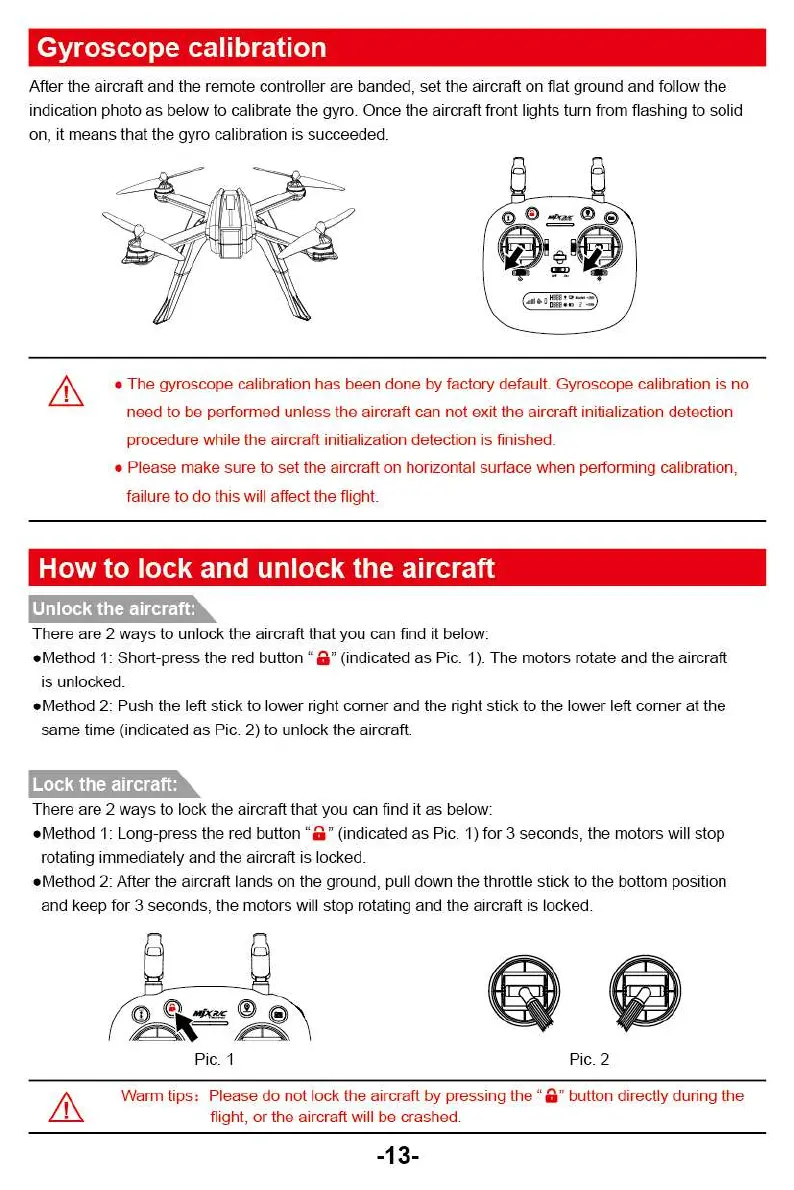
After the aircraft and the remote controller are banded, set the aircraft on flat ground and follow the
indication photo as below to calibrate the gyro. Once the aircraft front lights turn from flashing to solid
on, it means that the gyro calibration is succeeded.
oRr
A
• The gyroscope calibration has been done by factory default. Gyroscope calibration is no
need to be performed unless the aircraft can not exit the aircraft initialization detection
procedure while the aircraft initialization detection is finished.
•
Please make sure to set the aircraft on horizontal surface when performing calibration,
failure to do this will affect the flight.
How to lock and unlock the aircraft
Unlock the aircraft:
There are 2 ways to unlock the aircraft that you can find it below:
•
Method 1: Short-press the red button "
a.
(indicated as Pic. 1). The motors rotate and the aircraft
is unlocked.
•
Method 2: Push the left stick to lower right corner and the right stick to the lower left corner at the
same time (indicated as Pic. 2) to unlock the aircraft.
There are 2 ways to lock the aircraft that you can find it as below:
•
Method 1: Long-press the red button
a .
(indicated as Pic. 1) for 3 seconds, the motors will stop
rotating immediately and the aircraft is locked.
•
Method 2: After the aircraft lands on the ground, pull down the throttle stick to the bottom position
and keep for 3 seconds, the motors will stop rotating and the aircraft is lacked.
Warm tips: Please do not lock the aircraft by pressing the "a" button directly during the
flight, or the aircraft will be crashed.
-13-
Pic. 2
c0 01,_
Ave, 0
9
Pic. 1
Gyroscope calibration
After the aircraft and the remote controller are banded, set the aircraft on flat ground and follow the
indication photo as below to calibrate the gyro. Once the aircraft front lights turn from flashing to solid
on, it means that the gyro calibration is succeeded.
oRr
A
• The gyroscope calibration has been done by factory default. Gyroscope calibration is no
need to be performed unless the aircraft can not exit the aircraft initialization detection
procedure while the aircraft initialization detection is finished.
•
Please make sure to set the aircraft on horizontal surface when performing calibration,
failure to do this will affect the flight.
How to lock and unlock the aircraft
Unlock the aircraft:
There are 2 ways to unlock the aircraft that you can find it below:
•
Method 1: Short-press the red button "
a.
(indicated as Pic. 1). The motors rotate and the aircraft
is unlocked.
•
Method 2: Push the left stick to lower right corner and the right stick to the lower left corner at the
same time (indicated as Pic. 2) to unlock the aircraft.
There are 2 ways to lock the aircraft that you can find it as below:
•
Method 1: Long-press the red button
a .
(indicated as Pic. 1) for 3 seconds, the motors will stop
rotating immediately and the aircraft is locked.
•
Method 2: After the aircraft lands on the ground, pull down the throttle stick to the bottom position
and keep for 3 seconds, the motors will stop rotating and the aircraft is lacked.
Warm tips: Please do not lock the aircraft by pressing the "a" button directly during the
flight, or the aircraft will be crashed.
-13-



 To Next Page