Ⅹ
.TFT touch Screen User interface configuration
10.1 Conventions:
If the customer needs to customize the display picture of the touch screen, the first should follow the
following conventions:
1 . Scope of customization:
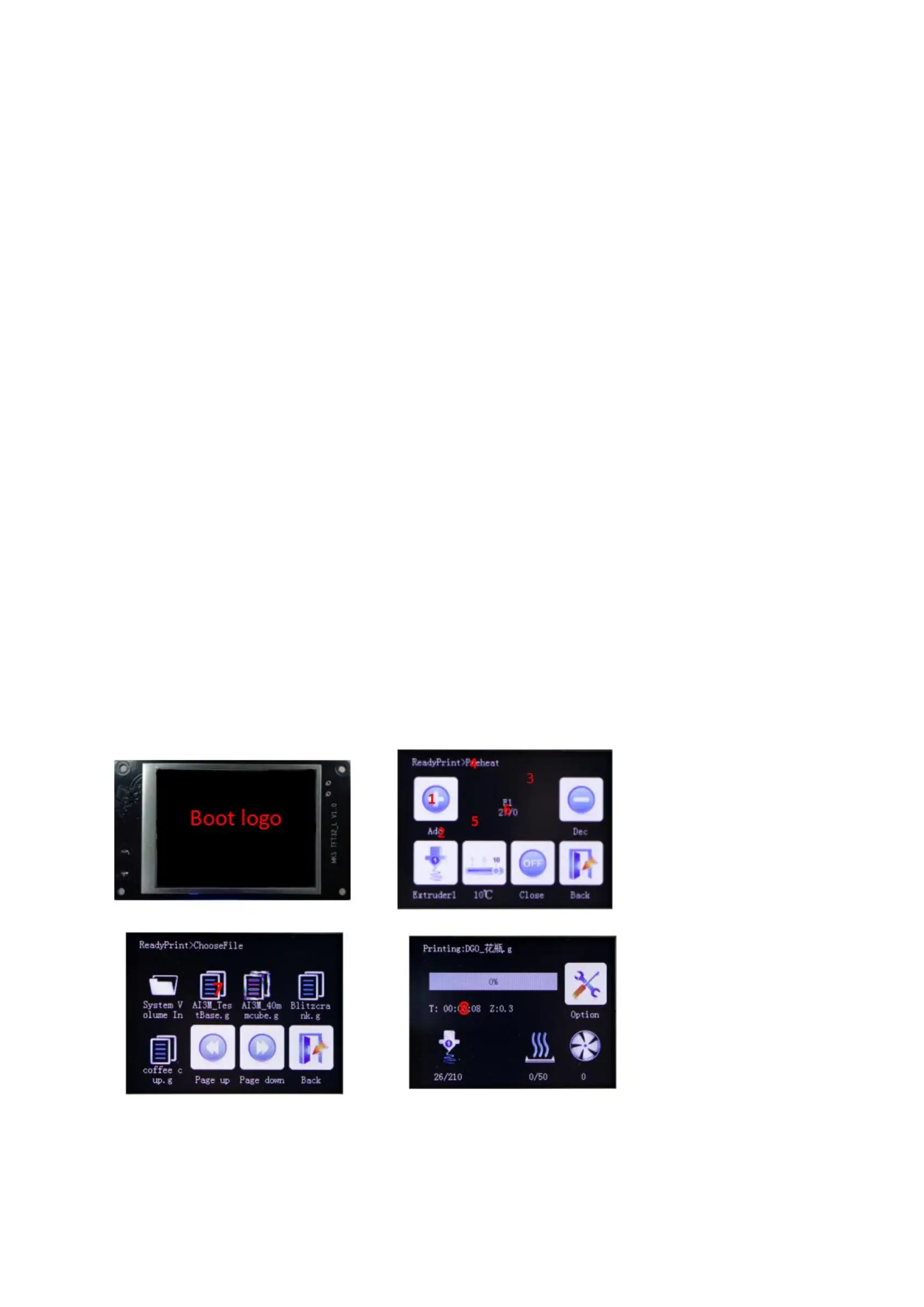
A. Power-on interface logo;
B. Picture of the button (see below "1" and "2") (including icons and text);
C. Screen background color (see below figure "3", default black);
D. Title text color (see below figure "4", default white);
E. Display the background color of the state of the temperature (see figure "5", the default dark blue);
F. Display the color of the state such as temperature (see below figure "6", the default white);
G. " Select the file interface, the font color of the file name (see figure "7", the default white);
H. " Select the file interface, the font background color of the file name, and suggest the same color as the
picture;
I. " Printing "interface, printing status information text background color; (See figure" 8 ", default white);
J. " Printing interface, print status information font color, suggest and picture color is the same;
K. Whether the button requires a 3D effect, the default is that the need, that is, the button picture outside
the white


 To Next Page