FAN- FAN+
MODE
HEATER SLEEP
CLOCK
TIMER
LOCK
LIGHT
0 0
C / F
14
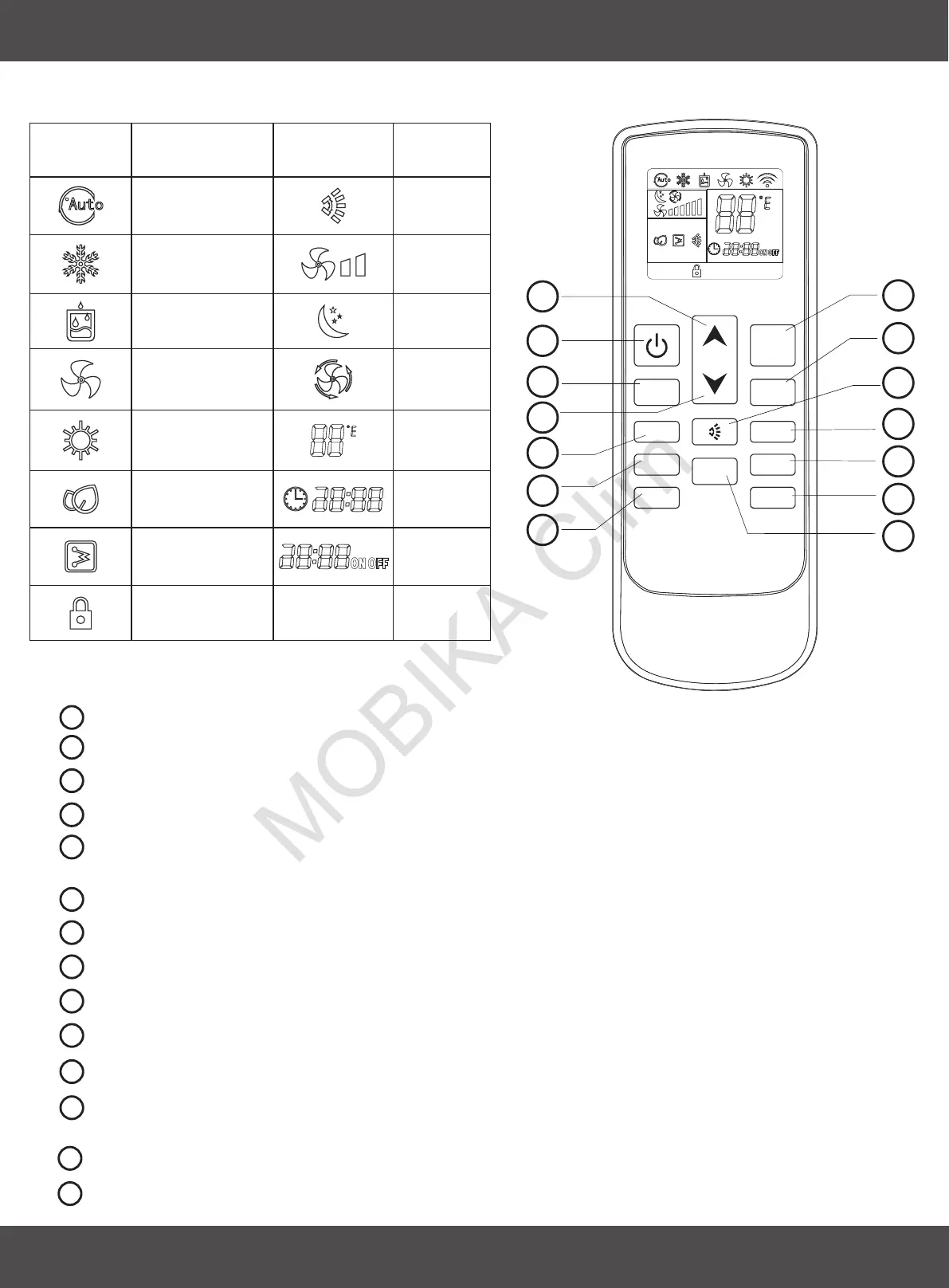
3.1 INTRODUCTION OF LCD ICONS
3.2 REMOTE CONTROL FUNCTIONS
1
2
4
5
6
9
10
3
7
8
11
MODE BUTTON: Set up the air conditioner operating mode
FAN SPEED BUTTON: Set up the fan speed
LOUVER SWING BUTTON: Adjust the airflow direction
SLEEP BUTTON: Automatically adjusting the setting temperature according the circadian rule.
TIMER BUTTON: Set up the time the air conditioner starts;
Set up the time the air conditioner stops.
LIGHT BUTTON(optional only): Switch on the light or UPI than the unit has this fuction
0 0
TEMP BUTTON: Set temperature unit to C or F
UP BUTTON: Increase the temperature and time
ON/OFF BUTTON: Turn on or turn off the air conditioner
FAN SPEED BUTTON: Set up the fan speed down
DOWN BUTTON: Decrease the temperature and time
12
ELECTRICAL HEATER BUTTON(optional only): Turns on the integrated electric heat to boost heating
0
performances when outdoor temperatures are below 5 C and additional heat is required.
9
10
7
8
11
12
13
14
Icons Meaning Icons Meaning
Auto
Cooling
Dry
Fan
Heating
Light
(optional only)
Heater
(optional only)
Fan speed
Airflow
direction
Sleep
Auto fan
Temp
Clock
Lock
Timer
13
CLOCK BUTTON: Adjust the clock
14
LOCK BUTTON: Lock the remote control set
1
2
4
5
6
3
3. USE AND MAINTENANCE
ENGLISH


 To Next Page