
 Need help?
Do you have a question about the MobileODT EVA 3 Plus and is the answer not in the manual?
Defines the intended use of the EVA System for diagnosing abnormalities in the vagina, cervix, and genitalia.
States that there are no contraindications for using the EVA System.
Mentions minimal patient risks and system testing according to medical standards.
Explains the structure and content of the user guide, including troubleshooting.
Introduces general warning signs and the stand-by symbol used in the manual.
Provides essential safety regulations and training requirements for users of the EVA System.
Lists serious adverse reactions, potential safety hazards, limitations, and corrective steps.
Outlines special care practices for the practitioner for safe and effective colposcope use.
Guides users to check for external damage and outlines subsequent chapters.
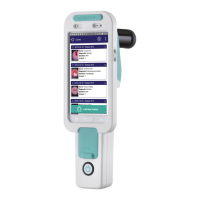
Lists all components included with the EVA System and their purpose.
Details connecting the colposcope to wheeled and portable stands, and a neck strap.
Explains how to turn on the LED light using the device's on/off button.
Discusses methods to stabilize the colposcope, such as using a stand or neck strap.
Details optimal distance and angle for capturing cervix images without patient contact.
Explains how to achieve full cervix illumination and minimize glare from the speculum.
Describes two methods for adjusting colposcope focus for clear images.
Instructions for connecting the charger to the optical unit's charging port.
Details how to charge the mobile device when it is fitted within the optical unit.
Recommends storing the colposcope in its provided case for protection and to minimize dust.
Guides on cleaning the optical unit lens with a soft cloth or lens wipe to prevent view obstruction.
Emphasizes cleaning the optical unit body between uses to prevent dirt accumulation and cross-contamination.
Provides step-by-step instructions for cleaning the optical unit body using disinfectant towelettes.
Covers common issues with the optical unit, including battery, LED, connections, and casing.
Addresses problems related to the lens, such as cracks, misalignment, or dirt affecting image quality.
Covers issues with the mobile device, including low battery, overheating, and insufficient memory.
Provides solutions for problems with the EVA application, like freezing, unresponsiveness, or camera issues.
Details electromagnetic emissions and guidance for the EVA System to ensure compatibility.
Provides recommended distances to maintain between the EVA System and RF communications equipment.
Explains what information to provide when contacting the Service and Repair department for support.
 General
| Device Type | Colposcope |
|---|---|
| Model | EVA 3 Plus |
| Manufacturer | MobileODT |
| Camera Resolution | 5 MP |
| Light Source | LED |
| Connectivity | Wi-Fi, Bluetooth |
| Battery Life | 4 hours |
| Screen Size | 5 inches |
| Compatibility | iOS, Android |

 To Next Page