19
9. Using the actuator
a. Preliminary checks
1 – Check the equipment is in good condition and use accessories that are the most
suitable for the actuator.
Make sure the torque management system and the handwheel adapter are compatible with the
action about to be carried out.
2 – Insert the battery. Set the torque limiter to minimum.
3 – Check the rotational direction required for the valve or the handwheel. Set the defined
rotation direction using the actuator’s left/right switch.
4 – Position the adaptor on the valve and set up the torque retention system. Consult the
instructions for adaptors.
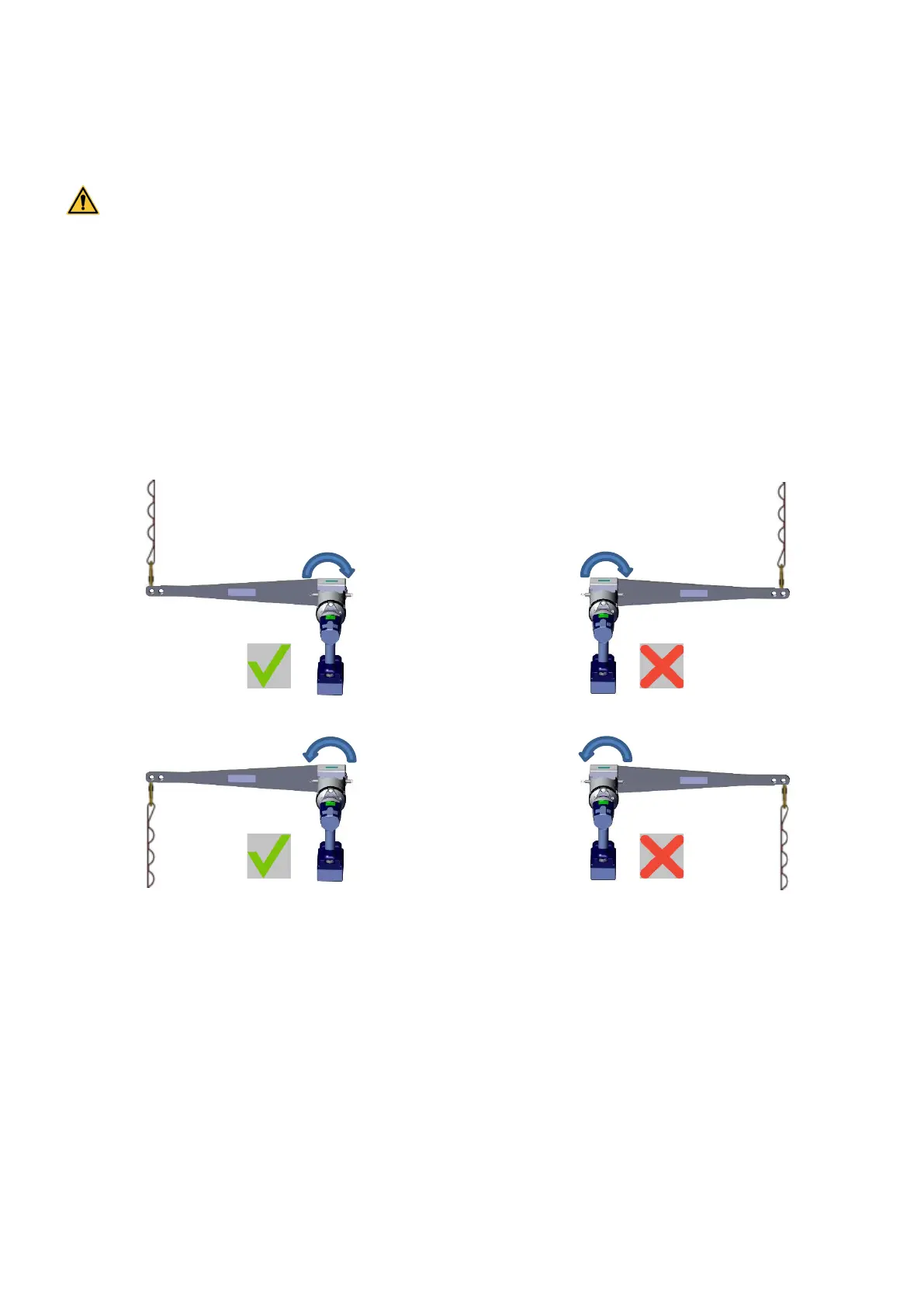
5 – Check that the strap is fixed on the appropriate side of the reaction bar depending on the
rotation direction
Handwheel direction D1
Handwheel direction D2
6 – When starting up, always start up slowly in order to VERIFY the rotational direction, and to
put tension on the torque retention strap or chain.
b. Torque reaction safety stop
In case you don’t use a torque reaction system or you don’t install it correctly, the actuator may
rotate suddenly and unexpectedly when started. If the rotation speed is high, this may be
dangerous for the user. In such a case, in order to protect users, the actuator will switch off,
beep once, and the LED light will flash continuously.



 To Next Page