-23-
Revision 2/F3506
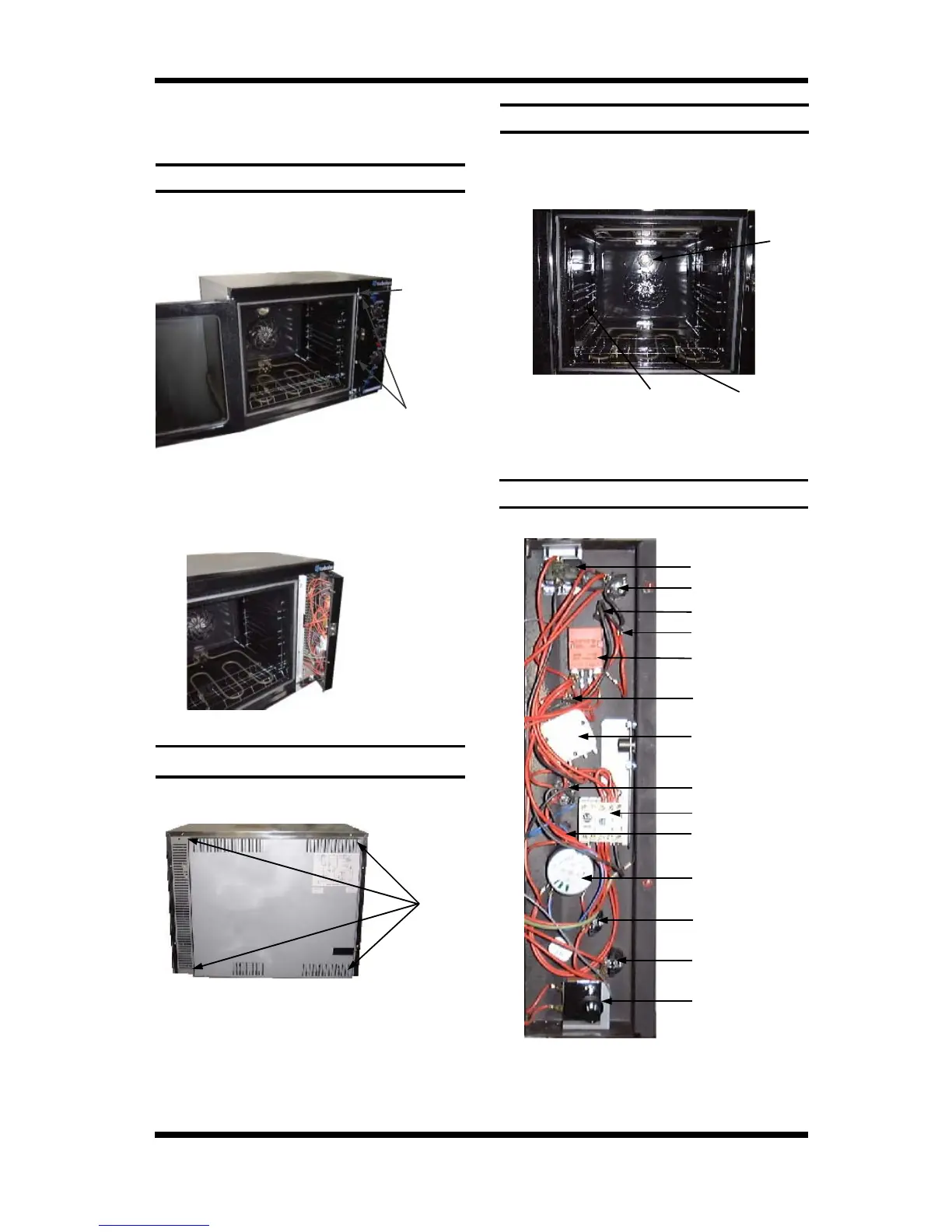
Element
Cover
Lamp
Cover
Side
Rack
Four
Screws
6.2 ACCESS
6.2.1 CONTROL PANEL
1) Open the oven door. Remove microswitch
button by pulling straight off.
2) Undo the two screws now visible.
1) Undo the four screws holding the panel.
6.2.2 SERVICE (REAR) PANEL
1) Remove trays, racks, element cover and
left hand side rack.
2) Undo lamp cover.
6.2.3 BAFFLE
3) Panel is now free to hinge along right
hand side. When closing the panel
ensure wires and capillary tube are clear
of metal or other terminals.
Figure 6.2.1
Microswitch
Button
Two
Screws
2) Remove panel.
Figure 6.2.2
Figure 6.2.3
3) Remove baffle.
Figure 6.2.4
6.2.4 CONTROL PANEL—REAR
Buzzer
Power Switch
Heating Indicator
Grill / Broil Indicator
Thermostat
Bake Time Up
Indicator
Roast‘n Hold Switch
Mini Contactor
Roast ‘n Hold Time
Up Indicator
Roast Timer (180 minute)
Steam Switch
Light Switch
Hold Thermostat
Bake Timer (60 minute)
Figure 6.2.5


 To Next Page