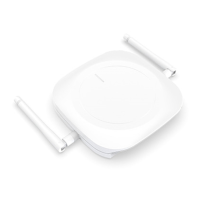
The MK107 BLE to WiFi Gateway is a device designed to bridge Bluetooth Low Energy (BLE) devices to a WiFi network, enabling communication with cloud servers. It supports connection to various MQTT brokers like EMQTT and Mosquitto, as well as cloud platforms such as AWS IoT and Ali IoT.
Function Description:
The primary function of the MK107 gateway is to collect data from nearby BLE devices and forward it to a configured server via WiFi. It acts as a data bridge, allowing BLE devices to communicate with the internet. The gateway supports various beacon types, including iBeacon, Eddystone-UID, Eddystone-URL, Eddystone-TLM, MkiBeacon, MkiBeaconX, BeaconX Pro + ACC, and Unknown types. It can filter beacon data based on multiple criteria, such as RSSI, MAC address, ADV Name, iBeacon Proximity UUID, iBeacon major, iBeacon minor, and raw ADV data. This filtering capability allows users to specify which beacon data should be reported to the server, reducing unnecessary data transmission. The gateway also supports duplicate data filtering, ensuring that only unique data is sent to the server within a specified filtering period.
Important Technical Specifications:
- Connectivity:
- Bluetooth Low Energy (BLE) for device communication.
- WiFi for server communication.
- Supports MQTT protocol for server connection.
- Compatible with AWS IoT and Ali IoT.
- Server Configuration:
- Configurable Host (IP address or domain name) and Port for the MQTT server.
- Unique Client ID for each gateway.
- Configurable Subscribe and Publish topics for MQTT communication.
- Quality of Service (Qos) settings (0-2).
- Keep Alive interval (10-120 seconds, default 60).
- User Credentials (Username and Password) for server access, can be blank if not required.
- SSL/TLS support for secure communication, with options for CA signed server certification, CA certificate file, or Self-signed certificates.
- Device Identification:
- Each added device has a unique Device ID.
- Time Synchronization:
- NTP server IP or domain name for time synchronization, can be blank to use the default NTP server.
- Configurable Timezone (UTC-12 to UTC+12, default UTC+0).
- Data Filtering:
- Beacon Type Filter: Supports 9 beacon types (iBeacon, Eddystone-UID, Eddystone-URL, Eddystone-TLM, MkiBeacon, MkiBeaconX, BeaconX Pro + ACC, Unknown).
- Beacon Data Filter:
- Filter Condition A and B, with "And" or "Or" relationship.
- RSSI: Range -127 dBm to 0 dBm.
- MAC address: Can be enabled/disabled.
- ADV Name: Can be enabled/disabled.
- iBeacon Proximity UUID: Can be enabled/disabled.
- iBeacon major: Value must be greater than or equal to the first value, and less than or equal to the second value.
- iBeacon minor: Value must be greater than or equal to the first value, and less than or equal to the second value.
- Raw ADV Data: Supports up to 5 filter items, with "And" relationship. Data type can be Bluetooth raw data. Data offset in bytes (0-29), and the second value must be greater than the first value. Raw data field for a certain data field under the data type, and it should match the data offset.
- Duplicate Data Filter:
- Filtering Period: 1-86400 seconds (default 10 seconds).
- Filter by: None, MAC, MAC+Data Type, MAC+Raw Data.
- Upload Data Option:
- Configurable to include Timestamp, Device Type, RSSI, and Raw Data in the uploaded report.
- LED Status Option:
- Configurable LED indicators for Bluetooth advertising, Bluetooth connected, Server connecting, and Server connected status.
- Data Report Timeout:
- Default: 20, range: 0-60 (unit: 50ms).
- Network Status Report Period:
- Default: 10, range: 0 or 10-86400 seconds. Value 0 means reporting only once upon successful connection.
- Connection Timeout:
- Default: 3, range: 0-1440 minutes. Value 0 means the device will not reboot.
- Scan Timeout:
- Default: 60, range: 0-1440 minutes. Value 0 means the device will not reboot.
Usage Features:
- Easy Setup: The gateway is configured via a mobile application (MKScannerPro APP), available on Google Play and App Store.
- Bluetooth Connection: The APP connects to the gateway via Bluetooth for initial setup and configuration. The gateway's indicator turns solid green upon successful Bluetooth connection.
- WiFi and Server Connection: After configuring WiFi SSID and password, the gateway automatically connects to the WiFi network and the configured server. The indicator turns blue flashing during this process and solid blue upon successful server connection.
- Real-time Data Display: The APP displays scanned beacon data in real-time, allowing users to monitor the data being collected.
- Customizable Filtering: Users can enable and configure various filters (beacon type, data content, duplicate data) to precisely control which data is sent to the server, optimizing data usage and relevance.
- Over-The-Air (OTA) Updates: The gateway supports firmware updates over the air. Users can initiate the update process through the APP, and the LED indicator provides feedback on the update status (yellow flashing for in-progress, solid green for success, solid red for failure). The OTA server is
47.104.172.169:8080.
- Device Management: The APP allows users to reboot and reset the device. Reboot sends a command to restart the device, while reset restores factory settings and turns the indicator green. Devices can also be removed from the device list by touching the screen for three seconds.
- System Time Synchronization: The gateway synchronizes time from an NTP server every hour. If the NTP server is invalid, it can synchronize time from the user's phone.
Maintenance Features:
- LED Status Indicators: The gateway provides visual feedback through LED indicators for various operational states (Bluetooth advertising, Bluetooth connected, Server connecting, Server connected), aiding in troubleshooting and monitoring. These indicators can be enabled or disabled via the APP.
- Data Report Timeout: This feature ensures that if the Bluetooth data packet is less than the specified length, the gateway will wait for the next piece of data. If the next piece of data is not scanned after the timeout period, it will directly report the currently scanned data to the server, preventing data loss or delays.
- Network Status Report Period: Users can configure how often the gateway reports its network status to the server. Setting it to 0 means it reports only once upon successful connection, reducing network traffic if continuous status updates are not required.
- Connection Timeout: If the gateway fails to connect to the server within the configured timeout period, it will automatically reboot, attempting to re-establish the connection. This helps in recovering from temporary network issues.
- Scan Timeout: If the scan switch is enabled but no data is scanned for a period of time, the gateway will automatically reboot. This ensures the device remains active and responsive in data collection.
- Firmware Updates: Regular firmware updates via OTA can improve device performance, add new features, and address security vulnerabilities. Users can also build their own OTA server to manage updates.
- Factory Reset: The "Reset Device" function allows users to revert the gateway to its factory default settings, which can be useful for troubleshooting or reconfiguring the device from scratch.

 Need help?

 To Next Page
 General