www.mokosmart.com
2.4.2 Beacon Data Filter
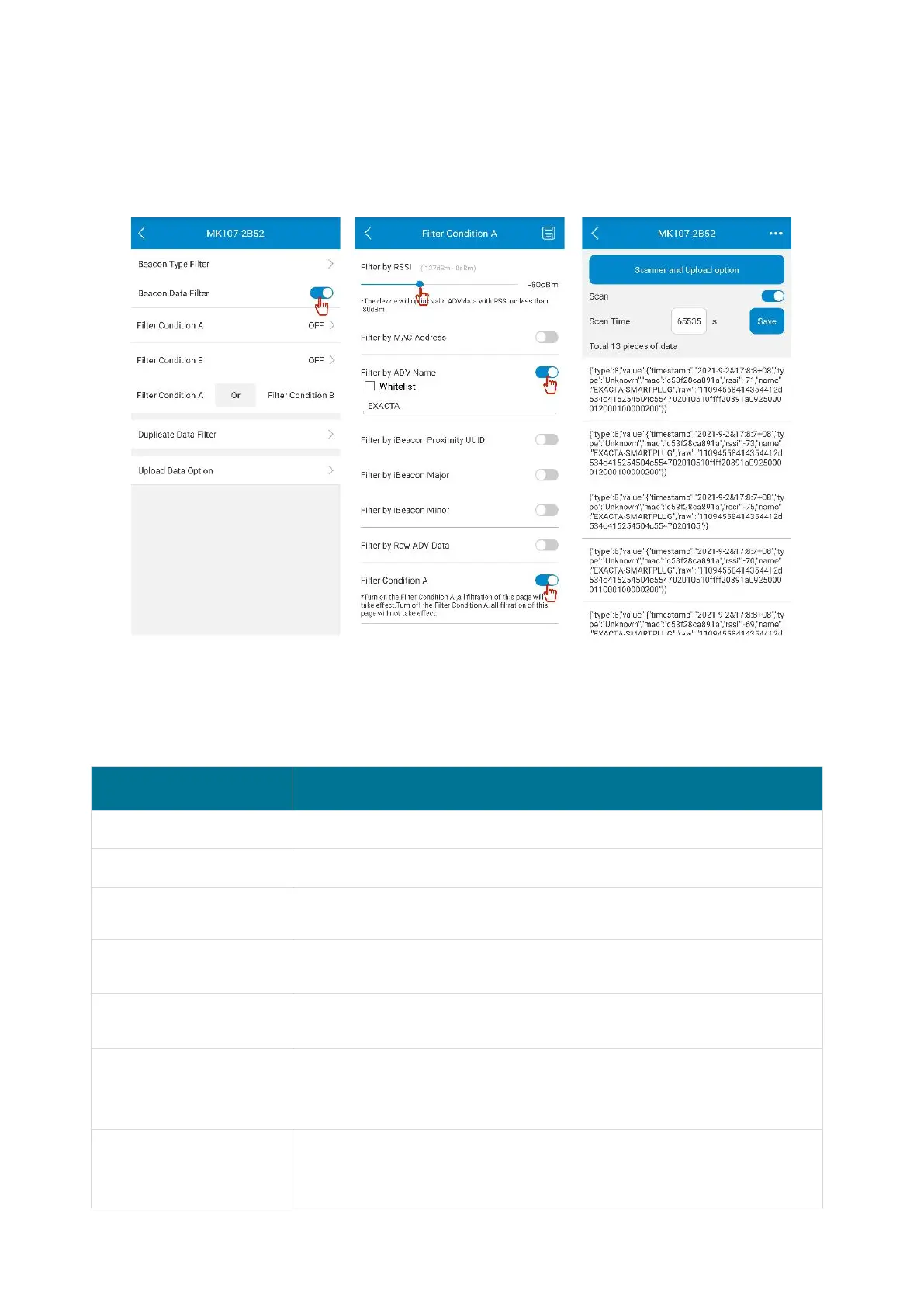
The gateway can also filter by beacon data, and it allows to set at most two filter conditions
(condition A and condition B). The content of the two filter conditions is the same. When both of
the filter conditions are ON, the relationship can be set to And or Or.
Both Condition A and Condition B include the following filter items, each filter item can be set to
whitelist filtering. If the whitelist box is unchecked, the gateway will report advertising data which
meets the filter rules. Otherwise the gateway will report advertising data which doesn’t meet the
filter rules.
Default: -127 dBm, range: -127- 0 dBm
Default is disabled, when enabling it, please enter a full MAC
address or keyword.
Default is disabled, when enabling it, please enter a full ADV name
or keyword.
Default is disabled, when enabling it, please enter a full iBeacon
UUID or keyword.
Default is disabled, when enabling it, please enter the range value
of iBeacon major, the second value must be greater than or equal
to the first value.
Default is disabled, when enabling it, please enter the range value
of iBeacon minor, the second value must be greater than or equal
to the first value.


 To Next Page