12
®
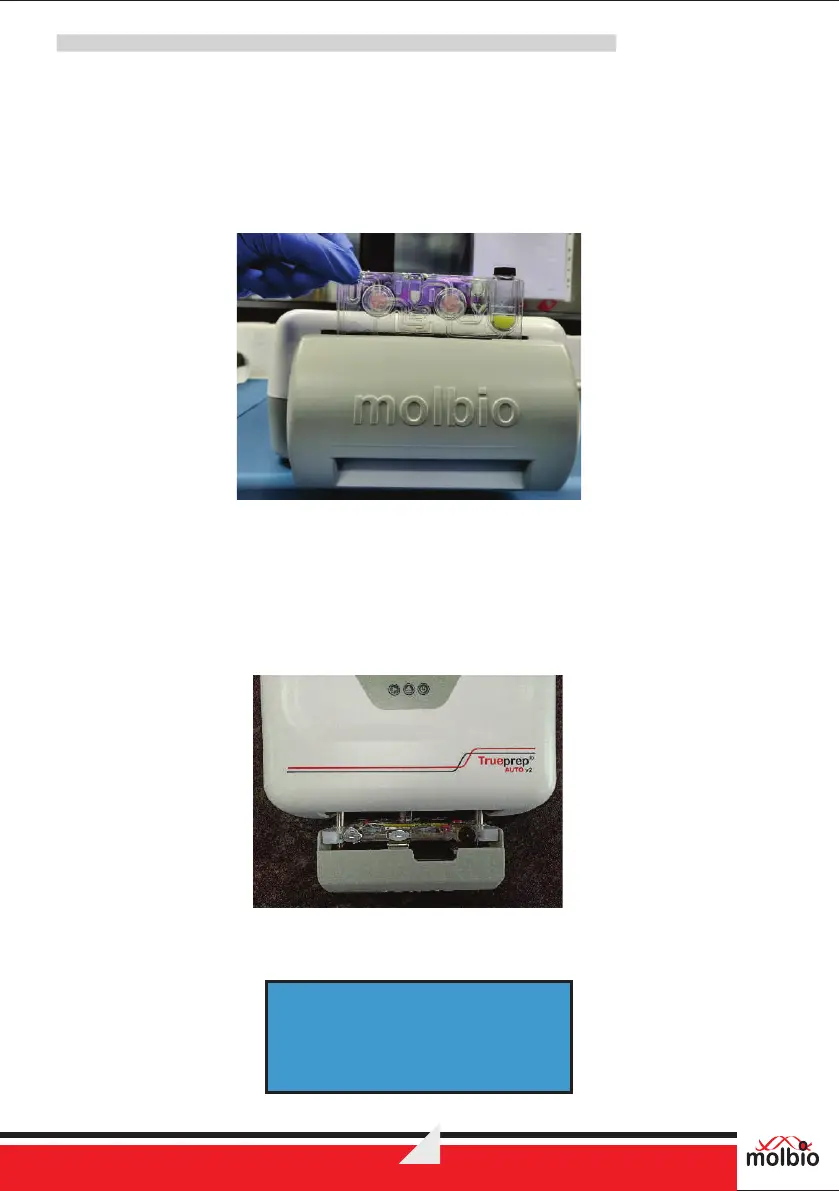
7.4.2 Take a cartridge out of the Cartridge Pouch from the Trueprep AUTO v2 Universal Cartridge
Based Sample Prep Kit Cartridge pack. The pouch also contains one Elute Collection Tube (ECT) for
use at the end of extraction. Place the cartridge, after adding pre-treated sample (sample + lysis
reagent) into the sample chamber (see procedure in corresponding Truenat™ pack insert), in the
cartridge holder. Note the orientation of the cartridge is to be placed in picture below.
Caution: Placing the cartridge in the wrong orientation will cause the cartridge holder to remain
open, and the cartridge will not be inserted in the device
Figure 11: Cartridge being placed in cartridge holder
7.4.3 Push the cartridge holder gently inwards to close it shut. Press the Start Button to proceed.
®
This is the start of the Trueprep AUTO v2 sample preparation process. After reading the QR
code of Cartridge Extraction process starts. If the QR code is read then the same cartridge
cannot be reused. The reagents from the bottle/pouch in the back will be automatically added to
the cartridge based on the pre-programmed protocol.
Figure 12: Cartridge placed in cartridge holder in correct orientation
7.4.4 Once the process is completed the device will give a beep sound with display message as below
COLLECT ELUTE
---COMPLETED---
®
®
Trueprep AUTO v2


 To Next Page