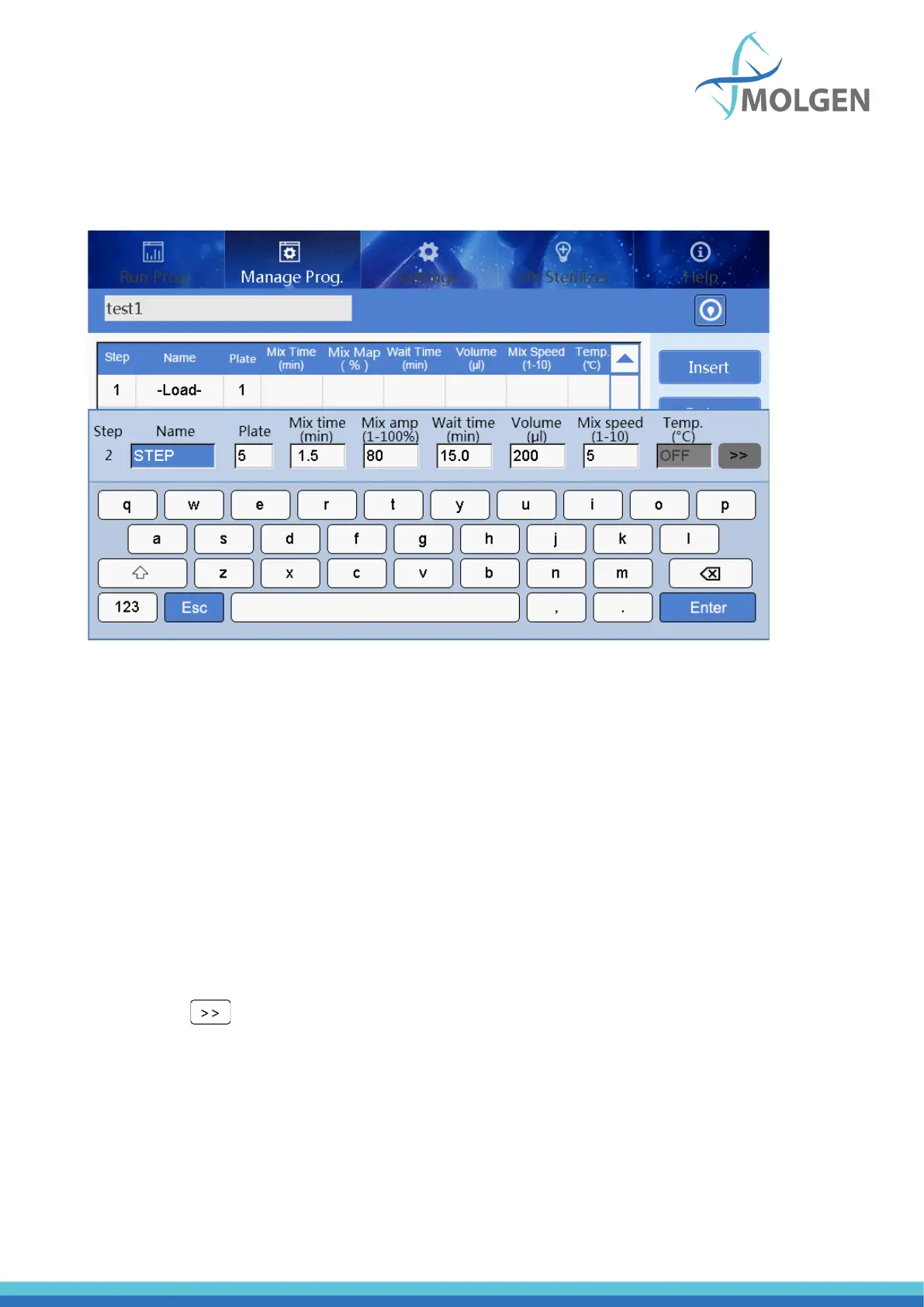
If you create a new program, or double-tap an existing program, it will show all the existing steps in the
program. Double-tapping on a step gives you the display as seen in figure 21, where you can double-
tap on each step to change settings.
Fig 21
In this screen, you can alter parameters per step. The parameters are explained below:
• Plate: select a plate position for the coming operation
• Name: set a name of the step
• Mix time: the mixing time for the selected plate.
• Mix amp: mix amplitude, the range is from 1 to 100%.
• Wait time: interval time between two steps.
• Volume: The volume is automatically converted to the amplitude of mixing according to the
formula.
• Mix speed: Ten kinds of mix speeds from 1 to 10. The higher the value is, the faster the mixing
speed will be.
• Temp.: The temperature can be set according to actual requirements, only plate position No.2
and 8 can be set, as these have heating properties.
• Click “ ” to enter the parameter settings of magnetic absorption, see figure 22



 To Next Page