Download the Monimoto App and install it on your smartphone. Minimum OS requirements
are iOS 14 and Android 8. Run the Monimoto App and follow the on-screen step-by-step
instructions that will guide you through the setup process. Android users, please make sure
both Bluetooth and location services are turned on.
Once the setup process has been completed you should receive an SMS from your device.
Be sure to add that number to your contacts with an appropriate name so you recognize it
immediately in case of alarm when the device calls you.
1 2 3 4
Battery
Battery
Battery
Battery
Battery
Battery
STEP 2
MONIMOTO APPLICATION SETUP
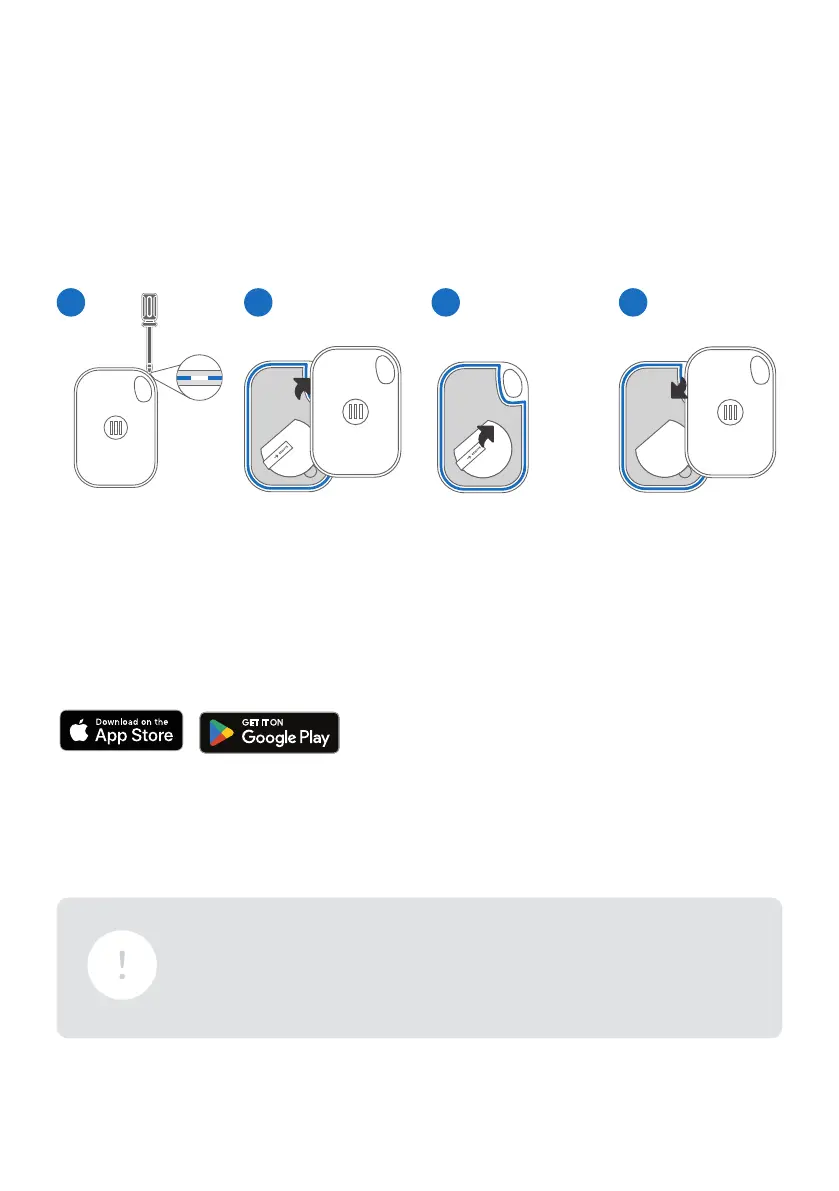
FIRST MAKE SURE THE BATTERY TAB IS REMOVED FROM THE KEY FOB.
SEARCH “MONIMOTO” IN APP STORE OR GOOGLE PLAY STORE
1 2 3 4
Insert a small flat
screwdriver into
the special hole
and lift.
Remove the
battery tab.
Separate the two
black pieces.
Realign the two
sides and firmly
close till you hear
a ‘click’ sound.
IMPORTANT: All the Bluetooth pairings are done only through the
App. Please do not try to pair your Monimoto or the Key Fob directly
through your Phone’s Bluetooth Settings because the App might be
unable to finish setup.
6


 To Next Page