If you lose the little rubber plug don’t worry, it is not needed for your
device to be waterproof and is only there for extra protection against
dust/dirt/grime from regular use. The charging port is waterproof
without the plug.
2. GETTING STARTED
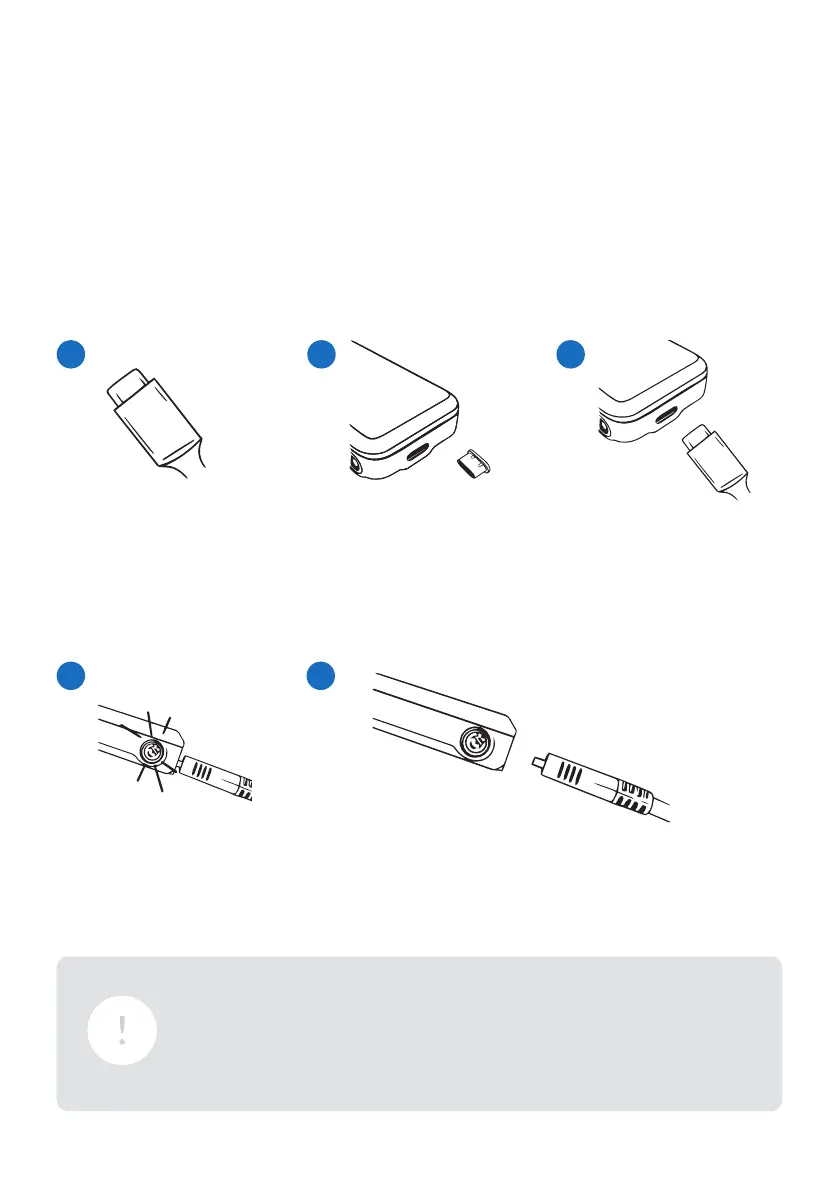
STEP 1
Get a USB-C charging
cable and adapter (not
provided with Monimoto).
The reset button LED will
start to pulse RED meaning
the device is charging.
After Monimoto is fully charged, the reset button LED
will display SOLID RED. Then you can remove the
cable and reinsert the rubber plug.
Find the USB-C charging
port and remove the
rubber plug.
Plug your USB-C
charging cable into the
charging port.
CHARGING YOUR MONIMOTO’S BATTERY FOR THE FIRST TIME
1
4 5
2 3
5


 To Next Page