– 32 –
For single or upper oven, remove the three ¼-in.
hex-head screws that attach the vent trim to the
front of the control compartment. Remove the
vent trim.
3.
Power Supply and Relay Boards
The power supply is mounted on a metal bracket
located in the control compartment. This power
supply serves both ovens on a double oven model.
The relay board for the single oven (or the upper
oven on a double oven model) is mounted on
this same metal bracket. The relay board for the
bottom oven is mounted on a metal bracket located
between the two ovens.
To access the oven power supply or relay board:
Access the control compartment. (See Control
Compartment Access or Lower Oven Control
Compartment Access.)
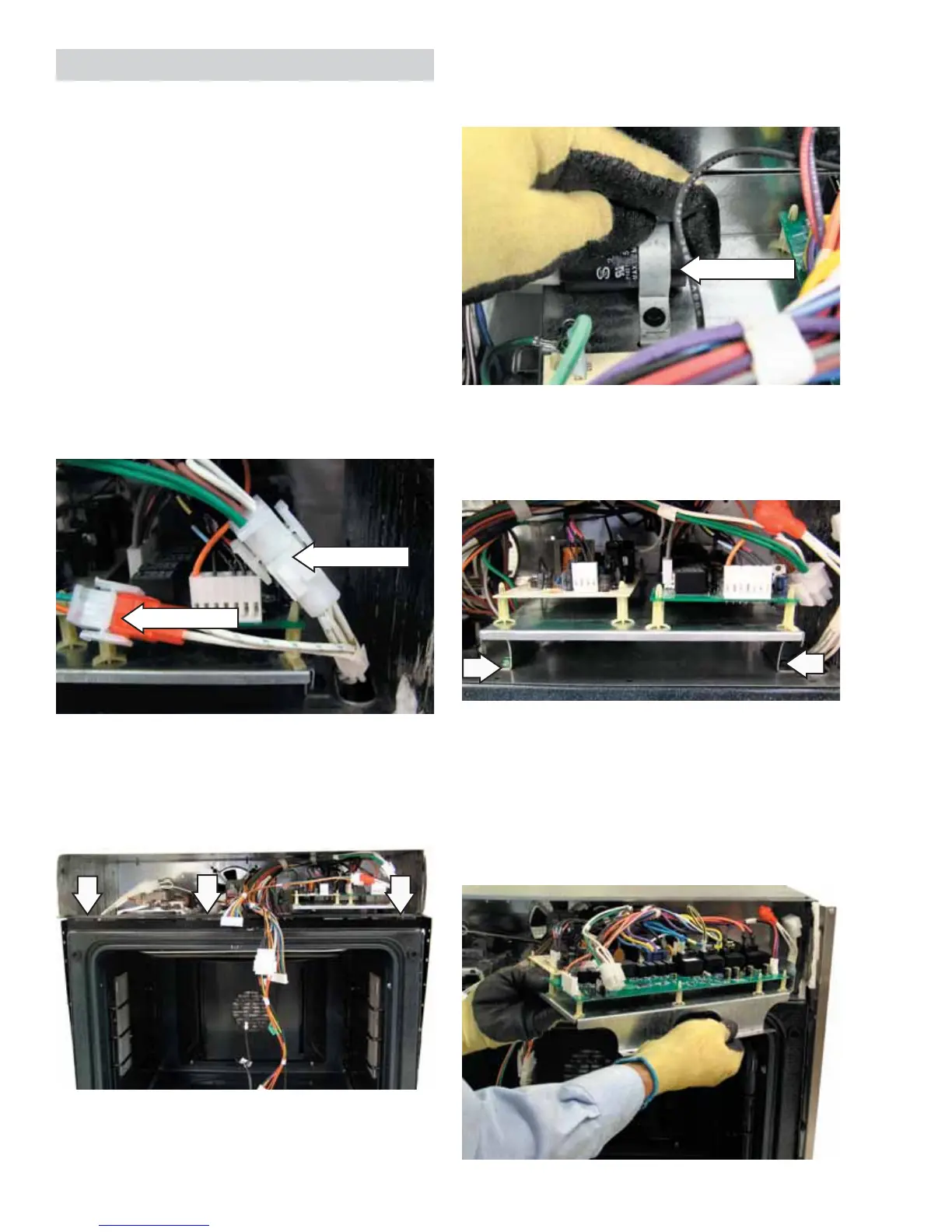
Disconnect the right side lights and meat probe
wire harnesses.
1.
2.
Disconnect
Disconnect
Carefully reach into the control compartment
and slide the capacitor out of the restraining
clamp.
4.
5. Remove the two ¼-in. hex-head screws that
attach the metal bracket front legs to the
control compartment.
Note: Upon reassembly, ensure the metal bracket
rear legs are inserted into the slots and that the
green ground screw is installed on the front left leg
of the metal bracket.
6. Pull the metal bracket outward and rotate it
clockwise.
Capacitor
(Continued Next Page)


 To Next Page