– 49 –
Error Codes
The electronic oven control has error (F) codes that can be utilized by the service technician in order to
quickly identify failed or improper operation of certain oven components. The oven may stop operating but
not give an F code on the display immediately. F codes are stored in nonvolatile EEPROM memory until the
same fault occurs twice consecutively. After that, the F code will be displayed. The last 7 F codes can be
recalled by pressing together the TIMER, CLOCK, and ENTER buttons for 3 seconds. For all F codes, except
F2, tone can be muted by pressing any button. All F codes, except for F9, are suppressed. F9 is the only error
code that can be displayed for the consumer.
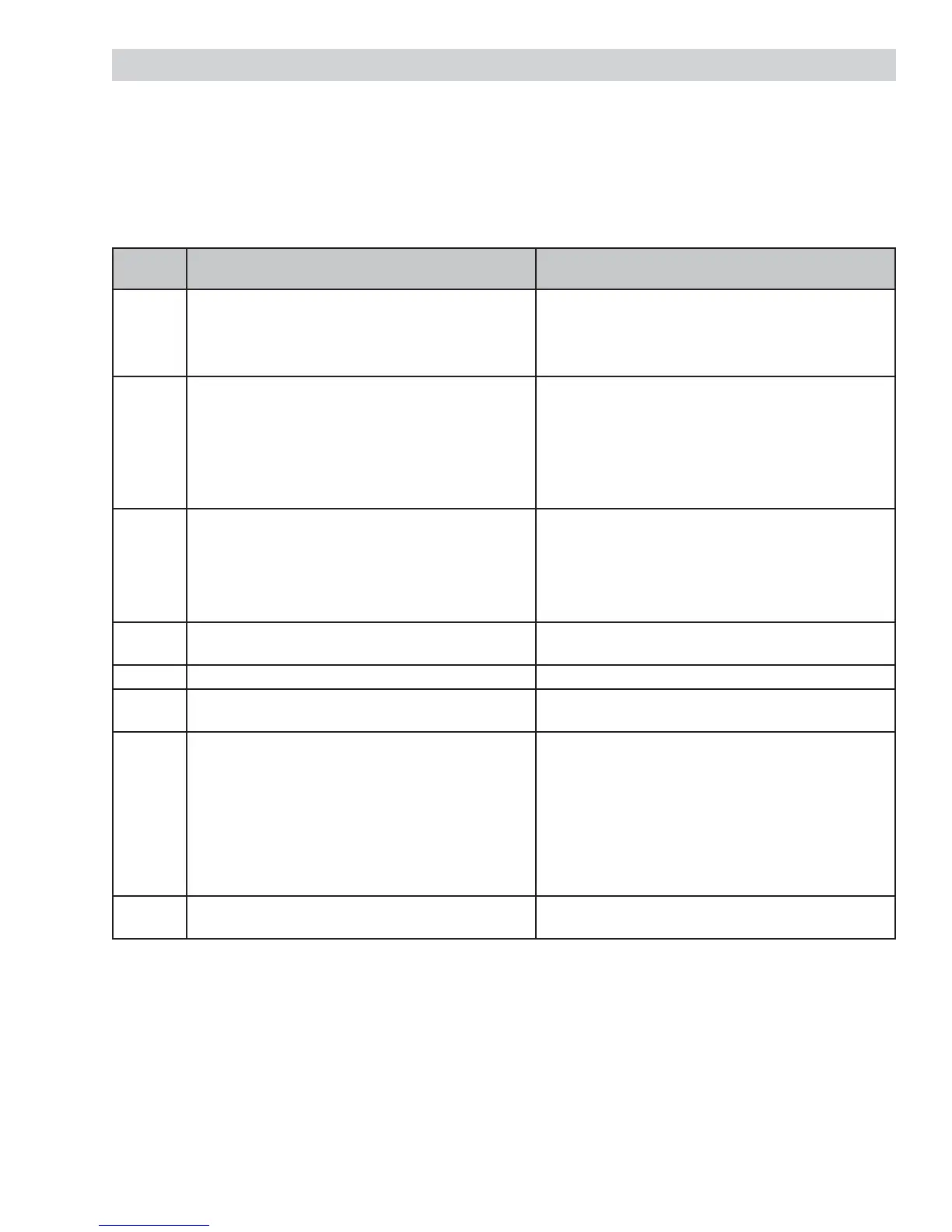
ERROR
CODE
MEANING CAUSE / CORRECTION
F2 Oven temperature
Inside oven cavity as measured by sensor over
650°F unlatched or 915°F latched
Welded relay contacts on the relay board
Airfl ow to rear of unit
High resistance in oven sensor leads and/or
connectors (especially at sensor in rear)
F3 Open oven sensor (over 2900 ohms) Disconnect power. Disconnect sensor harness from
control. Measure sensor resistance (white leads) to
be 1080 ohms at room temperature with 2 ohms per
degree change.
Look for damaged harness terminals if not a bad
sensor.
F4 Shorted oven sensor (under 950 ohms) Disconnect power. Disconnect sensor harness from
control. Measure sensor resistance (white leads) to
be 1080 ohms at room temperature with 2 ohms per
degree change.
Separate sensor from harness to determine fault.
F7 Shorted key Check logic display assembly. If rubber button pad is
misaligned, correct; otherwise, replace logic board.
F8 EEPROM data shift failure If repeated, replace logic board.
F9 Cooling fan stalls or other cause of open thermal
switch
Suspect stalled cooling fan or airfl ow to control area.
CX
C1
C2
C3
C4
C5
C6
Communication Error
Communication Fail with Upper Relay Board
Communication Fail with Upper Temp Encoder
Communication Fail with Upper Mode Encoder
Communication Fail with Lower Relay Board
Communication Fail with Lower Temp Encoder
Communication Fail with Lower Mode Encoder
Check harness fi rst and then replace component
indicated by CX error code.
FC Door Latch Error Inspect door latch and circuitry. Replace if switches
are defective.
Note:
To clear F codes, while in the F code mode, press COOK TIME and DELAY START simultaneously for 3
seconds.
F2 through F8 - If sensor, wiring connection, relay board, and airfl ow check OK, replace the logic board.
F9 - If cooling fan, FAD, and airfl ow check OK, replace the relay board.
If the initial set temperature displayed differs from the selected temperature, replace the temperature
encoder board.
If the door lock circuitry checks OK, but the door lock motor runs continuously, replace the logic board.
•
•
•
•
•


 To Next Page