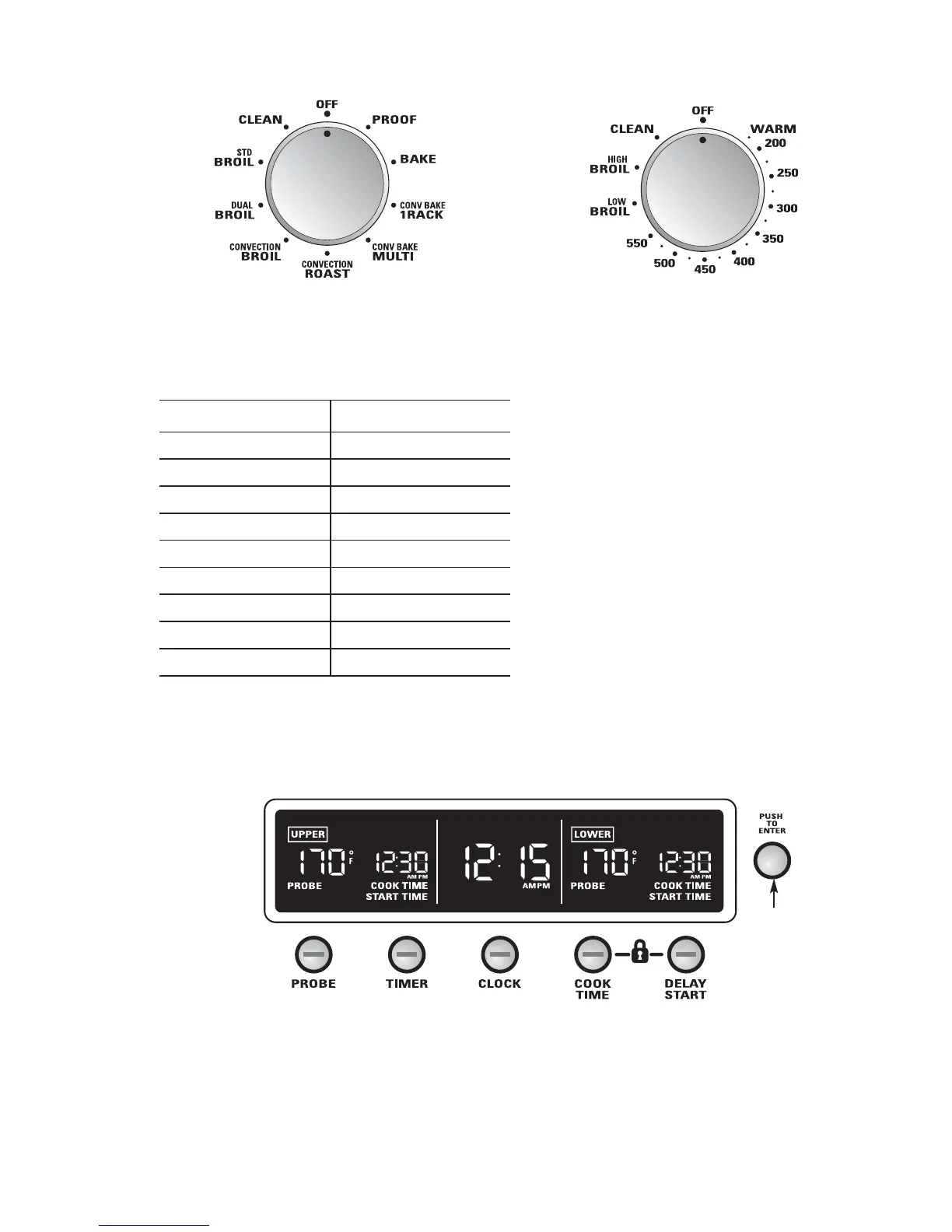
For all modes except Proof, the oven will not
operate unless both the Oven Mode and the
Temperature knobs are set. See table.
To cancel a feature, turn either the Oven
Mode knob or the Temperature knob to OFF.
To cancel PROOF, turn the Oven Mode knob
to OFF.
Mode Knob Temperature Knob
PROOF OFF
BAKE WARM to 550°F
CONV BAKE/1 RACK WARM to 550°F
CONV BAKE/MULTI WARM to 550°F
CONVECTION/ROAST WARM to 550°F
CONVECTION/BROIL HIGH or LOW BROIL
DUAL BROIL HIGH or LOW BROIL
STD BROIL HIGH or LOW BROIL
CLEAN CLEAN
Oven Mode knob Temperature knob
Push the PROBE, TIMER, CLOCK, COOK
TIME or DELAY START buttons and set them
by turning and pushing the Mini-Knob. See
each respective section for details.
The Mini-Knob will select in increments of 1, 5
or 10 depending on how fast it is turned. Turn
it clockwise to increase probe set temperatures
and time or counterclockwise to reduce them.
Push to set.
See the Control lockout section for how to lock
and unlock the controls.
Mini-Knob
Turn to select
Push to enter
Double oven display shown


 To Next Page