14
4. Once the gap is where you want it, touch the button to save the data and exit
the menu.
GLOBAL Z OFFSET LIVE LEVEL
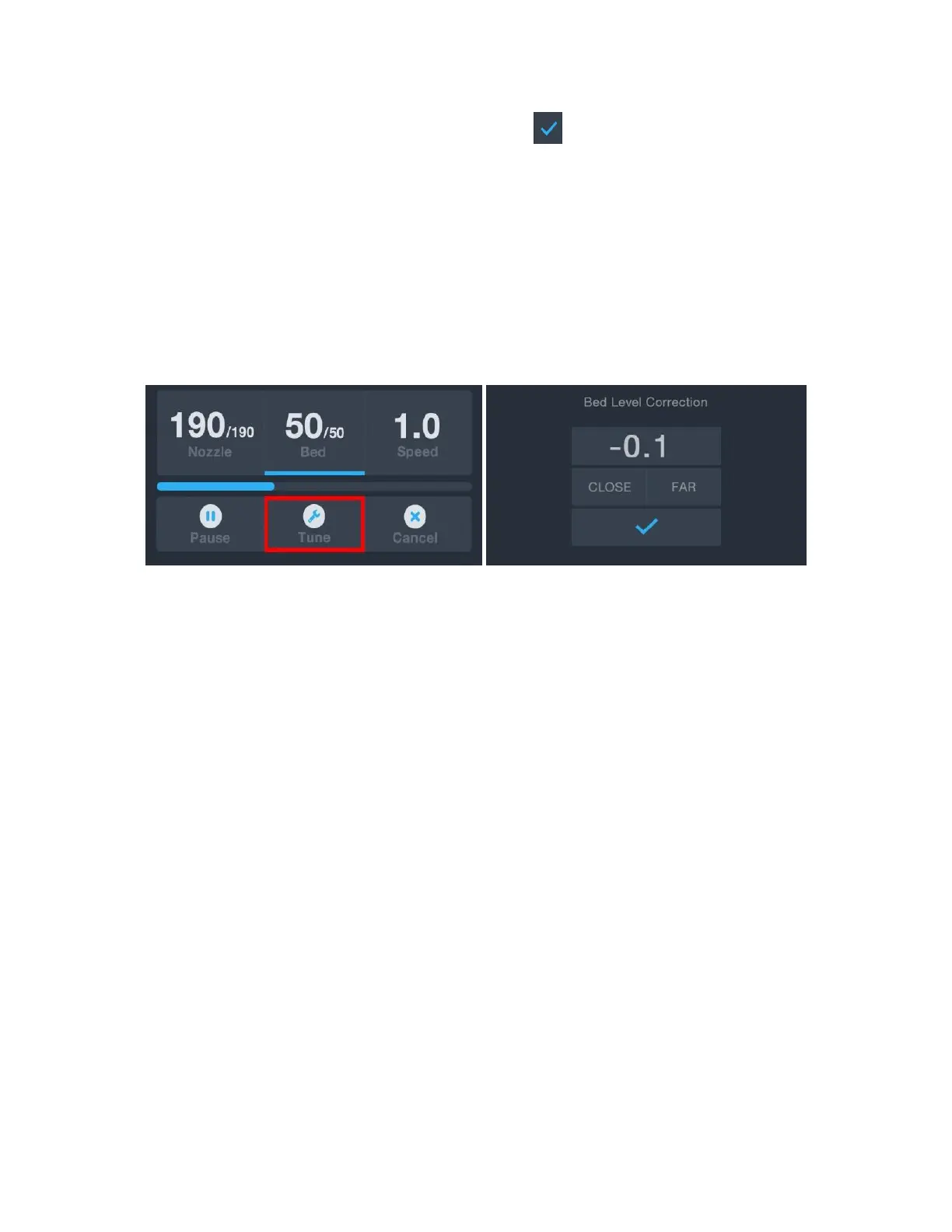
While printing is in progress, you can adjust the global Z offset. To do this, touch the Tune
button on the print screen, then touch the CLOSE button to decrease the gap between the
nozzle and the print bed or the FAR button to increase it.
WI-FI SETUP
You can connect the printer wirelessly to a 2.4GHz Wi-Fi® network to print models from
your Android™ phone or tablet. Perform the following steps to setup the Wi-Fi connection
for your device.
1. Download the free MP 3D Printer WiFi Connect app from the Google Play Store.
2. Disconnect the USB cable from the printer. You cannot use USB and Wi-Fi
connections at the same time.
3. Power on the printer.
4. Start the MP 3D Printer WiFi Connect app.
5. The SSID of your Wi-Fi network should be displayed on screen. If a different SSID is
displayed, open your device's Wi-Fi settings and select the appropriate Wi-Fi
network.
6. Enter your wireless password.


 To Next Page