In patch mode the ocean machine recalls all effect settings from the stored presets and the
controls work slightly differently.
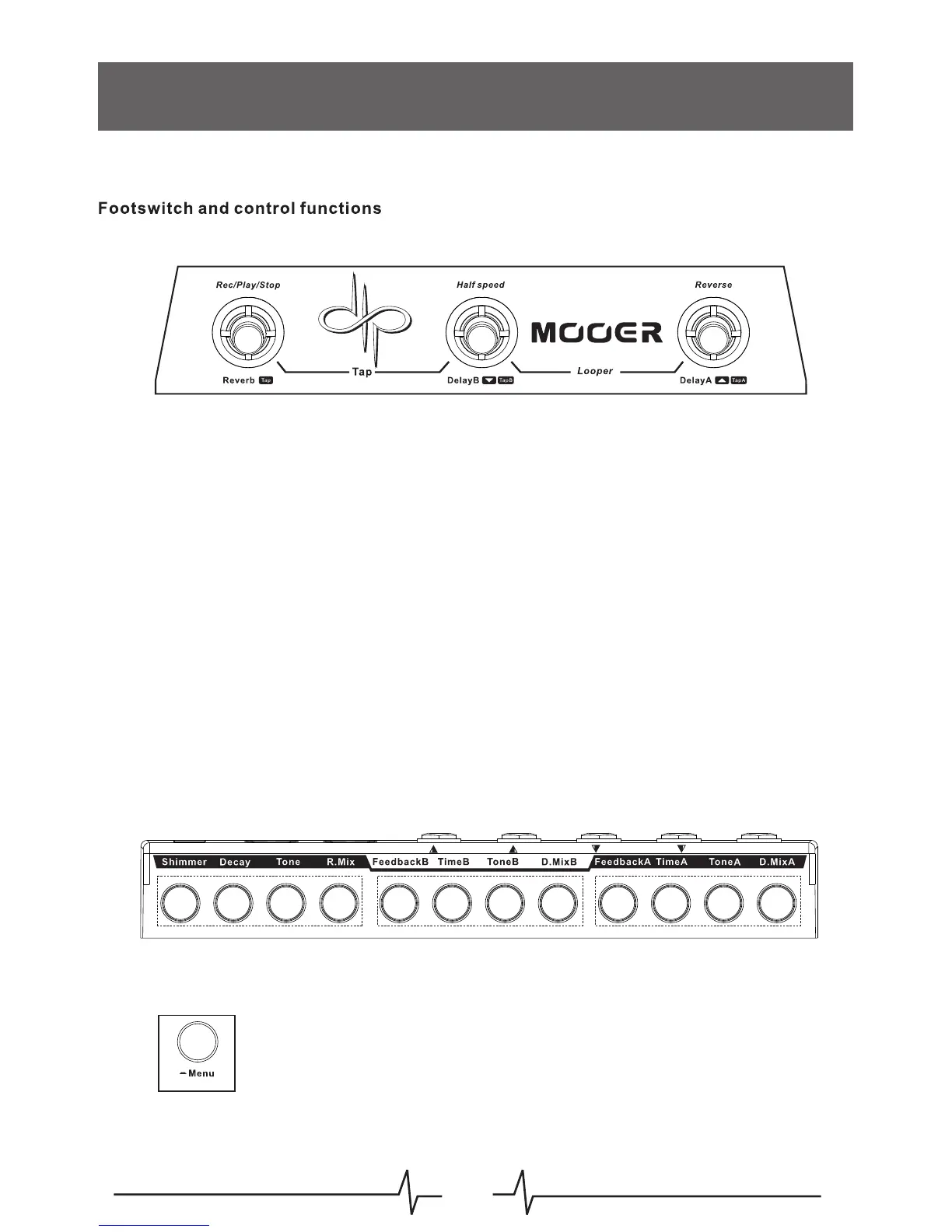
Reverb - Dedicated master Tap tempo. The footswitch LED will always show the current Tap
tempo
DelayB - Previous preset
DelayA - Next Preset
Simultaneously depress the Reverb + DelayB footswitches to toggle between the preset
selection screen and the Patch Control page
Simultaneously depress the DelayB + DelayA footswitches to enter/exit the looper
When on the Patch Control page all three footswitches and controls will maintain the same
functions (except tap tempo) as in play mode, allowing you to engage or disengage the reverb
or delays within your selected preset in real-time.
Effects Parameters
All of the basic effect parameters can be adjusted directly using their respective control
knobs. More effect parameters, relative tempos, ping pong, effects chain, etc. can all be
edited and adjusted within the Patch Control Page
Rotating the Menu control will adjust the master mix
Pressing the Menu control will enter the Patch Control Page
Patch Mode
MIX
07



 To Next Page