110LP MOON Series
Rear Panel Connections
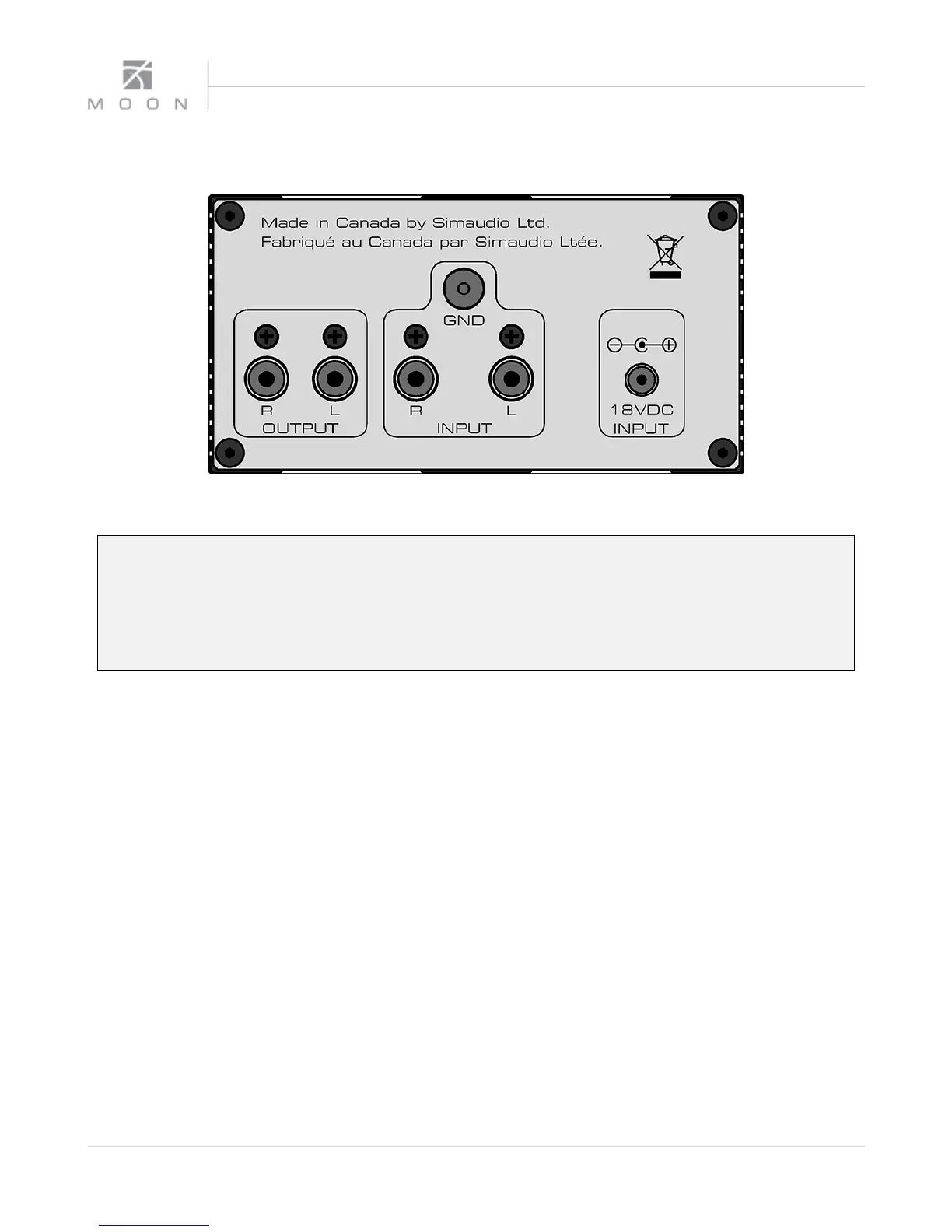
Figure 2: Rear panel of MOON 110LP
The rear panel will look similar to Figure 2 (above). There is one pair of single-ended inputs on RCA
connectors located in the center with a ground post directly above. Connect the cables from your turntable
to these inputs and the ground lead wire to the ground post. There is one pair of single-ended outputs on
RCA connectors located to the left of the inputs. Using a pair of RCA terminated interconnect cables,
connect these to your preamplifier/integrated amplifier. Don’t hesitate to use high quality interconnects.
Poor quality cables can degrade the overall sonic performance of your system. Finally, on the right side is
the power supply input connector, labeled “18VDC INPUT” for use with the included power supply.
All rear panel connectors on the MOON 110LP have
been chosen because they provide the best possible
connections for your unit. A poor contact will degrade
the signal substantially, and plugs and sockets should
all look clean and free of dirt and corrosion. The easiest
way to clean them is to remove the cables from their
sockets and push them back in again. This procedure
requires that your Phono Preamplifier and the rest of
your components be completely turned off. Not
heeding this warning may result in serious damage to
your equipment. Special contact cleaning fluids and
enhancers should not be used, as they deposit a difficult
to remove residue which can degrade the performance
of your components over the long term.
8



 To Next Page