9
Rev. 1.0
11/28/2017
STF-D/IP Hardware Manual
400-820-9661
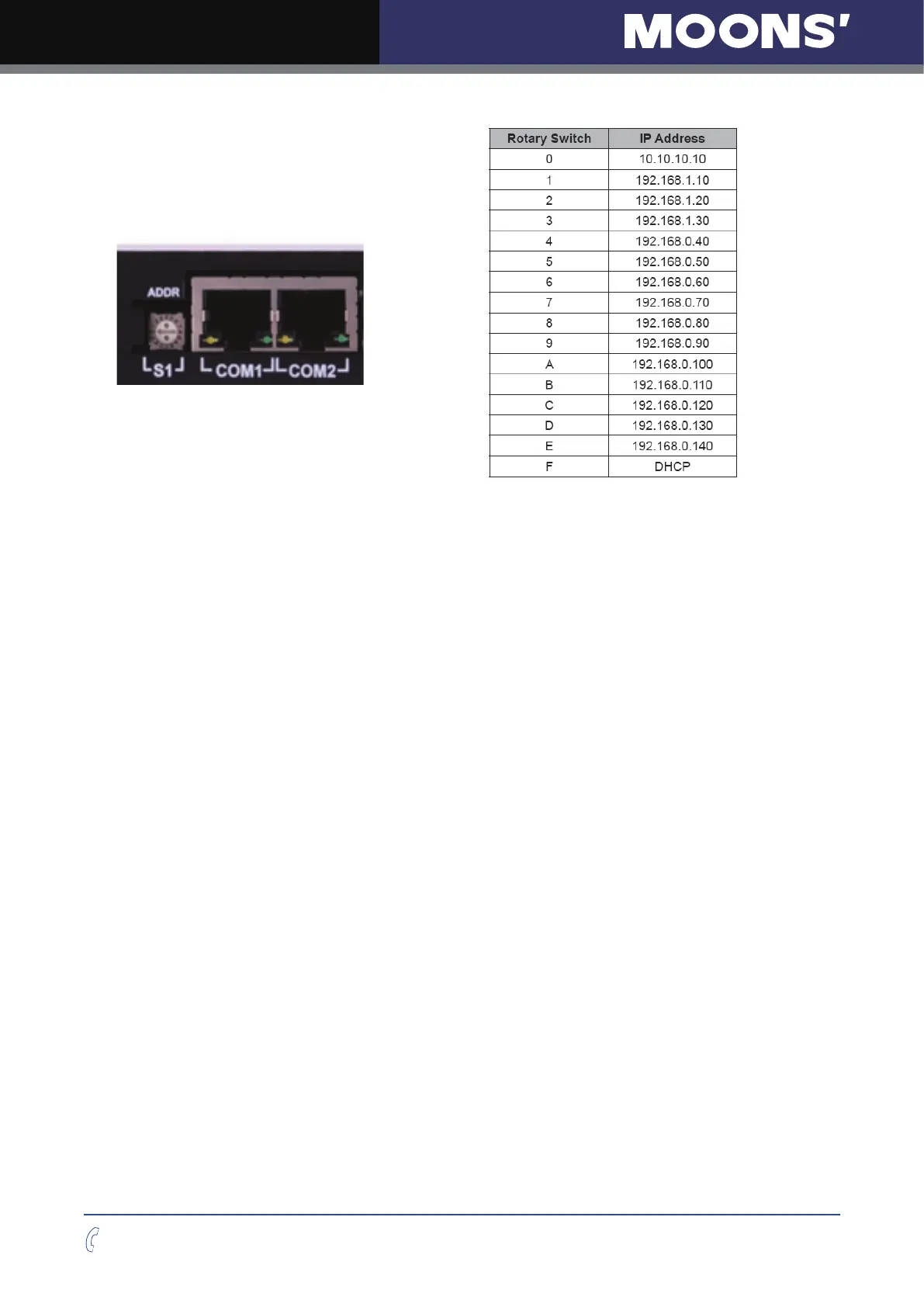
Setting F is
“
DHCP
”
, which commands the drive to get an IP address from a DHCP server on
the network. The IP address automatically assigned by the DHCP server may be
“
dynamic
”
or
“
static
”
depending on how the administrator has configured DHCP. The DHCP setting is
reserved for advanced users.
Your PC, or any other device that you use to communicate with the drive, will also have a unique
address.
On t
he drive, switch settings 1 through E use the standard class B subnet mask (i.e.
“
255.255.0.0
”
).
The mask for the universal recovery address is the standard class A (i.e.
“
255.0.0.0
”
).
One of the great features of Ethernet is the ability for many applications to share the network at
the same time.
Ports are used to direct traffic to the right application once it gets to the right IP address. The UDP
eSCL port in our drives is 7775. To send and receive commands using TCP, use port number
7776.
You
’
ll need to know this when you begin to write your own application. You will also need
to choose an open (unused) port number for your application. Our drive doesn
’
t care what that
is; when the first command is sent to the drive, the drive will make note of the IP address and port
number from which it
originated and direct any responses there. The drive will also refuse any
traf
fic from other IP addresses that is headed for the eSCL port. The first application to talk to a
drive
“
owns
”
the drive. This lock is only reset when the drive powers down.
If you need help choosing a port number for your application, you can find a list of commonly used
port numbers at http://www.iana.org/assignments/port-n
umbers.
One
final note: Ethernet communication can use one or both of two
“
transport protocols
”
: UDP
and TCP. eSCL commands can be sent and received using either protocol. UDP is simpler and
more efficient than TCP, but TCP is more reliable on large or very busy networks where UDP
packets might occasionally be dropped.



 To Next Page