9
DISPLAY RADIO
Introduction
The display radio (black) is a wireless device for the stove
to which it is associated with and through it, it is possible
to control and monitor the systems functions in real time.
The main features are:
- Battery powered remote control.
- Room thermostat.
- Control device for the operating parameters.
Warning: The system works by using the 433.92 MHz ISM radio band
frequency. The range of the device can be reduced significantly in the
case of a noisy environment: other appliances such as wireless
headphones, video, etc, may affect the performance of the system. Make
sure of the presence of such appliances and turn them off or limit their
use. In the case of interaction of multiple remote controls with more
stoves, one must associate each display radio with a specific stove (see
"Code change” page 13).
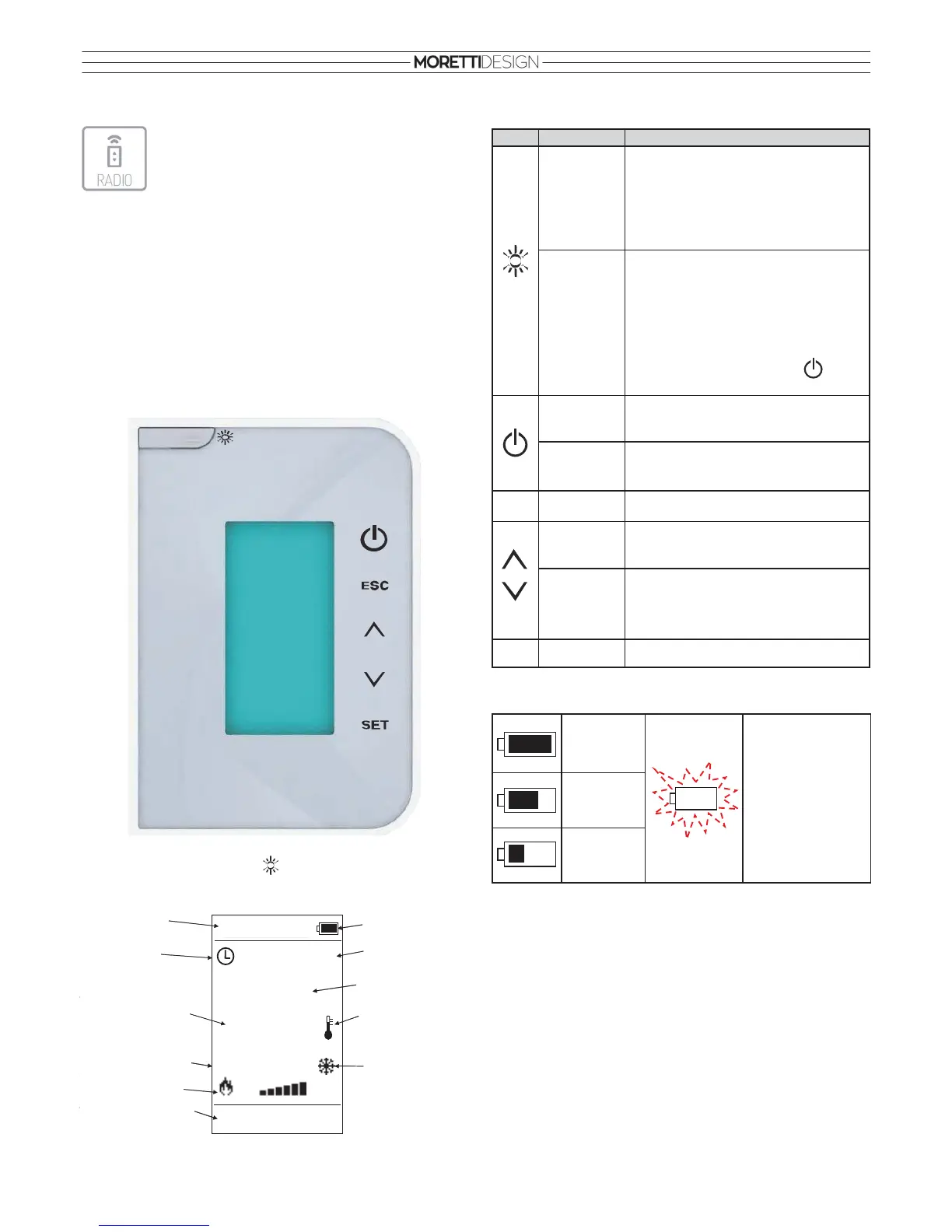
The display lights up when the button is pressed and the main
screen appears.
Button description
Battery charge level (4 X AA - 1,5V)
OPERATING STATUS
Check Up
This phase begins as soon as the On/Off button is pressed. During this
phase, the system performs a cleaning process of the burner by running
the exhaust fan at maximum speed and simultaneously checking the
probes and safety devices.
Ignition
After the Check Up phase has been completed, the system goes to
Ignition. The auger loads a quantity of pellets into the burner and the
ignition resistance is activated. The system waits until the combustion
begins, then it starts to load small amounts of pellets in order to raise the
temperature of the fumes.
Button
Function Description
Sleeping
Mode
Pressing the button when the main screen is
active, the device will continue to function
but will “fall asleep” thus reducing the battery
consumption. To turn the remote control
back on again, press again the button.
Standby
Mode
Pressing the button for 3 seconds from the
main screen, it is possible to turn off the
transmitter thus reducing battery
consumption. This feature is to be used
during a non use period of time of the
display radio. To turn on again press the
button again and press twice the button.
On/Off
Switch On/Off by pressing the button for 3
seconds
Unblock
Unblocks the system by pressing the button
for 3 seconds
ESC Esc
Exit from menu
Power
Setting
Power setting when not in menu
Scroll Menu
and
Submenu
Scroll through menu and submenu, increase
and decrease values
SET Set
Enter submenu, modify values, save data
Battery
charge level
full
The batteries are flat;
replace them as soon
as possible.
The figure starts
flashing.
Battery
charge level
at 2/3
Battery
charge level
at 1/3


 To Next Page