10
Fuel
Menu for selecting fuel type (type pellets).
Remote Keyboard
Menu that enables or disables the remote keyboard if connected to the
hydro stove.
Summer Winter
Menu for setting Summer Winter mode. Change setting only if the
configuration 2 or 3 are used (see PLUMBING CONFIGURATION on
page 23).
Chrono
This menu is used for setting the on/off switching time
frames.
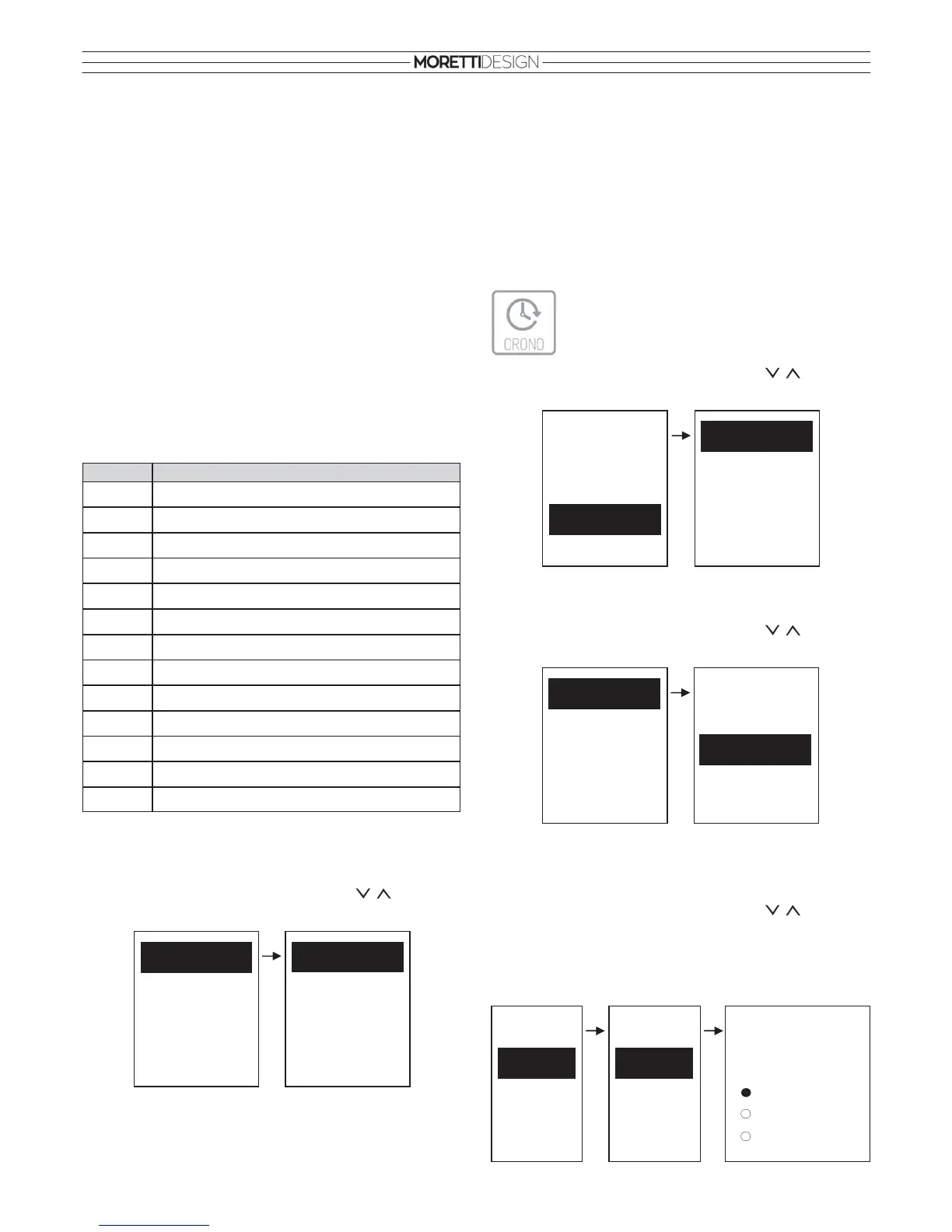
• To select the item in the menu use the buttons. To
confirm press SET. To exit press ESC.
Modality: To switch the stove on/off, it is necessary to select Modality
after the on/off time frames have been programmed.
• To select the item in the menu use the buttons. To
confirm press SET. To exit press ESC.
Chrono Program: Select a desired program for setting (after
programming the time frames, to enable the on/off switching of the
stove, it is necessary to select the desired mode from the Modality
submenu:
• To select the item in the menu use the buttons. To
confirm press SET. To exit press ESC.
Daily
Select a desired day of the week and program the on/off switching time
frames. There are 3 on/off switching time frame phases for
Chrono Program
Modality
Modality
Disabled
Weekly
Week-End
Daily
Chrono Program
Modality
Run Mode
After the ignition, the system goes into Run Mode. During this phase the
heating fan is activated and the system operates on the set combustion
power level.
Modulation
During the Run mode, the aim of the stove is to reach the set room
temperature, when this goal is achieved, the system goes into
Modulation where the fuel consumption is minimal and the fan will run at
the lowest speed power setting.
Combustion power setting
It is possible to modify the combustion power level at any time, but the
change is effective only in Run Mode. The power level ranges from 1 to
5. Increasing the power equals to a high pellet consumption and the
heating fan turning at high speeds.
Note: Turn off the stove in case of damage or malfunction.
THE MENUS
To enter the remote control Menu, press the SET button. A list of
Submenus will appear. When memorizing a new set value, it is also
transmitted towards the stove.
Thermostats
Menu per for setting the radio and boiler thermostat used by the hydro
stove.
• To select the item in the menu use the buttons. To
confirm press SET. To exit press ESC.
Puffer Thermostat: Menu for setting the temperature on the Puffer
Thermostat. It appears only if the configuration 2 or 3 are used (see
PLUMBING CONFIGURATION on page 23).
Order User menu
1 Thermostats
2 Fuel
5 Chrono
6 Time and Date
7 Calibration
8 Monitor
9 Load
10 Clean
12 Settings
13 System Menu
11 Language
3 Remote Keyboard
4 Summer Winter
Fuel
Remote Keyboard
Summer Winter
Chrono
Time and Date
Thermostats
Boiler Thermostat
Puffer Thermostat
Radio Thermostat
Thermostats
Fuel
Remote Keyboard
Summer Winter
Time and Date
Chrono
Program
Weekly
Week-End
Daily
Tuesday
Wednesday
Thursday
Friday
Daily Monday
Daily
Monday
ON OFF
09:30 11:15
00:00 00:00
00:00 00:00


 To Next Page