11
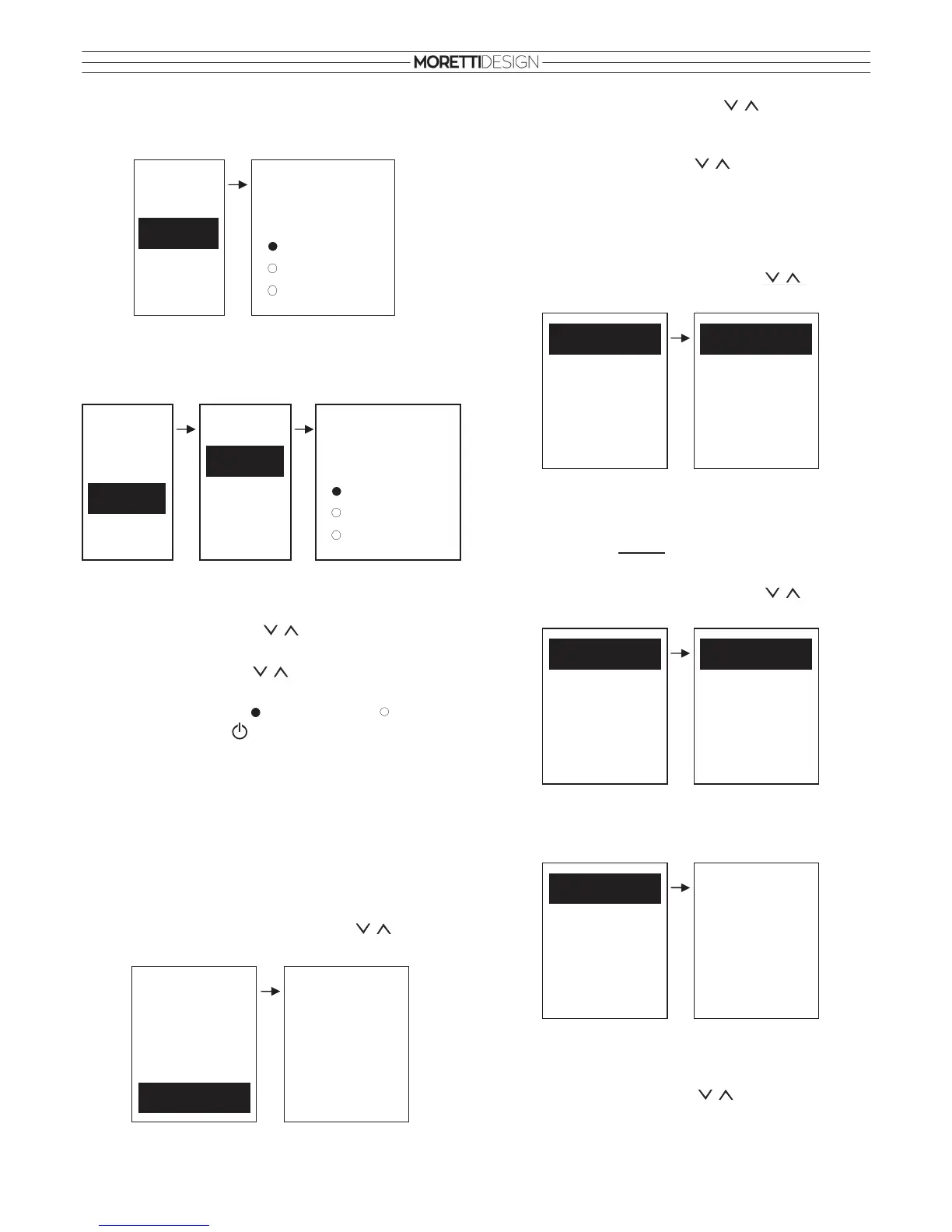
Weekly
It modifies directly the on/off switching time frames and there are 3
phases throughout the week.
Week-End
Selecting between “Monday-Friday” and “Saturday-Sunday” periods.
There are 3 phases for “Monday-Friday” and 3 phases for “Saturday-
Sunday”.
Time frame enable
Once the desired program has been selected:
• Select the time frame with that has to be set and enter
edit mode (the time starts flashing) by pressing SET.
• Modify the time with and save the setting by
pressing SET.
• Enable the time frame appears or disable appears by
pressing the button
• Press ESC to exit.
Programming through the Midnight
Set the switch OFF time at 23:59 for a week day time frame. Then set
the switch ON time for the following week day at 00:00.
The three different programs are memorized separately. eg: if the daily
program is modified, the other modalities do not change.
Time and Date
Menu that allows to set the Time and Date.
• To select the item in the menu use the buttons. To
confirm press SET. To exit press ESC.
Program
Daily
Week-End
Weekly
Mon-Sun
ON OFF
09:30 11:15
00:00 00:00
00:00 00:00
Weekly
Program
Daily
Weekly
Week-End
Sat-Sun
Week-End
Mon-Fri
Week-End
Mon-Fri
ON OFF
09:30 11:15
00:00 00:00
00:00 00:00
• Select hours, minutes and date with
• Enter edit mode (flashing cursor) by pressing SET.
• Modify the selected value with
and save the setting by
pressing SET.
• Press ESC to exit.
Calibration (models with FCS)
Menu for adjusting the automatic combustion correction range.
• To select the item in the menu use the buttons. To
confirm press SET. To exit press ESC.
MCS Calibration: Menu for adjusting the automatic combustion
correction range. There are 10 levels, 5 to increase and 5 to decrease,
the 0 level is the manufacturers default setting.
Calibration (models without FCS)
Menu for setting manually the combustion parameters.
• To select the item in the menu use the buttons. To
confirm press SET. To exit press ESC.
Auger Calibration: Menu for setting the operating time of the auger.
There are 10 levels, 5 to increase and 5 to decrease, the 0 level is the
manufacturers default setting.
Once Auger Calibration has been selected:
• Enter edit mode (flashing cursor) by pressing SET.
• Modify the selected value with and save the setting by
pressing SET.
• Press ESC to exit.
MCS Calibration
Fan Calibration
Auger Calibration
Time and Date
15 : 54
Wednesday
06/12/2017
Thermostats
Fuel
Remote Keyboard
Summer Winter
Chrono
Time and Date
Monitor
Load
Clean
Language
Settings
Calibration
Monitor
Load
Clean
Language
Settings
Calibration
Fan Calibration
Auger Calibration
Auger Calibration
Max: 5
Set: 0
Min: -5


 To Next Page