Chapter 1 Getting Started Overview of the C5t/F5t 6
Right side
Microphones Record sounds and use for speech recognition.
Web camera
(optional)
Interact over the web.
Touchscreen
display
Use your finger or pen to navigate the tablet.
Docking
connector
Connect to a C5t/F5t docking station.
Power adapter
port, USB port, and
cover
Connect the power adapter.
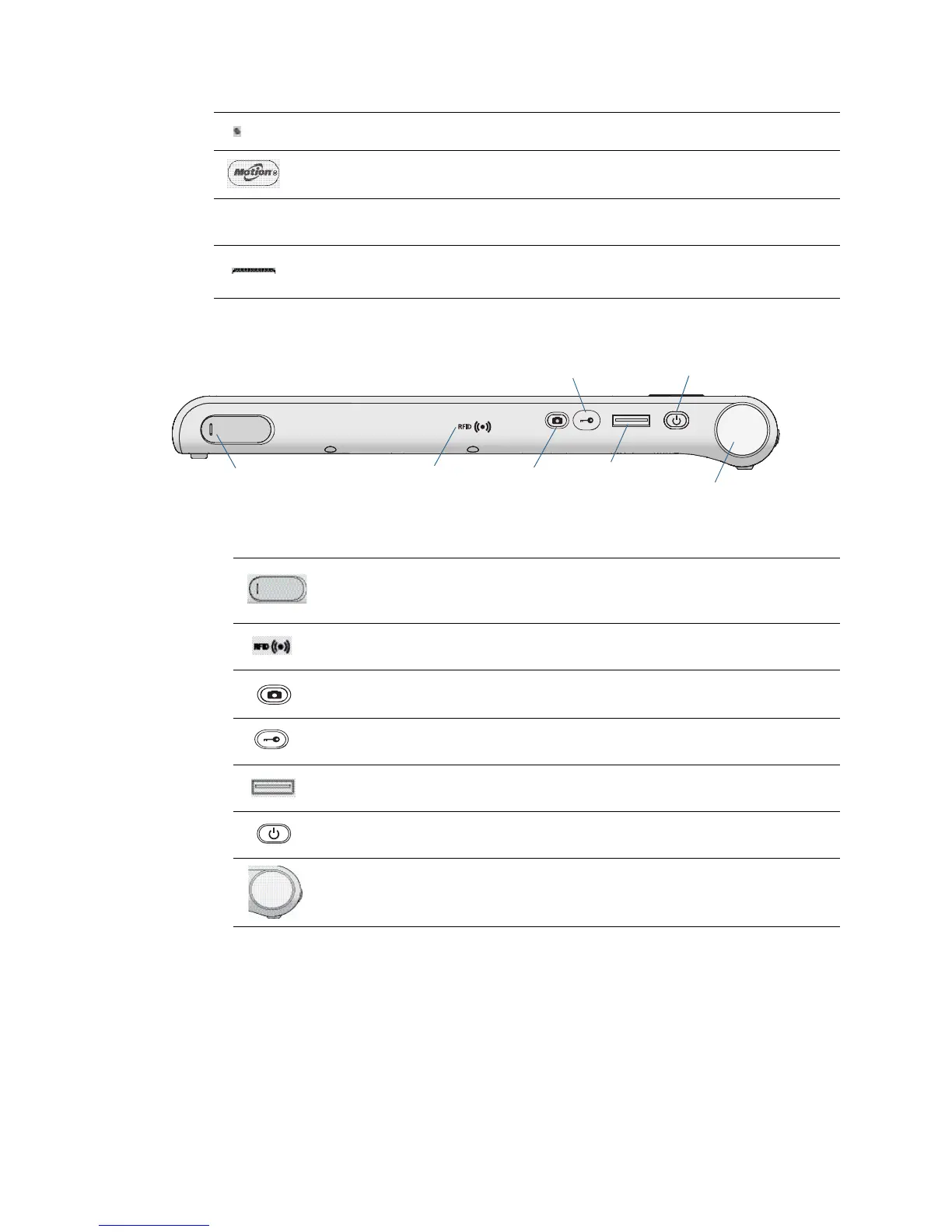
RFID (optional)
antenna area
Scan area for reading RFID tags.
Camera (optional)
button
Use to activate the built-in documentation camera.
Windows® Security
button
Use to log on to or lock the tablet. Equivalent to
Ctrl+Alt+Del on a keyboard.
Fingerprint reader Scan your fingerprints for added security. You can also
use the fingerprint reader as a navigation device.
Power button Turns the tablet on and off.
Barcode scanner
(optional)
Reads codes from barcode labels.
Power adapter
port, USB 2.0/3.0 port,
Camera
button
Fingerprint
reader
Barcode scanner
Windows® security
button
Power
button
RFID antenna
area
and cover



 To Next Page