EN
39
4.9 - Customising the system - Basic Menu
If necessary, users may select a basic menu which allows
modication of the control unit’s basic parameters. To select the
basic menu proceed as described below.
Exampling of modifying a BASIC MENU parameter
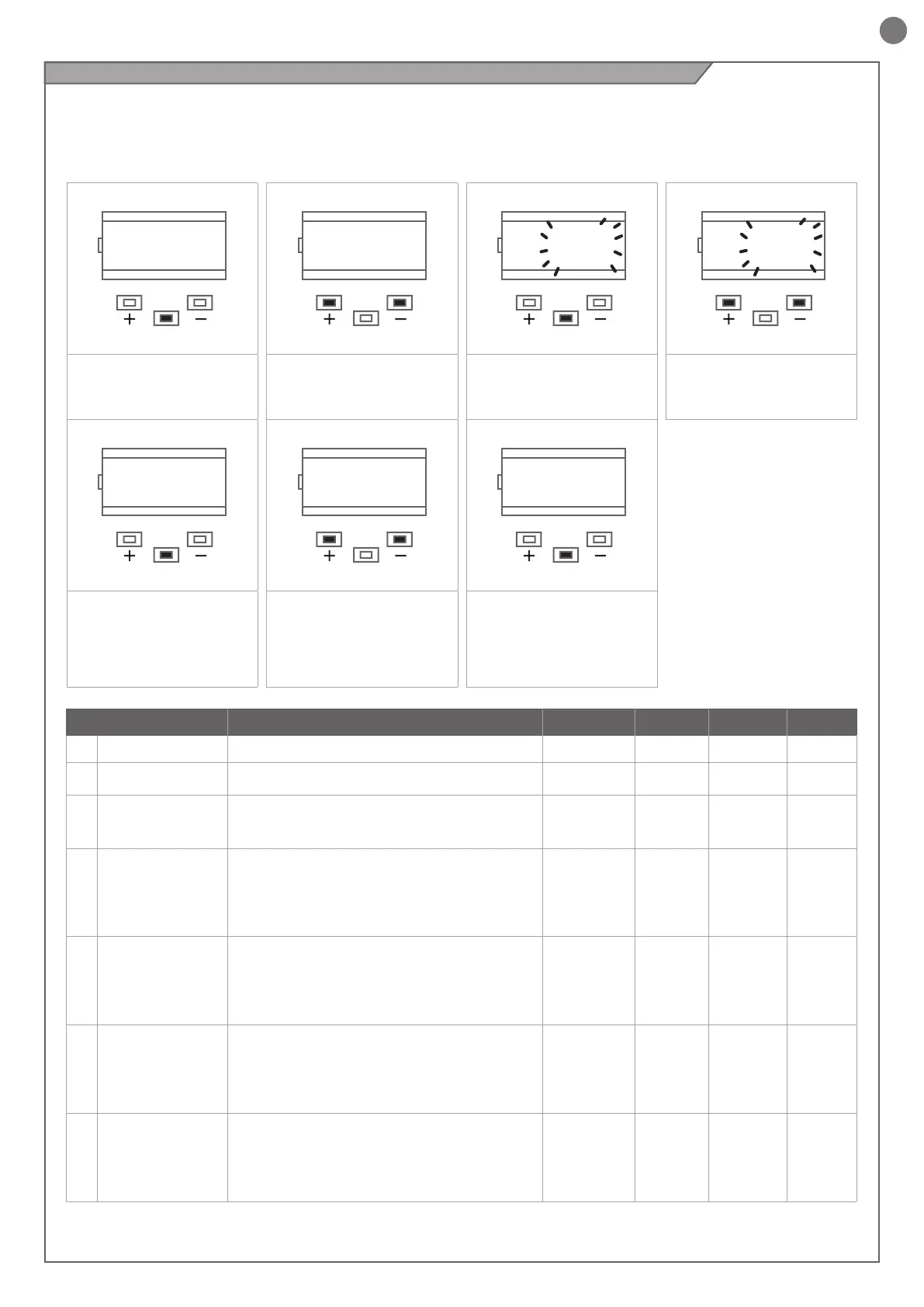
WARNING: to be certain of accessing the NORMAL OPERATION
display state, the starting point for accessing the basic menu,
press the MENU button twice
MENU
DOWNUP
--
MENU
DOWNUP
tCL
MENU
DOWNUP
20
MENU
DOWNUP
19
Press the MENU button for 1
second to access the basic
menu.
After accessing the BASIC
MENU, press the + and –
buttons to scroll through the
functions.
To access the value modication
function, press the MENU
button for 1 second, until the
value starts to ash quickly.
Press the + and – buttons to to
modify the value.
MENU
DOWNUP
19
MENU
DOWNUP
tCL
MENU
DOWNUP
--
Press the MENU button
for 1 second to display the
parameter in order to save
the modied value, or MENU
quickly to quit the function
without saving.
Press the + and – buttons to
scroll through the functions to
modify other parameters.
Press the MENU button quickly
to quit the menu.
PARAMETERS DESCRIPTION DEFAULT MIN MAX UNIT
1
TCL
Automatic reclosure time (0 = o) 0 0 900 s
2
ttr
Reclosing time after transit on PH1
(0 = o)
0 0 30 s
3
SEI
Sensitivity on obstacles
0 = Maximum impact force
10 = Minimum impact force
3 0 10
4
SFO
Motor speed during opening
1 = minimum
2 = low
3 = medium
4 = high
5 = maximum
4 1 5
5
SSO
Motor speed during opening deceleration phase
1 = minimum
2 = low
3 = medium
4 = high
5 = maximum
1 1 5
6
SFC
Motor speed during closing
1 = minimum
2 = low
3 = medium
4 = high
5 = maximum
4 1 5
7
SSC
Motor speed during closing deceleration phase
1 = minimum
2 = low
3 = medium
4 = high
5 = maximum
1 1 5



 To Next Page