EN
38
4.8 - Learning a transmitter
A transmitter can be “learned” via the specic programming menu or by remote memorisation, using a previously memorised transmitter.
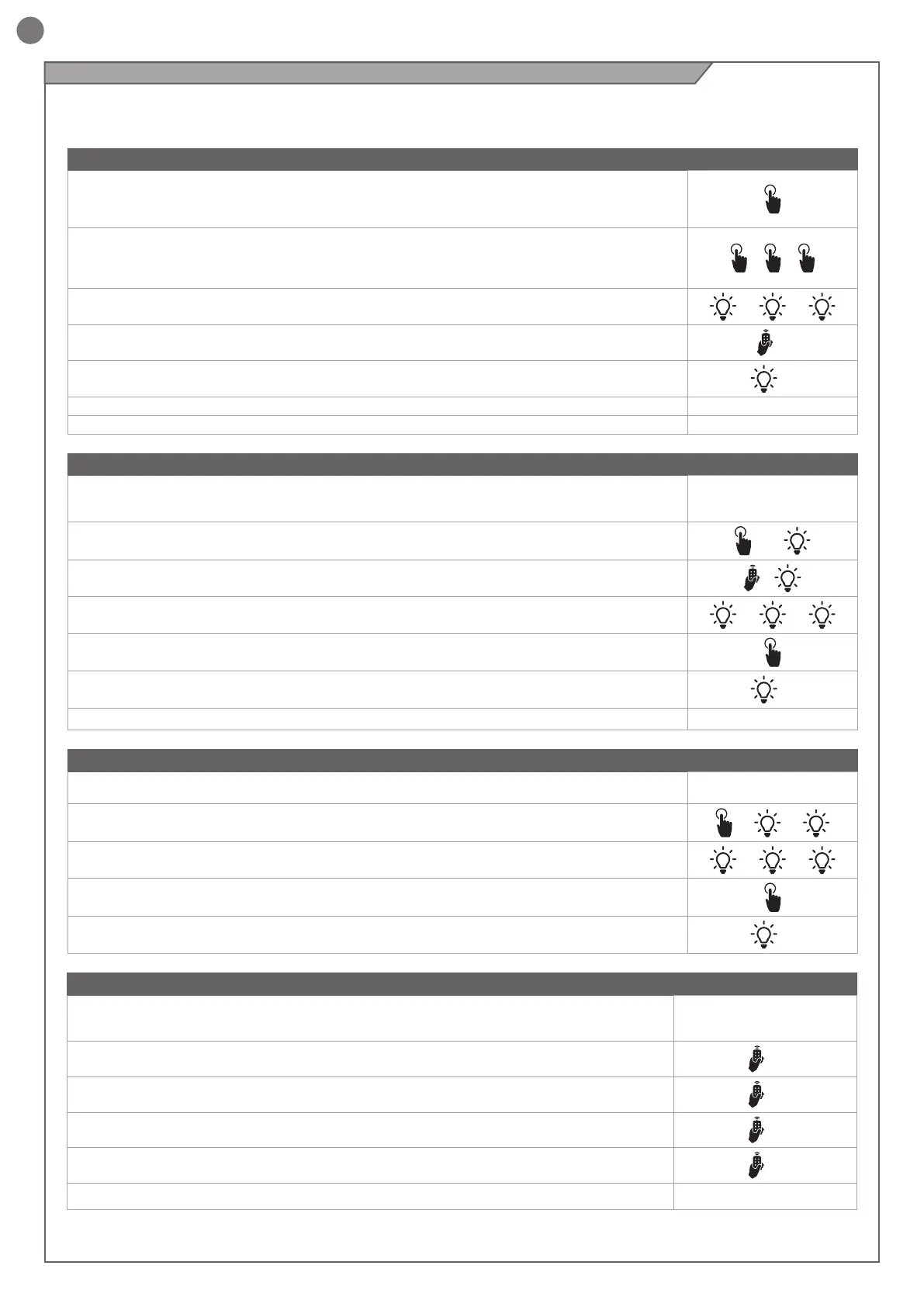
MEMORISING A TRANSMITTER
If you are in programming mode exit pressing the MENU button until -- appears. Press the DOWN (RADIO)
button for more than 2 seconds. Until the display shows the word “rad” (radio), then release the button
1. Press and release the DOWN (RADIO) button a number of times equal to the number of the output to be
activated: once for output STEP BY STEP, twice for output PARCIAL, three times for output ONLY OPEN,
four times for output LIGHT ON/OFF, ve times for output PRESET (button 1 = output 1, button 2 = output
2, button 3 = output 3, button 4 = output 4)
+ +
2. The LED will ash a number of times equal to the number of the output selected, with 1 second pauses
between ashes
+ 1s + 1s
3. Press the button of the transmitter to be memorised within 7 seconds, holding it down for at least 2
seconds
2 s
4. If the memorisation has been successful, the LED will give one long ash
>3s
5. To memorise another transmitter on the same output, repeat point 3
N.B If no commands are given for 7 seconds, the receiver automatically quits the programming mode
DELETING A TRANSMITTER
If you are in programming mode exit pressing the MENU button until -- appears. Press the DOWN
(RADIO) button for more than 2 seconds. Until the display shows the word “rad” (radio), then release the
button
1. Press the DOWN (RADIO) button until the LED lights up (about 3 seconds)
>3s ►
2. Press the button of the transmitter to be deleted within 7 seconds, holding it down until the LED goes
out. Release the transmitter button
►
3. About 1 second after the button is released, the LED starts to ash
0,5s 0,5s
4. Conrm the deletion by pressing the DOWN (RADIO) button
5. If the deletion has been successful, LED will give one long ash
>3s
N.B If no commands are given for 7 seconds, the receiver automatically quits the programming mode
CLEARING THE ENTIRE RECEIVER MEMORY
If you are in programming mode exit pressing the MENU button until -- appears. Press the DOWN (RADIO)
button for more than 2 seconds. Until the display shows the word “rad” (radio), then release the button
1. Press the DOWN (RADIO) button and hold it down until the LED lights up (about 3 seconds) and then
goes out (about 3 seconds). Release the button
>3s
>3s
2. About 1 second after the button is released, the LED starts to ash
1s + 1s +
3. Press the button on the receiver as the LED ashes for the third time
4. If the deletion has been successful, the LED will give one long ash
>3s
REMOTE MEMORISATION OF A TRANSMITTER WITH A TRANSMITTER ALREADY MEMORISED
A transmitter can be memorised without accessing the receiver. The user needs to have a transmitter
memorised previously, after which the procedure is as described below. The remote copy procedure
must be carried out in the area served by the receiver.
1. Press the button of the new transmitter to be memorised, holding it down for at least 5 seconds
>5s
2. Press the button of the old transmitter to be copied (if phase 1 has been successful, the automation
system will not respond)
>3s
3. Press the button of the new transmitter to be memorised, holding it down for at least 3 seconds
>3s
4. Press the button of the old transmitter to be copied, holding it down for at least 3 seconds, to
conrm and quit the programming mode
>3s
N.B If no commands are given for 7 seconds, the receiver automatically quits the programming mode



 To Next Page