Introduction Installation Troubleshooting Glossary License
SBV5220 VoIP Cable Modem User Guide 4
Rear Panel
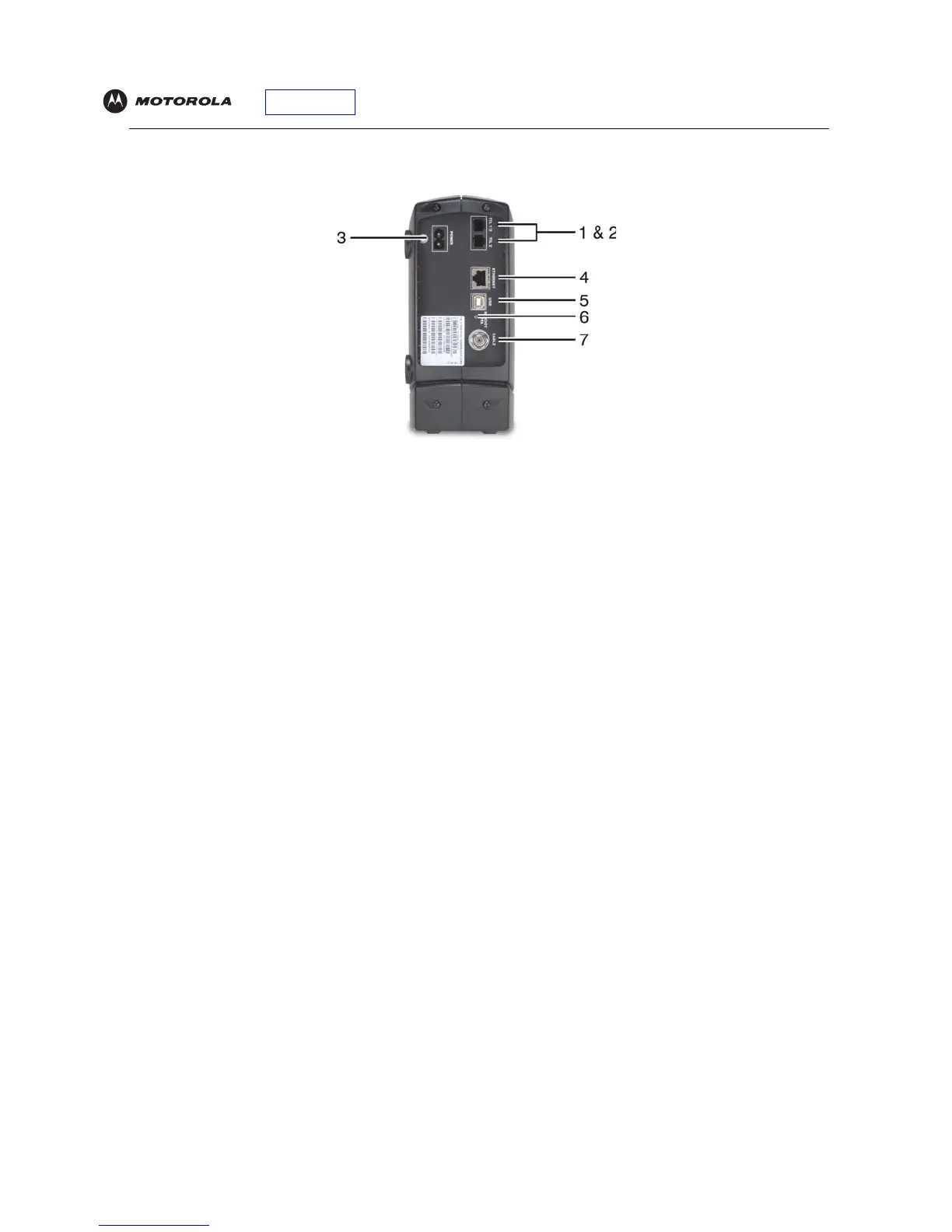
The rear panel provides cabling connectors and the power receptacle:
Key Item Description
1 & 2 Tel 1 and Tel 2 Telephone ports 1 and 2 provide connections for two telephone lines.
3POWER Provides AC power to the VoIP cable modem.
4 ETHERNET Provides the connection to Ethernet equipped computers using a cable terminated with an
RJ-45 connector.
5USB Provides the connection to USB equipped computers.
6 Reset If you experience a problem, you can push this recessed button to reset the VoIP cable modem
(see “Troubleshooting” on page 40). Resetting may take some time (5 to 30 minutes) because
the VoIP cable modem must find and lock on the appropriate communications channels.
7 CABLE Provides the connection to the coaxial cable (coax) outlet.


 To Next Page
 Loading...