5.13.5 Operation of Model selecting
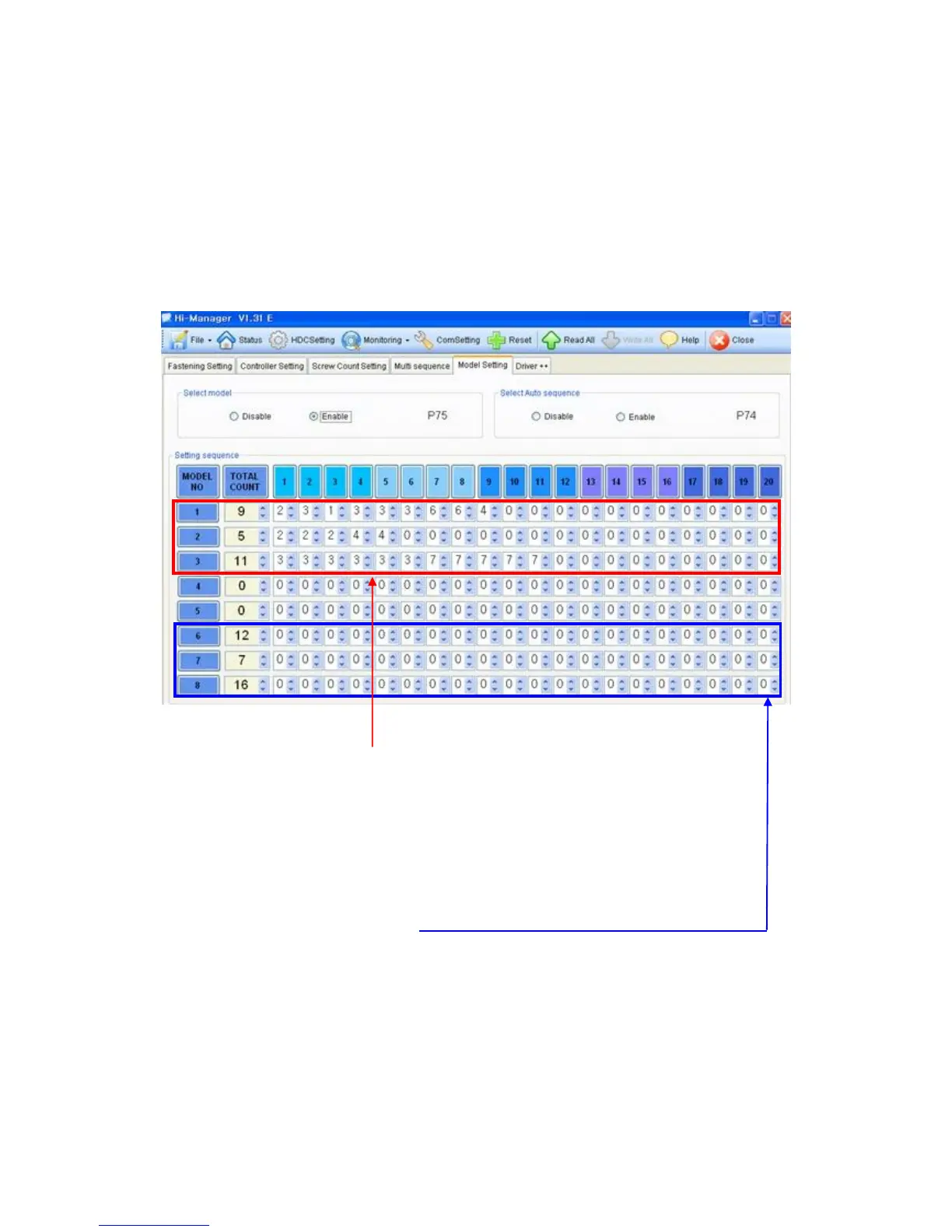
When model select feature is enabled on P75 (model select), total 20 preset
numbers can be programmed to be selected in sequence on the model #.
Total 8 models can be programmed in the HDC v2.1.
The selecting models can be changed only through the remote interface I/O.
■ Auto sequence fastening
1) Select Enable (1) of "Select model" on P75
2) Select Enable (1) of "Select Auto sequence" on P74 for auto sequence fastening
3) Key in the screw numbers on total count window for Model 1 to 8
4) Select preset numbers from 1st to the end for auto sequence fastening.
The fastening number is possible up to 20 screws.
■ Non auto sequence fastening
1) Select Enable (1) of "Select model" on P75
2) Select Disable (0) of "Select Auto sequence" on P74 for Non auto sequence fastening
3) Key in the screw numbers on total count window for Model 1 to 8
4) Leave "0" on every windows
Preset # can be changed by sensor or PLC according to the selection on P64.



 To Next Page