Corporate Headquarters: 1080 North 11th Street, San Jose, CA 95112 Phone: (408) 292-2214 Fax: (408) 292-2733
www.etorque.com
Page 22
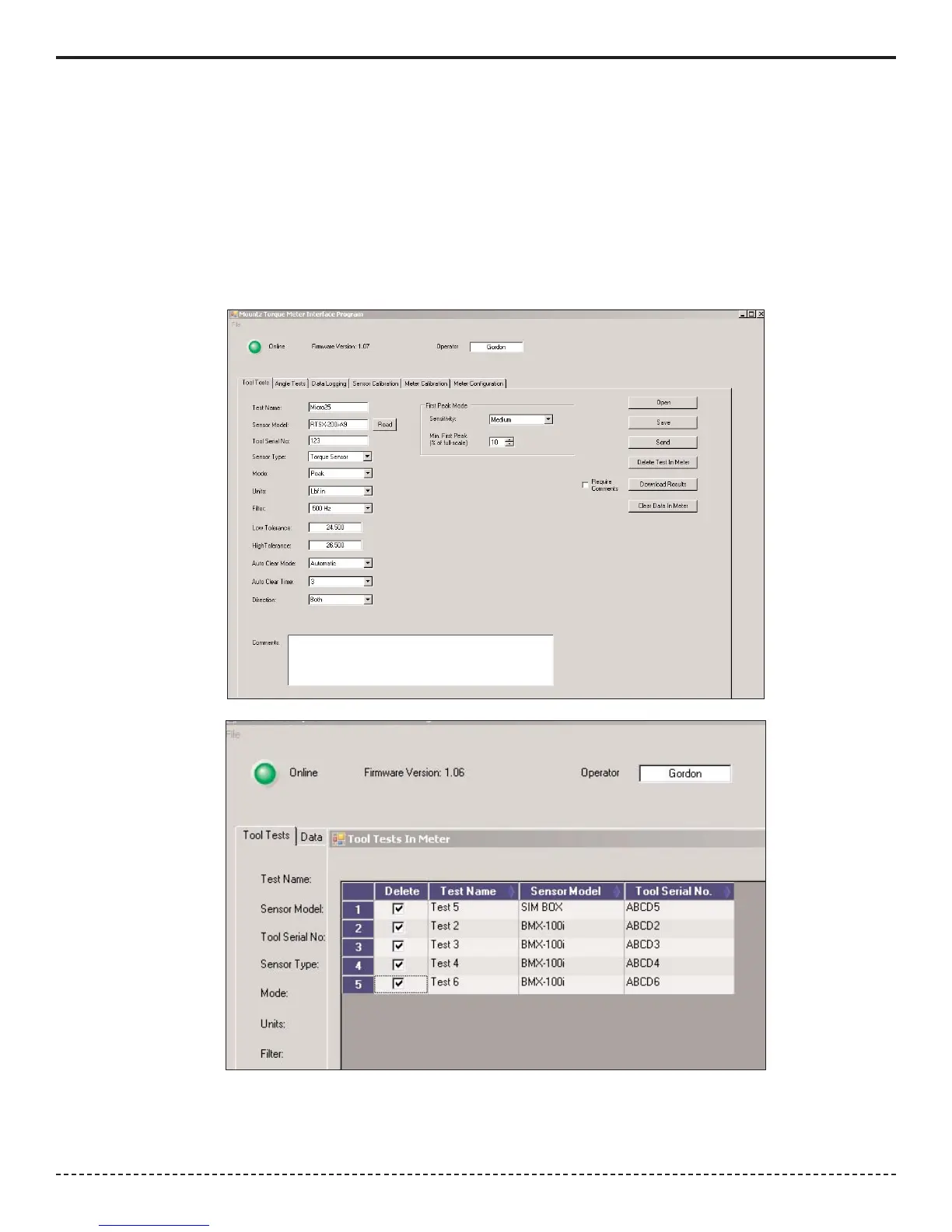
Download Results - Retrieves the results of a tool test after it has been run. It will offer a change to add further notes to
the test at this point. The results will save in the PC in a location of your choice. There will be an "Operator Folder" with
the name of the Operator entered in the upper portion of the Tool Test Screen. The results are stored in a .csv file which
can be opened in Excel or using a text editor program, such a Notepad. The file name will be the name given to the tool
followed by the date and the time at which to test was started. If you use this function often you probably will want to cre-
ate a shortcut to this folder on your desktop
Clear Data in Meter - Clears the test data for this Tool Test in the PTT meter. Make sure to Download the Results before
clicking this button. The operator will be asked for confirmation before the action takes place.


 To Next Page