12
6
QUARTZ PERPETUAL CALENDAR
Includes SE Pilot ETA Retrograde
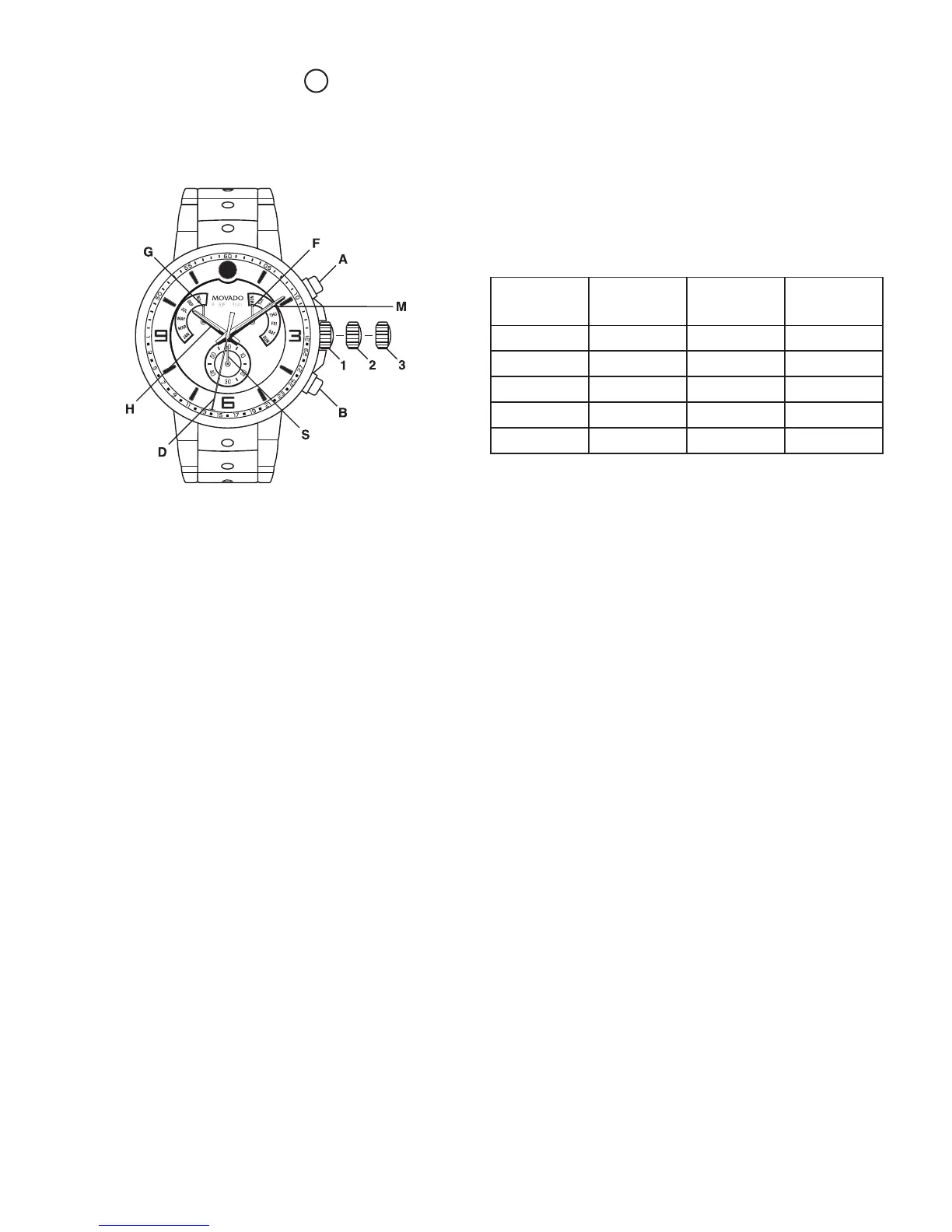
LEGEND:
H – Hour hand
M – Minute hand
S – Small seconds hand
D – Date window
G – Month hand
F – Week day hand
A – Push-button
B – Push-button
Crown positions:
Position 1 – Normal running position; crown
pushed into case.
Position 2 – Resets hands to their origin.
Position 3 – Position for setting the time with stop
second and correction of the date at
every passing midnight.
To set the time:
1. Pull crown out to position 3.
2. T urn the crown clockwise or anticlockwise to set
the desired time.
3. Once the time is synchronized, push the crown
back into position 1.
To set the year:
1. Pull crown out to position 3.
2. Press push-button A once.
3. Press push-button B until current year (1-4).
Year 1 Year 2 Year 3 Year 4
leap year
2013 2014 2015 2016
2017 2018 2019 2020
2021 2022 2023 2024
2025 2026 2027 2028
2029 2030 2031 2032
To set the month:
1. Pull crown out to position 3.
2. Press push-button A twice.
3. Press push-button B until desired month.
To set the date:
1. Pull crown out to position 3.
2. Press push-button A three times.
3. Press push-button B until desired date.
To set the day:
1. Pull crown out to position 3.
2. Press push-button A four times.
3. Press push-button B until desired day.
Resetting the indicators
The day, month and date hands may need to be reset.
The indicators are reset with the crown in position 2.
To correct the date:
1. Pull crown out to position 2.
2. Press push-button A once.
3. Press push-button B until the hand goes to 1.
FIGURE A










 To Next Page