58
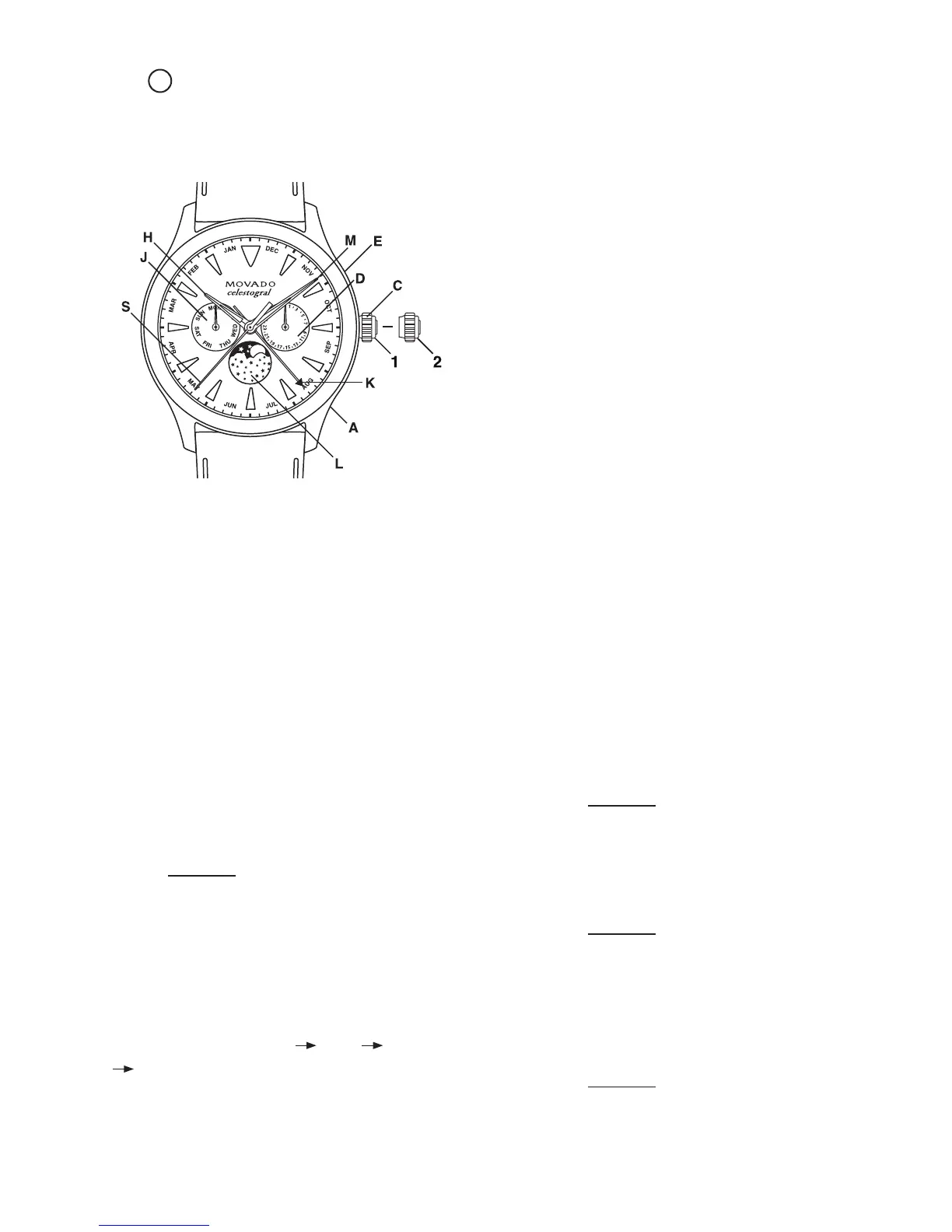
LEGEND:
H – Hour hand
M – Minute hand
S – Seconds hand
K – Month indicator hand
D – Date indicator
J – Day of week indicator
L – Moon phase subdial
1, 2 – Crown C positions
A – Date corrector button
E – Month indicator corrector button
The dials on these watch models feature three subdials
that indicate the weekday, date and current phase of
the moon, and a center-mounted month indicator hand.
IMPORTANT: DO NOT use button A to adjust date D
when the time is between 11:30 PM and 5:30 AM
(the blocking period) or button E to adjust the calendar
week from Sunday–Monday (the blocking period)
when automatic calendar changes are already in
progress. Doing so could damage the mechanism.
Setting instructions
Setting sequence: Moon phase Date Day of
week Time.
1. Pull crown C out to position 2; watch stops.
2. Turn crown C clockwise until full moon image
appears at the top of the moon phase subdial.
3. Set the day of the week J to date of last full moon
by repeatedly rotating crown C clockwise and then
counterclockwise between 10:00 PM and 01:00
AM. Each time the hour and minute hands advance
past midnight, the hand in subdial J will advance by
one; continue until the hand in subdial J indicates
the day of week of the last full moon; consult a
newspaper or the internet for the information
as needed.
4. Continue turning crown C clockwise until hands H
and M indicate a time of 06:00 AM.
5. To set the date, press button A until subdial D
indicates the date of the last full moon; see chart
below.
6. Then turn crown C clockwise, advancing hour and
minute hands until subdial D indicates current date.
7. Continue turning crown C clockwise until hands H
and M indicate desired time, being sure to take
AM/PM time into account.
8. Press button E to set month indicator hand K,
moving it to indicate the beginning, middle or end
of the current month on the scale around the dial’s
perimeter.
IMPORTANT: DO NOT adjust during the blocking
period from Sunday–Monday.
9. Push crown back into position 1; watch restarts.
Quick change correction for Date:
Press button A until current date in indicated in subdial D.
IMPORTANT: DO NOT adjust during the blocking
period from 11:30 PM and 5:30 AM.
Quick change correction for Month:
Press button D until month indicator hand K points to
desired position on the monthly scale around edge
of dial.
IMPORTANT: DO NOT adjust during the blocking
period from Sunday–Monday.
FIGURE A
26
QUARTZ 3-HAND MOON PHASE/DAY/DATE MODELS – TYPE A
Includes Movado Heritage Series Celestograf 42mm models










 To Next Page