
 Need help?
Do you have a question about the Movado Datron and is the answer not in the manual?
Movado watches feature shock-resistant movements tested to international standards.
Guidance on preventing dust entry to maintain watch integrity.
How magnetic fields affect watch timekeeping and potential remedies.
Information on water resistance standards and limitations for Movado watches.
Important precautions for watch care, including crown and water exposure.
Proper care for leather, resin, and rubber straps to ensure longevity.
Details on the 1.55 Volt silver-oxide battery and its expected lifespan.
How the watch indicates a low battery and the recommended replacement procedure.
Explains the functions of different crown positions for setting time.
Instructions on how to manually wind an automatic Movado watch.
Details crown positions for setting time, date, and day.
Guide on manually winding automatic Movado watches.
How to quickly correct the date and GMT hand using the crown.
How to set the local time on worldtime models.
Procedure for quick date correction on worldtime models.
How to set the worldtime GMT hand on the watch.
Steps to set time and worldtime GMT indication on these models.
How to correct the date on worldtime models with GMT and small second dial.
Explains crown positions and how to adjust time accurately.
Procedure for quick date correction on animated date models.
Instructions for winding the automatic movement by hand.
Step-by-step guide to set the perpetual calendar functions.
How to reset indicators and correct the date on perpetual calendar watches.
How to correct the day of the week setting.
Instructions for correcting the month display.
Overview of setting time and date for Type A chronographs.
Precise method to set the time to the exact second.
Procedure for quick date correction on chronograph models.
Steps to set time and date after battery replacement.
How to start, stop, and reset the chronograph for simple timing.
Measuring combined time of multiple shorter events.
How to take intermediate time readings during events.
Realignment of chronograph hands to zero positions.
Overview of setting time and date for Type B chronographs.
Procedures for adjusting time and quick date correction.
Steps to reset all chronograph counters to their zero positions.
Explains basic, accumulated, and split-time chronograph operations.
Instructions for setting time on 1/5 sec Type A chronographs.
Overview of chronograph functions for measuring time.
How to start, stop, and reset the chronograph for simple timing.
Measuring combined and intermediate times with the chronograph.
Realignment of chronograph hands to zero positions.
Procedures for setting time, day, and date on Type B chronographs.
Overview of chronograph functions.
Explains simple, accumulated, and split-time chronograph operations.
Realignment of chronograph hands to zero positions.
General overview of time and date setting procedures.
Steps to adjust time, time zone, and date.
General overview of chronograph operations.
Basic, intermediate, and results-based chronograph operations.
Realignment of chronograph hands to zero positions.
Steps to adjust time and correct time zone/date.
General overview of chronograph operations.
Overview of simple, accumulated, and split-time chronograph functions.
Realignment of chronograph hands to zero positions.
Overview of setting time, date, and big date features.
Method to set time precisely to the second.
Procedure for quick correction of the Big Date feature.
Steps to set time and date after a battery change.
General overview of chronograph operations.
How to perform simple and accumulated time measurements.
Taking intermediate time readings and synchronizing hands.
Instructions for setting time and adjusting date rapidly.
General overview of chronograph operations.
Steps to set time and adjust date using the crown.
Realignment of chronograph hands to zero positions.
How to select functions and operate the touch screen.
Aligning analog hands with the digital display time.
How to check/change time display mode and set time/seconds.
Procedures for setting digital date, month, and day.
How to adjust time zone and daylight saving time.
Overview of using the digital chronograph functions.
Procedures for setting date, city, and measurement units.
Adjusting display duration, sound, and backlight.
How to use functions and choose home screen displays.
How to select time display format and use the pedometer.
How to view the calendar and navigate between months.
How to set and use the countdown timer.
How to display world time and use the stopwatch.
Procedures for setting time, date, day, and chronograph.
General overview of chronograph operations.
Explains simple, accumulated, and split-time chronograph operations.
Manual adjustment of chronograph hands to zero positions.
Steps for setting and quick corrections for moon phase, date, and month.
Steps for setting moon phase, day, and date with quick corrections.
Crown positions and overview of watch modes (Local Time, Chrono).
Using Local Time mode and entering hand indexing.
How to enter time setting mode and set year, month, date.
Steps to set the year using buttons and hands.
How to operate the chronograph in different display modes.
Overview of the countdown timer function.
Reading and setting the countdown timer values.
How to start, stop, resume, and reset the countdown timer.
How to use the unidirectional bezel for measuring elapsed time.
How to unlock and secure the screw-down crown for water resistance.
How to use the rotating reflector ring for measuring elapsed time.
Instructions for interchanging watch straps using the Strap Tool.
How to pack and mail your watch for service or repair.
How to track watch service status online.
Information about the two-year limited warranty.
Details of Movado's warranty coverage and what is excluded.
How to find authorized Movado service centers globally.
 General
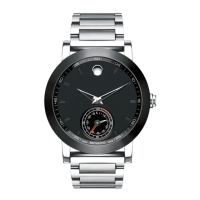
| Brand | Movado |
|---|---|
| Model | Datron |
| Case Material | Stainless Steel |
| Case Shape | Round |
| Case Diameter | 40 mm |
| Features | Date display |
| Crystal | Sapphire Crystal |
| Functions | Date |








 To Next Page