49
23
DIGITAL L.E.D. TOUCH-SCREEN MODELS
WITH DUAL-TIME ZONE AND MONTH/DATE DISPLAY
Includes Movado BOLD Touch models
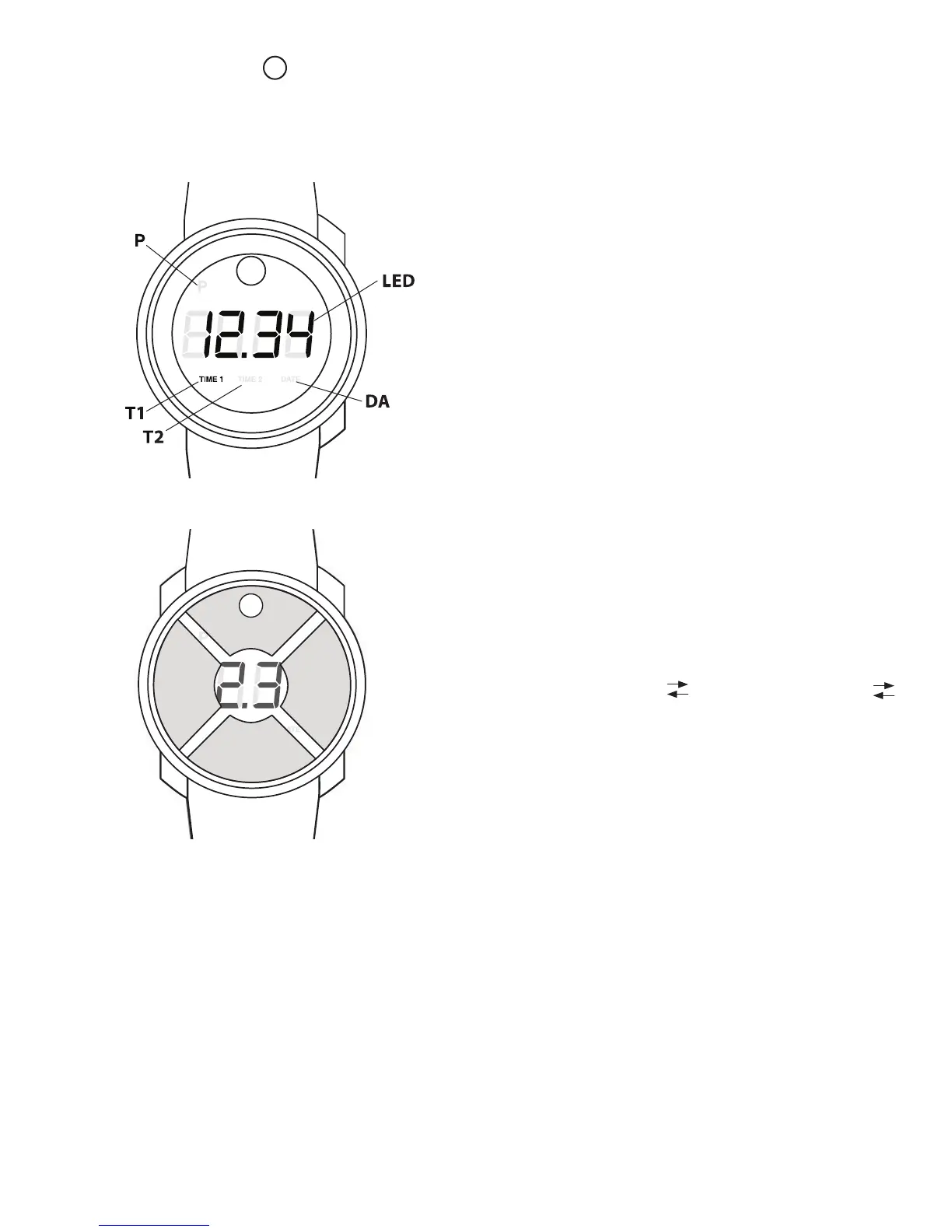
LEGEND:
LED – Main Digital Display
T1 – Time Zone 1 Mode Indicator
T2 – Time Zone 2 Mode Indicator
DA – Date Mode Indicator
P – PM Indicator (appears in Setting Mode only)
These dual-time digital watch models feature an
innovative touch screen 4-Digit LED display with
3-mode function: TIME1, TIME2 and DATE. In the
Main LED display, the TIME Modes are shown
in 12-hour format; the DATE Mode appears in
Month/Date format. One of three smaller LED
displays beneath the Main one indicates which
Mode is active. The touch-screen crystal is specially
treated to resist fingerprints/smudging.
TOUCH REGIONS:
A – ON/OFF
B – SET
C – SWIPE
D – SWIPE
The crystal over the dial has four touch regions or
quadrants:
A – Touch near 12 o’clock to turn the watch
ON or OFF.
B – Touch near 6 o’clock to SET the active
display.
C/D – Swipe your finger horizontally in either
direction to move from one display MODE
to another:
Mode sequence:
TIME1 (Hour/Minutes) TIME2 (Hour/Minutes)
DATE (Month/Date)
OPERATING THE WATCH/TOUCH-SCREEN:
1. To turn your watch ON, touch the dot in region
A, maintaining contact for about 2 seconds until
the LED display lights up. TIME1 will automatically
display at start-up.
NOTE: Once ON, whenever the touch screen idles
(is not touched) for 5 seconds, the watch will go
into Sleep Mode, and the LED display will go dark,
conserving battery power: Touch any region to wake
up the LED display.
2. To move between the 3 Display Modes, swipe your
finger across regions C and D in either direction.
3. To turn the watch OFF, touch the dot in region A
for about 2 seconds until the LED displays the word
“bye”, then goes dark.
FIGURE A
A
B
CD
FIGURE B









 To Next Page