5
Hardware Installation
Installing the SIM Card
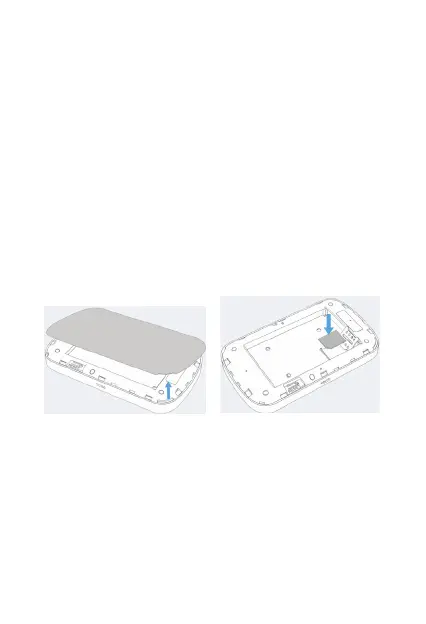
Follow the below instructions to install the SIM card:
1. Remove the SIM card from the outer card, being careful
not to touch the gold contacts.
2.
4. Insert the SIM card into the slot until it is fully inserted, and
then slide the SIM tray cover to the left to lock the SIM tray.
Note: Do not bend or scratch the SIM card and avoid exposing the
Inserting and Charging the Battery
1. Remove the battery cover and align the battery contacts
with the terminals in the battery compartment as shown.
Push the battery down until it clicks into place.
2. Replace the battery cover over the battery compartment
and press down on the four corners of the battery cover until
it clicks into place.
3. Locate the SIM card slot. The metal SIM tray cover slides
right and left to open or lock the SIM tray, respectively. Slide
the SIM tray cover to the right to unlock the cover, and hold
the SIM card so the gold contacts are facing down and
properly aligned in the SIM card slot.
Ensure the device is powered o. Remove the battery cover,
and take the battery out.
SIM card to static electricity, water or dirt.



 To Next Page