47
Calibration
GB
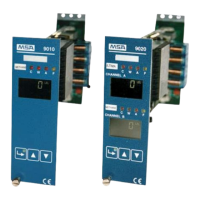
Model 9010/9020 SIL
Action Display
Hold ENTER until green configuration diode starts flashing. Display shows "0"
Set password using UP or DOWN keys and press ENTER to
confirm the choice.
Display shows "0"
Set Access Code 1 using UP or DOWN keys and press ENTER
to confirm
9010 only: Display shows "P1"
9020 only: Display shows "Cha"
For 9020 only:
Set "Cha" (Channel A) or CHb (Channel B) using UP or DOWN
keys and press ENTER to confirm the choice
Display shows "P1"
Make sure that the detector/transmitter is in the required condi-
tions for the zero-setting [zero gas or with the cap for performing
the zero-setting using the appropriate adapter contained in the
calibration kit]. Press ENTER to confirm
Display alternates showing "P1" and
the indication related to the detector
signal
Wait until detector signal is stabilized
Press ENTER to confirm zero setting
Display shows "P2"
Press the ENTER button to confirm
Display alternates between showing
"P2" and the expected value of cali-
bration gas.
Check that the set value effectively corresponds to the calibration
gas concentration in the cylinder.
If the calibration gas concentration is different, modify it using the
UP/DOWN buttons.
Display alternates between showing
"P2" and the expected value of cali-
bration gas.
Press ENTER to confirm Display shows "P3"
Press ENTER to confirm
Display alternates between showing
"P3" and the indication related to the
detector signal.
Apply calibration gas to the detector and wait until the detector
signal I is stabilized. Then press ENTER to confirm
Display shows "P4"
Press ENTER to confirm
Display alternates between showing
"P4" and the indication related to the
detector signal
Check the indication related to the detector signal corresponds
with calibration gas concentration. Remove the calibration cap
from the detector and wait until the indication goes back below the
values corresponding to the preset alarm thresholds.
Press ESCAPE to exit configuration menu



 To Next Page